
Build Your Own Corner of the Internet
A practical guide to using AI to plan, build, publish, secure, and maintain an independent website with simple, portable infrastructure.
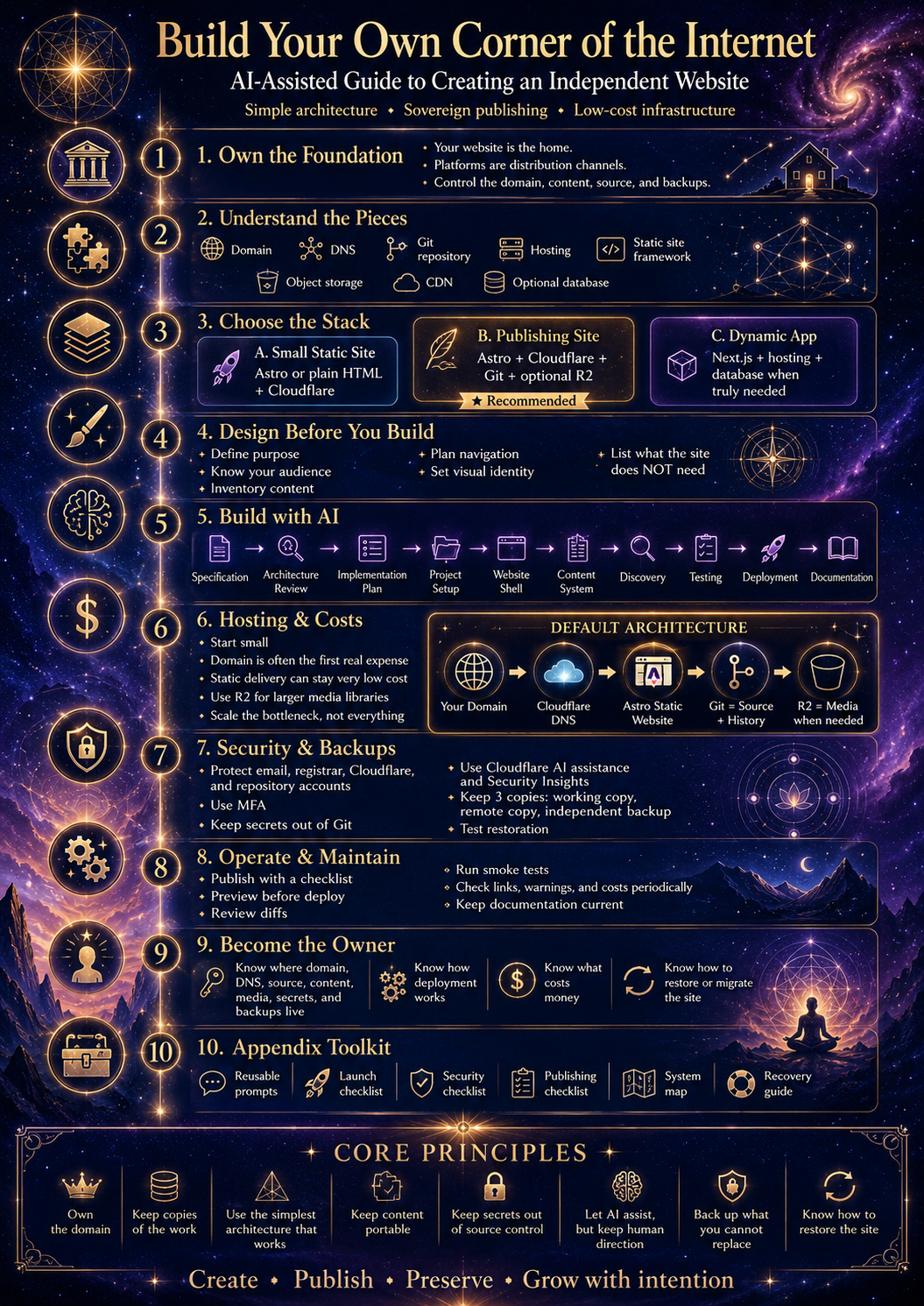
Introduction
Build Your Own Corner of the Internet
For most of the history of the internet, building and maintaining a website required at least some technical knowledge. You needed to understand hosting, domains, HTML, servers, databases, deployment, security, and often several different programming languages before you could turn an idea into something people could actually visit.
That barrier is rapidly changing.
AI can now handle much of the technical work that previously required a web developer. It can create pages, organize content, write code, configure infrastructure, diagnose errors, improve designs, test changes, and explain unfamiliar systems as you work.
This does not mean technology has become irrelevant.
It means the role of the person building the website has changed.
You no longer need to understand every line of code before you can create something useful. You need to understandwhat you are trying to build, what parts of the system matter, and how to direct an AI collaborator without surrendering control of the project.
That is what this guide is about.
It is not a comprehensive course in web development.
It is a practical guide for writers, researchers, artists, educators, journalists, independent creators, community builders, and anyone else who has something they want to make available on the internet without making a social platform the permanent home of their work.
By the end, you should understand enough to take an idea such as:
I want a website where I can publish my articles, artwork, research, guides, or other material.
and turn it into:
I have my own domain, my own website, my own source files, and a system I understand well enough to maintain with AI assistance.
You may still use social media, video platforms, newsletters, forums, or other services.
The difference is that those services no longer have to be the foundation of everything you create.
Your website can become the foundation.
The New Division of Labor
AI-assisted development works best when the human and the AI have different responsibilities.
The human should determine:
- what the website exists to accomplish;
- what information belongs on it;
- how that information should be organized;
- what the site should look and feel like;
- what services they are comfortable depending upon;
- what information should remain private;
- what they are willing to spend;
- and what they ultimately want to own and control.
The AI can then help translate those decisions into:
- website architecture;
- pages and layouts;
- navigation;
- responsive design;
- code;
- content structures;
- storage configuration;
- deployment;
- testing;
- documentation;
- troubleshooting.
Think of the AI less as a magical website generator and more as atechnical collaborator.
You provide direction.
It provides implementation.
You review the result.
Together, you iterate.
This relationship becomes much more reliable once you understand the basic structure of the system you are directing.
You do not need to become an expert.
You do need to know what the important pieces are.
You Can Start Small
Another misconception about owning a website is that it must be expensive.
It does not.
Many informational websites are remarkably lightweight.
If your primary goal is publishing things such as:
- articles;
- essays;
- guides;
- artwork;
- photographs;
- documentation;
- research;
- project archives;
- downloadable files;
then you may not need a database, dedicated server, user-account system, or complicated backend at all.
Modern infrastructure providers make it possible to start with very little cost.
For example, Cloudflare offers services that can cover many of the basic needs of a small publishing site, including domain routing, content delivery, security, hosting options, and object storage through R2.
A small site can therefore begin with an architecture that costs little or nothing beyond the domain itself, depending on the services and usage involved.
If the site grows significantly, infrastructure can grow with it.
That is a much better starting philosophy than paying for resources you do not yet need.
Throughout this guide, we will follow a simple rule:
Build for the website you have now. Expand when reality gives you a reason to expand.
Simplicity Is a Feature
AI can generate sophisticated software very quickly.
That creates a new problem.
It can also generate unnecessary software very quickly.
If you ask an AI to build a website without giving it constraints, you may end up with:
- databases you do not need;
- authentication systems nobody uses;
- unnecessary APIs;
- large dependency trees;
- complicated deployment environments;
- expensive infrastructure;
- features that make maintenance harder without making the website better.
More technology does not automatically produce a better website.
For many independent publishing projects, the ideal architecture is surprisingly simple:
Content → Website → Visitors
Everything else should justify its existence.
If you need a database later, add one.
If you need user accounts later, add them.
If you need advanced search, commerce, community features, or private dashboards later, those systems can be introduced when the requirement actually exists.
Your first goal is not to build the most sophisticated website possible.
Your first goal is to create a website that works, belongs to you, is understandable, and can evolve.
What This Guide Will Help You Build
There is no single correct website architecture.
Someone publishing several essays a year needs something very different from someone building a large interactive application.
This guide focuses primarily on independent informational websites: sites where the main purpose is to publish and preserve material.
That can include:
- personal websites;
- independent publications;
- educational archives;
- research collections;
- artistic portfolios;
- documentation libraries;
- community resources;
- project websites;
- philosophical or spiritual writing;
- journalism;
- books and companion materials;
- multimedia archives.
We will begin with the simplest architecture capable of supporting these uses.
From there, you will learn when additional technology becomes useful.
You will also receive reusable prompts that you can give to an AI coding assistant. These prompts will help the AI analyze your project, recommend an architecture, build the website, configure storage, deploy it, test it, document it, and help you maintain it later.
You do not have to memorize those instructions.
They are tools.
The important thing is understanding what you are asking the AI to do.
Part I
Own the Foundation
1. Your Website and Your Platform Presence Are Different Things
Many people already publish on the internet.
They post writing on social platforms.
They upload videos.
They share artwork.
They participate in communities.
They build audiences around accounts maintained by companies that provide the infrastructure.
There is nothing inherently wrong with using these platforms. They can be extraordinarily useful.
The problem appears when a platform becomes theonly place where the work exists or the only reliable way people know how to find it.
Consider a platform-centered publishing model:
Creator → Platform → Audience
Everything passes through the platform.
The creator produces the work, but the platform controls much of the relationship between that work and the people trying to reach it.
The platform may determine:
- who sees a post;
- whether followers are notified;
- whether search surfaces the material;
- what formats are allowed;
- what links are promoted or suppressed;
- what monetization options exist;
- whether an account remains available;
- whether old material remains accessible.
Even completely ordinary changes can create problems.
A platform can redesign its discovery system.
A company can shut down.
Policies can change.
Algorithms can change.
Accounts can be suspended accidentally.
Features can disappear.
Content can become difficult to locate years later.
None of these possibilities require assuming malicious intent. They are simply consequences of building your entire publishing system inside infrastructure controlled by someone else.
Owning a website changes the architecture.
Instead of:
Creator → Platform → Audience
you can build:
Creator → Website → Audience
and then connect that website outward:
Website → Social Media
Website → Search Engines
Website → Newsletters
Website → Video Platforms
Website → Forums
Website → Direct Visitors
Now the platforms become distribution channels rather than the permanent home of the work.
That distinction matters.
Your Website Becomes the Canonical Source
Imagine you publish an article.
If the article exists only as a social media post, the platform is effectively hosting the canonical copy.
If the complete article exists at:
yourwebsite.com/articles/example
then that page can become the canonical version.
You can still post excerpts elsewhere.
You can make videos discussing it.
You can share it across multiple platforms.
You can link it in newsletters.
You can quote it in discussions.
But all of those roads can point back toward something you maintain.
The same idea works for:
- research;
- images;
- documentation;
- books;
- project announcements;
- educational resources;
- public archives.
The internet becomes a network of entrances into your work rather than a collection of isolated containers holding pieces of it.
Distribution and Storage Should Not Be Confused
This distinction is worth remembering:
Distribution is how people discover your work.
Publication is where the work lives.
A social network can be excellent for distribution.
A video platform can be excellent for distribution.
A mailing list can be excellent for distribution.
Search engines are distribution systems.
None of them necessarily need to be the permanent foundation of the material itself.
You can think of your website as the library and external platforms as roads leading toward it.
Some roads may become busy.
Others may disappear.
New roads may emerge.
The library remains.
2. What Does It Mean to “Own” a Website?
Website ownership is not absolute.
Your website still depends upon the broader internet.
You may depend on:
- a domain registrar;
- DNS providers;
- hosting companies;
- network infrastructure;
- storage providers;
- payment processors;
- email services;
- local laws and regulations.
The goal is not to eliminate all dependencies.
That would be unrealistic.
The goal is toavoid unnecessary single points of dependency and retain control of the pieces that are portable.
There are several parts of a website that you should understand and control.
Your Domain
Your domain is the human-readable address of your website.
For example:
example.com
A domain is important because it provides continuity between infrastructure providers.
Suppose your website is hosted by Company A today.
Several years from now, you decide Company B is better.
If you control the domain, visitors can continue going to:
example.com
even though everything behind that address has changed.
The domain is therefore one of the most important pieces of continuity you possess.
Keep control of the account that owns it.
Protect that account.
Keep its recovery information current.
Your Content
You should maintain copies of the actual material you publish.
That may include:
- Markdown files;
- text documents;
- images;
- PDFs;
- videos;
- audio;
- datasets;
- downloadable archives.
Do not allow the deployed website to become the only copy of important work.
A website should be a publication destination, not your only backup.
Your Source Code
The source code describes how the website itself works.
For an AI-assisted project, keeping the source is particularly important.
AI can modify an existing project much more reliably when it can inspect:
- the current code;
- the project structure;
- configuration files;
- documentation;
- previous changes.
A source repository also provides history.
If a change causes problems, version control can often show exactly what changed and allow the previous state to be restored.
We will use Git-based repositories later in this guide for precisely this reason.
You do not need to become a Git expert.
You simply need to understand thatthe repository is the working history of your website.
Your Credentials
Accounts, passwords, API keys, access tokens, and private keys deserve special treatment.
These should not be casually placed inside website files or handed to systems that do not need them.
Part of maintaining control over a website is understanding:
- which accounts can change it;
- which accounts control the domain;
- which services can deploy new versions;
- which credentials provide access to storage;
- how account recovery works.
The AI can help configure these systems.
You should remain the authority deciding who receives access.
Your Backups
A strong publishing system assumes that something will eventually fail.
A laptop can fail.
A hosting provider can have an outage.
An account can become inaccessible.
A file can be deleted accidentally.
A deployment can break.
The answer is not fear.
The answer is redundancy.
Important work should ideally exist in several places.
A simple model is:
Source repository
+ Local copy
+ Deployed website
For irreplaceable content, additional offline or external backups are even better.
When copies exist independently of one another, the failure of one system does not destroy the underlying work.
3. Independence Is an Architecture
It is tempting to think of independence as choosing the “right” company.
That misses the larger principle.
No hosting company, technology company, or infrastructure provider needs to be treated as permanent.
A more durable approach is to construct the website so that pieces can be replaced.
Consider this architecture:
Domain
↓
Website source
↓
Hosting
↓
Visitors
If the source is portable and you control the domain, hosting can change.
Likewise:
Website
↓
Media storage
If images and downloads are organized properly, the storage provider can eventually change.
The same principle applies throughout the system.
This is why open formats and common technologies are valuable.
A collection of articles stored as ordinary Markdown files is easy to preserve.
A collection stored exclusively inside an obscure proprietary publishing system may be much harder to move.
A standard image file can be copied anywhere.
A domain can be redirected.
A Git repository can be duplicated.
Static website files can be served by many different providers.
The more portable the important parts are, the more choices you retain later.
Avoid Building a New Kind of Lock-In
AI makes it possible for people without much programming experience to build surprisingly sophisticated projects.
That opportunity comes with a trap.
You can leave one restrictive platform only to create a website whose architecture is so complicated that you become dependent on a particular developer, AI system, framework, or hosting provider to understand it.
That is not much of an improvement.
A good AI-assisted website should gradually becomemore understandable, not less.
Ask the AI to document what it creates.
Keep the architecture simple where possible.
Prefer common technologies.
Avoid unnecessary dependencies.
Maintain copies of your content outside the website.
Know which providers perform which functions.
You do not need to understand every technical mechanism.
You should be able to answer:
- Where is my domain registered?
- Where is my website hosted?
- Where is my source code?
- Where are my images and downloads stored?
- Where are my backups?
- What service would I need to replace if one stopped working?
If you can answer those questions, you already understand more about your infrastructure than many website owners.
4. Your Website Does Not Need to Replace Everything
Independent publishing does not require abandoning other platforms.
That would often be counterproductive.
A healthy architecture can look like this:
Your Website — Permanent Home
↓
Social Networks — Conversation and Discovery
↓
Video Platforms — Multimedia Distribution
↓
Newsletter — Direct Distribution
↓
Search Engines — Discovery
↓
Communities and Forums — Discussion
Each system serves a different purpose.
If one works well, use it.
The important change is that no single external platform needs to contain your entire identity, archive, audience relationship, and publishing history.
Your site provides continuity between them.
Publish Once, Distribute Many Times
One useful workflow is:
- Create the original material.
- Publish the complete version on your website.
- Create smaller versions for other platforms.
- Point interested readers toward the complete source.
A long article might become:
- a short social post;
- several quotations;
- a video discussion;
- an infographic;
- a newsletter summary;
- a forum discussion.
All of these can lead toward the same original work.
This reduces duplication and helps establish a coherent archive over time.
After several years, rather than having hundreds of disconnected posts scattered across platforms, you can have an organized body of work with stable addresses and internal relationships.
That is one of the largest advantages of owning the publishing layer.
5. Start With the Smallest System That Works
Before we begin choosing technologies, there is one final principle to establish.
Do not build infrastructure merely because it is available.
Suppose you want to publish:
- an About page;
- thirty articles;
- some artwork;
- several downloadable PDFs;
- a contact page.
You probably do not need:
- a dedicated server;
- a large database;
- user accounts;
- complex authentication;
- Kubernetes;
- microservices;
- multiple backend APIs.
You need pages and files.
That simplicity has enormous advantages.
Simple websites generally have:
- fewer things that can fail;
- fewer security surfaces;
- lower costs;
- easier backups;
- easier migrations;
- faster loading;
- easier AI maintenance.
As requirements grow, architecture can grow with them.
A site receiving ten visitors does not need to be designed like a site receiving ten million.
Fortunately, modern hosting and content-delivery systems can scale surprisingly far before a small publisher needs sophisticated infrastructure.
That allows us to begin with a much better question than:
What is the most powerful website stack I can build?
Instead ask:
What is the simplest website stack that fully serves my purpose?
That question will guide the rest of this book.
Before Moving On
At this point, you do not need to choose a framework or create an account anywhere.
You only need to understand the architecture we are working toward.
Your website will become the stable home of your material.
Your domain will provide continuity.
Your source repository will preserve the website itself.
Your content will remain backed up independently.
Hosting and storage providers will provide infrastructure without becoming synonymous with the work.
External platforms can continue serving as valuable distribution channels.
And AI will help connect these pieces without requiring you to become a professional developer first.
In Part II, we will open the technical box and examine what each component actually does:
Domain. DNS. Repository. Framework. Hosting. Storage. CDN. Database. Analytics.
Once those concepts are clear, choosing a technology stack becomes much easier.
Part II
Understanding the Pieces
When people first encounter web development, it can seem as though everything is part of one enormous technical system.
Domains, DNS, hosting, repositories, frameworks, servers, databases, CDNs, APIs, storage buckets, deployments, analytics—the terminology piles up quickly.
The underlying structure is much simpler.
A website is usually a collection of separate services performing separate jobs.
You do not need to understand every technical detail of those services.
You need to understandwhat each one does, why you might need it, and which parts your website can function without.
A simple publishing website might look like this:
Domain
↓
DNS
↓
Website Hosting
↓
Website Files
↓
Visitors
Additional media
↓
Object Storage
Behind the scenes, the website's source code may also exist inside a repository:
Your Computer
↓
Source Repository
↓
Hosting Provider
↓
Website
Once these relationships are clear, most of the technical vocabulary becomes much easier to understand.
6. The Domain
A domain is the human-readable address people use to reach your website.
For example:
example.comWithout domains, people would often have to interact with numerical network addresses or provider-specific URLs.
The domain gives your site a stable identity.
You might change:
- hosting providers;
- website frameworks;
- storage providers;
- server architecture;
- design systems;
- repositories.
Yet your visitors can continue using the same domain.
That makes the domain one of the most important pieces of continuity in the entire system.
Domains Have Owners
A domain is registered through a domain registrar.
The registrar maintains the registration associated with that domain and provides controls allowing you to manage it.
Whichever company you use, the important thing is thatyou retain access to the account controlling the domain.
Protect that account carefully.
Use:
- a strong password;
- multifactor authentication;
- current recovery information;
- an email address you control.
If your website becomes important, the domain becomes important too.
Domains Are Separate From Hosting
This distinction confuses many new website owners.
Your domain and your website do not necessarily need to come from the same company.
For example:
Domain Registrar
↓
example.com
Website Host
↓
Your website files
DNS connects the two.
This separation is useful because it makes hosting replaceable.
If one provider becomes too expensive, unreliable, restrictive, or simply unsuitable for your project, you can move the website elsewhere and point the same domain toward the new host.
Your visitors may never notice.
7. DNS
DNS stands forDomain Name System.
You do not need to memorize how DNS works internally.
The useful mental model is:
DNS tells the internet where services associated with your domain can be found.
Suppose someone enters:
example.cominto a browser.
DNS helps direct that request toward the infrastructure serving your website.
Think of the domain as a name and DNS as a directory telling the internet what that name points toward.
DNS Can Connect More Than a Website
A domain may control several kinds of services.
For example:
example.com
www.example.com
media.example.com
api.example.com
mail.example.com
These can all point toward different infrastructure.
You may never need most of them.
The important concept is that DNS provides the routing layer connecting your domain to the services behind it.
Cloudflare as the DNS Layer
Throughout this guide, we will frequently use Cloudflare as an example because it can perform several useful functions within the same ecosystem.
A Cloudflare-based architecture might eventually look like:
Your Domain
↓
Cloudflare DNS
↓
Website Hosting
Cloudflare may also provide:
Security
CDN
Storage
Caching
Other infrastructure
You do not need to use every service a provider offers.
The goal is to use only the pieces that solve an actual problem.
8. The Source Repository
Your source repository is where the files used to build your website are stored and tracked.
For many projects, this will be a Git repository hosted somewhere such as GitHub.
A repository might contain:
Website code
Page templates
Styles
Configuration
Articles
Metadata
Documentation
Images
Build instructions
Not every file associated with your website necessarily belongs there. Very large media libraries, for example, are often better stored elsewhere.
But the repository should contain enough information to recreate and continue developing the website.
Why Repositories Matter
Imagine you ask your AI assistant to change the homepage.
It modifies several files.
The next day, you realize something stopped working.
Without version history, figuring out what changed may be difficult.
With Git, the system can record the state before and after the change.
Conceptually:
Version 1
↓
Change
↓
Version 2
↓
Change
↓
Version 3
You can inspect those changes and, when necessary, restore earlier work.
This is especially important when working with AI.
AI coding tools can make changes extremely quickly.
Version control makes those changes much safer.
Git Is Not the Same Thing as GitHub
Another distinction worth knowing:
Gitis the version-control system.
GitHubis a service that can host Git repositories.
You do not need to master Git commands to use AI-assisted development.
Your AI coding assistant can often handle routine operations such as:
- checking changed files;
- creating commits;
- comparing versions;
- creating branches;
- reverting mistakes.
But you should understand what it is doing.
At minimum, know that acommitis essentially a recorded checkpoint in the history of the project.
Your Repository Is Not Your Backup Plan by Itself
A remote repository is valuable, but important work should ideally exist in more than one place.
For example:
Your computer
+
Remote Git repository
+
Deployed website
For irreplaceable writing, artwork, research, or media, additional backups are worth maintaining separately.
The goal is that the failure of any single service does not erase the underlying project.
9. The Website Itself
The website is the collection of code and content that browsers ultimately display.
At the simplest possible level, a web page can be made from:
- HTML;
- CSS;
- JavaScript.
These technologies perform different roles.
HTML
Defines the structure and content.
For example:
Heading
Paragraph
Image
Link
Navigation
CSS
Controls presentation.
For example:
Fonts
Spacing
Colors
Layouts
Mobile behavior
Visual effects
JavaScript
Adds behavior and interactivity.
For example:
Menus
Search interfaces
Interactive components
Dynamic content
User interactions
You do not need to write these manually to build a site with AI.
Understanding their roles simply helps you understand what the AI is modifying.
10. Frameworks
A framework provides a structure for building larger websites more efficiently.
Instead of manually creating every page from scratch, a framework lets developers create reusable systems.
For example, rather than writing a separate navigation bar for 200 pages, the website may define the navigation once and reuse it everywhere.
Popular approaches include frameworks such as:
Astro
Next.js
There are many others.
This guide does not need to turn into a comparison of every framework available.
The important question is:
What kind of website are you building?
When a Framework Is Useful
Frameworks become useful when you have:
- many pages;
- reusable layouts;
- article libraries;
- categories;
- metadata;
- search;
- structured content;
- interactive components;
- dynamic features.
Suppose your website contains 300 articles.
Each article might use the same structure:
Title
Date
Author
Description
Article body
Related material
Footer
A framework can generate all of those pages from reusable templates.
That is much easier to maintain than manually creating hundreds of separate HTML documents.
When a Framework May Be Unnecessary
If you only need:
Home
About
Projects
Contact
then a very simple static website may be enough.
Again, simplicity should win unless complexity solves a real requirement.
11. Static and Dynamic Websites
One of the most useful distinctions you can learn is the difference betweenstaticanddynamicwebsites.
The words can sound more complicated than they are.
Static Websites
A static website generally serves files that have already been created.
For example:
Visitor requests article
↓
Server sends article page
↓
Browser displays it
The content may have originally been generated by a framework, but by the time visitors request it, much of the work has already been completed.
Static architecture is excellent for:
- articles;
- documentation;
- research;
- portfolios;
- archives;
- guides;
- informational pages.
Static sites tend to be:
- inexpensive;
- fast;
- portable;
- easy to cache;
- comparatively simple to secure.
For independent publishing, this should usually be the starting point.
Dynamic Websites
Dynamic websites perform more work in response to visitors.
Examples include:
- signing into accounts;
- updating profiles;
- private dashboards;
- shopping carts;
- personalized feeds;
- messaging systems;
- collaborative applications.
A dynamic system may look more like:
Visitor request
↓
Application
↓
Database
↓
Logic executes
↓
Custom response
This capability is powerful.
It also creates more infrastructure.
You may need:
- servers or serverless functions;
- databases;
- authentication;
- permissions;
- session management;
- more security controls;
- more monitoring.
If your site does not require these things, do not build them merely because AI can.
12. Hosting
Hosting is the infrastructure that makes your website available to visitors.
Your source code may live on your computer and inside GitHub, but visitors need somewhere on the internet from which the finished site can be served.
That is the job of hosting.
A common workflow looks like:
Your Computer
↓
Git Repository
↓
Hosting Provider
↓
Public Website
When you change the repository, the hosting provider can often automatically build and deploy a new version of the site.
Deployment
Deploymentsimply means publishing a version of your website to the infrastructure serving visitors.
Think of the workflow as:
Edit
↓
Test
↓
Save version
↓
Deploy
↓
Visitors see update
Modern hosting systems can automate much of this process.
Your AI assistant can also help inspect deployment errors when something goes wrong.
Hosting Does Not Have to Be Expensive
The amount of infrastructure a website requires depends heavily on what it does.
A static publication receiving thousands of readers may be much cheaper to operate than an interactive application receiving far fewer visitors.
Why?
Because serving an existing file is usually much simpler than:
- running application code;
- querying a database;
- authenticating users;
- generating personalized responses.
This is another reason we will favor static architecture whenever possible.
13. Object Storage
Websites often contain files that are larger than the website code itself.
Examples include:
- photographs;
- illustrations;
- PDFs;
- audio;
- video;
- downloadable archives;
- datasets;
- high-resolution artwork.
These files can be placed intoobject storage.
Cloudflare R2 is one example.
Conceptually, instead of this:
Website repository
├── Code
├── Articles
├── 4,000 images
├── Videos
├── PDFs
└── Downloads
you can separate responsibilities:
Website Repository
├── Code
├── Content
└── Configuration
Object Storage
├── Images
├── PDFs
├── Downloads
├── Audio
└── Other large files
This can make the website repository smaller and easier to work with.
What Is a Bucket?
Object-storage systems commonly organize files into containers calledbuckets.
A bucket might contain:
images/
documents/
downloads/
covers/
art/
The terminology is unusual at first, but the concept is simple.
A bucket is essentially a managed location for files.
Why R2 Fits This Guide
For the kinds of sites this guide focuses on, object storage can be particularly useful because publishing projects often accumulate large media libraries over time.
For example:
Article
↓
Website page
Article illustration
↓
R2
Downloadable PDF
↓
R2
The website references the file without needing to store every large asset inside the source repository.
We will later walk through how to ask an AI coding assistant to create and document this architecture.
You do not need to manually understand every storage command.
You need to understandwhat belongs there and why.
14. CDN
CDN stands forContent Delivery Network.
The basic idea is that copies of public website resources can be distributed or cached across infrastructure in different locations.
Instead of every visitor always retrieving everything from one distant origin, a CDN can make frequently requested content available closer to users.
Conceptually:
Visitor A
↑
Nearby CDN
↑
Original Website → CDN Network → Visitor B
↓
Nearby CDN
↓
Visitor C
For readers, the result can mean faster delivery.
For website operators, caching can also reduce how often the underlying application or storage system must perform the same work.
You do not need to manage a worldwide network yourself.
Providers such as Cloudflare handle that infrastructure.
15. Databases
A database stores structured information that applications need to read and change.
For example, a community website might contain:
Users
Posts
Comments
Permissions
Messages
Settings
A database makes sense because that information changes continuously.
Your Articles Do Not Necessarily Need a Database
This is an important distinction.
Suppose you have 500 essays.
They can exist as files:
articles/
├── article-one.md
├── article-two.md
├── article-three.md
└── ...
The website framework can turn those files into pages.
No database is necessarily required.
This architecture has advantages:
- the writing remains readable outside the website;
- the content can be backed up easily;
- migration is simpler;
- fewer systems need maintenance.
A database should therefore answer a real requirement.
Do not ask:
Should my website have a database?
Ask:
What information needs to change dynamically in a way that ordinary files cannot handle well?
If there is no good answer, you may not need one.
16. Markdown and Structured Content
Markdown is a simple text format commonly used for articles and documentation.
A file might look something like:
# Article Title
This is a paragraph.
## Section
More writing here.
- Item one
- Item two
- Item three
It remains readable even without the website.
That makes Markdown especially attractive for independent publishing.
Your articles can exist as ordinary files while the website determines how they are visually presented.
One article can therefore become:
Markdown content
↓
Website template
↓
Finished article page
Change the website design and every article can inherit the new design without rewriting the article itself.
This separation betweencontentandpresentationis extremely useful.
17. Analytics
Analytics systems tell you how people are using the website.
Depending on the system, they may answer questions such as:
- How many people visited?
- Which pages are popular?
- Where are visitors arriving from?
- What devices are they using?
- Which material is being discovered?
Analytics are optional.
Your website does not require analytics to function.
That distinction matters because it helps prevent unnecessary infrastructure from being added automatically.
Before adding analytics, decide what you actually want to learn.
If the only question is:
Is anyone visiting my site?
then you may need far less data than a commercial advertising platform does.
Collect information because it serves a purpose, not simply because it is possible to collect it.
18. Search
Search is another feature that sounds simple but can be implemented in many different ways.
A small website might search information directly inside files already included with the site.
A very large archive may eventually benefit from:
- a dedicated search index;
- a database;
- an external search service.
Again, scale should determine architecture.
Do not begin with an enterprise search system when twenty articles can be searched directly.
19. Forms and Email
A contact page introduces another architectural question.
A purely static website cannot normally send email by itself without connecting to some additional service or function.
That does not mean you need an entire backend.
You may simply use:
Contact Form
↓
Small serverless function
↓
Email service
or another specialized form provider.
This illustrates an important architectural principle:
A mostly static website can still contain a few dynamic features.
You do not need to transform the entire website into a complex application because one small feature requires server-side processing.
20. APIs
API stands forApplication Programming Interface.
The phrase can sound intimidating, but an API is essentially a structured way for one software system to communicate with another.
For example:
Your Website
↓
Weather API
↓
Weather Data
or:
Your Website
↓
Email Service API
↓
Send Message
APIs become useful when your website needs information or functionality provided by another service.
You do not need an API merely because you have a website.
They should be introduced when an actual integration requires them.
21. How the Pieces Fit Together
We can now assemble everything we have discussed into a realistic publishing architecture.
For example:
DOMAIN
↓
CLOUDFLARE DNS
↓
WEBSITE HOSTING
↓
WEBSITE
/ \
/ \
ARTICLE FILES MEDIA
↓ ↓
Markdown Cloudflare R2
\ /
\ /
VISITOR
Behind the website:
Your Computer
↓
Git Repository
↓
Hosting Platform
↓
Deployment
And for resilience:
Website Source
├── Local copy
└── Remote repository
Published Content
├── Source files
├── Website
└── Backup
Media
├── R2
└── Backup
That is already enough infrastructure to operate a substantial independent publication.
You do not automatically need:
Database
User accounts
Authentication
Payment system
Dedicated server
Complex API layer
Microservices
Container orchestration
Those technologies are valuable when their requirements exist.
Until then, they are additional things to maintain.
22. The Minimum Stack
For someone starting from nothing, the minimum system can be remarkably small.
A basic site might contain:
1. Domain
2. DNS
3. Website files
4. Git repository
5. Hosting
Add object storage if you have significant media:
6. Cloudflare R2That is enough for many projects.
An AI coding assistant can help manage nearly all of the technical implementation.
The human primarily needs to understand the relationships.
23. What You Should Understand Before Continuing
You do not need to memorize technical definitions.
You should simply be able to recognize the major pieces.
Domain
The stable public address of your website.
DNS
Connects that address to your infrastructure.
Repository
Stores and tracks the source of your website.
Framework
Provides reusable structure for building the website.
Hosting
Makes the finished website available on the internet.
Deployment
Publishes a new version of the website.
Object Storage
Stores large files such as images and downloads.
CDN
Helps distribute public content efficiently.
Database
Stores information that needs to be queried and changed dynamically.
Analytics
Provides optional information about visitors and traffic.
API
Allows different software systems to communicate.
That is most of the vocabulary you need to begin making informed architectural decisions.
Before Moving On
You now know enough to look at a website architecture and understand what the major components are doing.
That gives you something extremely important when working with AI:
the ability to question unnecessary complexity.
If an AI says:
We should create a database.
you can ask:
What information requires one?
If it recommends an API:
What system needs to communicate with what?
If it adds a new service:
What function does this service provide that the existing architecture cannot?
If it recommends a complicated backend:
Which requirement makes a static architecture insufficient?
You do not need to know how to implement every alternative yourself.
You need enough understanding to ask whether the complexity has a reason.
In Part III, we will use these concepts to choose actual technology stacks.
Rather than presenting dozens of competing tools, we will build around a small number of practical architectures:
A simple Cloudflare-first static site.
A larger independent publishing site using Cloudflare R2.
A more dynamic application architecture for projects that genuinely need it.
From there, you will be able to choose the smallest stack that fits what you actually want to build.
Part III
Choosing Your Technology Stack
You now understand the major pieces of a website.
The next question is:
Which pieces should you actually use?
This is where web development can become unnecessarily confusing.
Search for “best website technology stack” and you may encounter dozens of frameworks, hosting companies, databases, content-management systems, programming languages, storage providers, and competing opinions.
You do not need to evaluate all of them.
For the kinds of independent websites this guide focuses on, most people can begin with one of three architectures:
- Simple Static Site— for small informational websites.
- Independent Publishing Site— for articles, research, guides, artwork, archives, and substantial content libraries.
- Dynamic Application— for websites that genuinely require accounts, private data, dashboards, or continuously changing server-side information.
The first two can often begin with extremely little infrastructure cost.
That is where most readers should start.
24. The First Rule: Choose the Smallest Stack That Works
Atechnology stackis simply the collection of technologies used to build and operate your website.
For example:
Astro
+
Cloudflare
+
GitHub
+
R2
is a technology stack.
So is:
Next.js
+
Vercel
+
Cloudflare
+
Database
Neither is inherently better.
They solve different problems.
Your job is not to select the most powerful stack.
Your job is to select theleast complicated stack that completely satisfies your requirements.
That distinction matters because every technology you add creates another thing that may eventually need to be:
- configured;
- updated;
- secured;
- documented;
- backed up;
- migrated;
- repaired.
AI makes managing those systems easier.
It does not make unnecessary architecture valuable.
25. Our Recommended Starting Point
For most independent publishing projects, this guide recommends beginning with aCloudflare-first static architecture.
A typical version looks like:
Domain
↓
Cloudflare DNS
↓
Cloudflare Workers Static Assets
↓
Astro Website
↓
Visitors
With your source maintained separately:
Your Computer
↓
Git Repository
↓
Cloudflare Deployment
If your website contains a substantial amount of media, add:
Cloudflare R2
↓
Images
PDFs
Downloads
Audio
Large files
As of August 2026, Cloudflare recommends Workers Static Assets for new static sites and applications on its platform. Static-asset requests are currently free and unlimited, while Worker code that executes dynamically follows Workers usage limits and pricing.
That distinction creates an unusually useful model for independent publishing:
Static information can remain extremely inexpensive to serve.
Dynamic functionality can be introduced separately when it is actually required.
26. Stack A — The Simple Static Site
This is the smallest architecture in the guide.
Use it when you need something such as:
- a personal website;
- an About page;
- a portfolio;
- a project page;
- several articles;
- a collection of links;
- a small educational resource;
- a landing page.
A reasonable architecture is:
Domain
↓
Cloudflare DNS
↓
Cloudflare Workers Static Assets
↓
Static Website
Source:
Local Computer
↓
Git Repository
↓
Deployment
That is essentially the entire system.
What Should Build the Website?
You have two reasonable choices.
Option A — Plain HTML, CSS, and JavaScript
For a very small site, you may not need a framework at all.
Your project might look like:
index.html
about.html
projects.html
styles/
scripts/
images/
This is extremely portable.
Almost any web host can serve ordinary static files.
The disadvantage appears when the website grows.
If twenty pages all contain the same navigation, footer, metadata structure, and layout, maintaining those pages separately becomes inefficient.
That leads to the second option.
Option B — Astro
Astro is a particularly good fit for this guide because it is designed around content-oriented websites and supports static generation, reusable components, Markdown content, and deployment to Cloudflare. Astro's own documentation describes it as a framework focused on content-driven sites, including blogs and similar publications, and its content collections can work directly with Markdown and other structured files.
Instead of manually repeating everything, you might have:
src/
├── components/
│ ├── Header
│ ├── Footer
│ └── Navigation
│
├── layouts/
│ └── Article
│
├── content/
│ └── articles/
│
└── pages/
Now the AI can create reusable systems.
Change the navigation once and every page can inherit the change.
Change the article layout once and hundreds of articles can inherit the new design.
For that reason,Astro will be our default recommendation for informational and publishing websites unless there is a reason to choose something else.
Astro maintains an official Cloudflare deployment path, so this combination is directly supported rather than depending on an unusual custom configuration.
27. When Stack A Is Enough
Use the Simple Static Site when your website primarily answers:
What information should I show visitors?
rather than:
What should the server calculate separately for each visitor?
Examples:
Portfolio
Photography
Research profile
Personal homepage
Book website
Small article collection
Documentation
Project archive
Business information
Educational pages
You probably do not need R2 immediately if the site contains only a modest number of normal-sized images and files.
You probably do not need a database.
You probably do not need user accounts.
You probably do not need a traditional server.
Start there.
You can expand later.
28. Stack B — The Independent Publishing Site
This is the architecture that will be most relevant to many readers of this guide.
Use it for a larger body of public information:
- articles;
- long-form writing;
- research;
- guides;
- books;
- documentation;
- artwork;
- photographs;
- public archives;
- educational resources;
- downloadable material.
A practical architecture is:
DOMAIN
↓
CLOUDFLARE DNS
↓
WORKERS STATIC ASSETS
↓
ASTRO SITE
/ \
/ \
Written Content Large Media
↓ ↓
Markdown / MDX Cloudflare R2
Behind it:
Your Computer
↓
Git Repository
↓
Cloudflare Deployment
Now we have separated the website into two major categories.
The repository contains:
Website code
Layouts
Components
Styles
Articles
Metadata
Configuration
Documentation
R2 contains:
Large images
PDFs
Downloads
Audio
High-resolution art
Archives
Other media
This separation is useful because the repository remains focused on the website itself while object storage handles potentially large media libraries.
Cloudflare describes R2 as object storage for unstructured data and currently provides Internet egress from R2 without an egress charge.
29. Why R2 Can Be So Useful
Imagine that over several years your website accumulates:
1,500 images
200 PDFs
Artwork
Book files
Audio
Download packages
Research documents
Putting all of those directly into your Git repository is possible in some circumstances, but it can eventually make the repository unnecessarily heavy.
Instead:
Git Repository
↓
Website structure and content
Cloudflare R2
↓
Large media library
The website simply references those files.
For example:
Article Page
↓
https://media.example.com/images/example.webp
The article itself remains part of the website.
The image comes from object storage.
R2's Free Starting Capacity
At the time this guide is being written, Cloudflare R2 Standard storage includes a monthly free tier of:
10 GB-month of storage
1 million Class A operations
10 million Class B operations
Internet egress:
No egress charge
Those numbers will eventually change, so always check current pricing before designing around a specific limit.
The broader principle is more durable:
Object storage allows media to scale separately from the website itself.
For many new independent publishing projects, the currently included capacity can provide substantial room before storage itself becomes a meaningful expense.
30. You Do Not Have to Use R2 Immediately
Do not create infrastructure simply because this guide recommends it for larger sites.
Suppose you have:
8 articles
12 images
1 logo
2 PDFs
Keep them with the site.
There is little reason to complicate the architecture yet.
A useful threshold is not a specific number of files.
Ask instead:
Is my media library becoming large enough that managing it separately would make the project easier?
If the answer is no, leave it alone.
Later, your AI coding assistant can migrate media into R2.
31. Stack C — The Dynamic Application
Eventually, some readers will want to build something more complicated than a publication.
For example:
User accounts
Private dashboards
Saved preferences
Community posts
Messaging
Membership areas
Collaborative tools
Interactive applications
Personalized information
Now the architecture changes.
A possible system becomes:
DOMAIN
↓
CLOUDFLARE DNS
↓
APPLICATION
↓
┌─────────┼─────────┐
↓ ↓ ↓
Database R2 APIs
↓
Users
Data
State
At this point, a framework such as Next.js may become a stronger candidate.
Next.js supports both static and server-dependent application patterns, and its current documentation includes deployment models ranging from public static pages to full application runtimes and self-hosting.
If using Vercel, Next.js has particularly direct platform integration; Vercel describes Next.js deployment on its platform as zero-configuration and supports Git-triggered deployment workflows.
A common architecture might therefore be:
Domain
↓
Cloudflare DNS
↓
Vercel
↓
Next.js
↓
Database / APIs
Media
↓
Cloudflare R2
This is similar to the architecture many developers already use because it separates responsibilities cleanly.
32. Cloudflare or Vercel?
This does not need to become a competition.
They can serve different purposes.
Cloudflare-First
A publishing architecture might be:
Cloudflare DNS
↓
Cloudflare Workers Static Assets
↓
Astro
↓
Cloudflare R2
Advantages include:
- very small infrastructure footprint;
- static content can be served without per-request static-asset charges under Cloudflare's current model;
- storage can remain in the same ecosystem;
- fewer providers to manage;
- a natural path from static content toward Workers functionality later.
Cloudflare's current Workers model provides a Free plan, and static asset requests do not count like Worker-script executions.
This makes it our preferredstarting architecturefor a typical new independent publication.
Vercel + Cloudflare
Another perfectly reasonable system is:
Cloudflare
↓
DNS / R2 / CDN
Vercel
↓
Application Hosting
Next.js
↓
Website
This becomes especially attractive when the project already uses Next.js heavily or benefits from application features closely integrated with its deployment environment. Vercel officially supports Git-connected automatic deployments and provides direct Next.js integration.
There is nothing wrong with paying for infrastructure when it saves meaningful time or reduces complexity.
The important question is:
What are you receiving in exchange for the additional dependency and cost?
If the answer is valuable developer convenience, application functionality, or infrastructure you genuinely use, the expense may be worthwhile.
33. Astro or Next.js?
This is another decision that can be kept much simpler than online framework debates often make it.
Use the website's purpose.
Start With Astro When:
Your site primarily contains:
- articles;
- guides;
- documentation;
- portfolios;
- research;
- books;
- public archives;
- informational pages.
Astro is explicitly designed around content-driven websites and can generate static pages from content collections such as Markdown files.
Think:
CONTENT FIRSTConsider Next.js When:
Your website behaves more like software.
For example:
Users sign in
↓
Application loads their data
↓
Users modify information
↓
Server stores changes
↓
Interface changes dynamically
Think:
APPLICATION FIRSTNext.js can still build static pages, so this distinction is not absolute. Its current documentation supports static exports as well as runtime-backed application features.
The purpose of the distinction is simply to avoid giving every informational website an application-sized architecture.
34. When Do You Need a Database?
Ask one question:
What information does the website need to remember that is changing independently of the source files?
If the answer is:
Nothingyou probably do not need a database.
If the answer is:
User accounts
Comments
Orders
Private profiles
Saved progress
Messages
Community posts
Application state
then a database may be appropriate.
Consider an article website.
You can store:
title
date
author
category
description
article body
inside a Markdown file.
No database is necessary.
But suppose visitors can create accounts and bookmark articles.
Now the system must remember:
User 128
↓
Saved Articles
↓
Article 12
Article 37
Article 94
That information changes independently of your website's source files.
A database now makes sense.
35. When Do You Need User Accounts?
User accounts introduce substantial responsibility.
An account system creates questions about:
- passwords;
- authentication;
- account recovery;
- personal information;
- authorization;
- abuse prevention;
- privacy;
- database security.
Do not create accounts merely because they make a project feel more sophisticated.
Ask:
What can a signed-in visitor do that an anonymous visitor cannot?
If there is no important answer, remove the account system.
A public article archive does not need accounts simply so people can read articles.
A portfolio does not need accounts.
A research library probably does not need accounts.
A documentation site probably does not need accounts.
The absence of an unnecessary login system is not a missing feature.
It is simpler architecture.
36. When Do You Need a CMS?
CMS meansContent Management System.
Systems such as traditional publishing dashboards allow authors to write content through an interface rather than editing files directly.
That can be useful.
It also introduces another platform into the architecture.
For someone working comfortably with an AI coding assistant, Markdown may provide a simpler workflow:
Tell AI:
"Create a new article from this document."
↓
AI creates:
article-name.md
↓
Git records it
↓
Website builds article
↓
Article is published
The content remains an ordinary file.
For an individual creator or small team, that may be enough.
A CMS becomes more attractive when:
- many nontechnical contributors publish independently;
- editors need formal workflows;
- permissions differ between authors;
- content must be managed through a graphical interface;
- publication schedules become complicated.
Again:
Add the system when the requirement appears.
37. A Practical Cost Philosophy
Rather than asking:
How much should a website cost?
ask:
Which pieces actually create costs in my architecture?
A simple static website might have:
Domain registration
+
Potential storage
+
Potential dynamic compute
and very little else.
Under Cloudflare's current pricing structure, static asset requests can be served without request charges, Workers has a free usage tier, and R2 provides included monthly Standard-storage capacity and operations.
That makes it entirely practical to begin with a very small infrastructure bill.
If the website becomes large enough to exceed free allowances, that is not necessarily a problem.
It means the site has grown.
At that point, evaluate:
Traffic
Storage
Dynamic requests
Bandwidth model
Build usage
Database usage
Other services
Then upgrade the parts actually under pressure.
Do not pre-purchase infrastructure for hypothetical success.
38. Scale the Bottleneck, Not Everything
Suppose your website grows dramatically.
You discover that images are consuming significant storage.
That does not necessarily mean you need to replace your entire website architecture.
Expand storage.
Suppose the article archive grows to thousands of pages and search becomes slow.
Improve search.
Suppose you eventually create member accounts.
Add authentication and a database.
Suppose dynamic Worker usage grows beyond the free allowance.
Upgrade the compute layer.
This is a much healthier architecture than periodically rebuilding everything.
Think:
Problem
↓
Identify constrained component
↓
Improve that component
not:
Website growing
↓
Add everything
39. The Three Recommended Stacks
We can now reduce the entire chapter to three choices.
STACK A
Small Static Website
Best for:
Personal sites
Small portfolios
Project pages
Landing pages
Small information sites
Architecture:
Domain
↓
Cloudflare
↓
Astro or plain HTML/CSS
↓
Workers Static Assets
Repository:
GitDatabase:
NoneR2:
OptionalComplexity:
LOWSTACK B
Independent Publishing Site
Best for:
Articles
Research
Books
Guides
Education
Artwork
Documentation
Large public archives
Architecture:
Domain
↓
Cloudflare DNS
↓
Astro
↓
Workers Static Assets
Content:
Markdown / MDXMedia:
Cloudflare R2Repository:
GitDatabase:
Usually noneComplexity:
LOW–MODERATEThis is thedefault architecture recommended by this guide.
STACK C
Dynamic Application
Best for:
Accounts
Dashboards
Private data
Community systems
Interactive applications
Persistent user state
Possible architecture:
Cloudflare DNS
↓
Vercel or Cloudflare
↓
Next.js
↓
Application Runtime
↓
Database
Media:
R2Authentication:
Only if requiredComplexity:
MODERATE–HIGHDo not begin here unless your requirements lead here.
40. The Decision Tree
If you are still unsure, use this.
What are you building?
│
↓
Is the website primarily public information?
/ \
YES NO
│ │
│ ↓
│ Does it require accounts,
│ private data, or persistent
│ user-specific information?
│ / \
│ YES NO
│ │ │
│ ↓ ↓
│ STACK C Reconsider whether
│ it really needs
│ dynamic architecture
↓
Do you expect substantial written content?
/ \
YES NO
│ │
↓ ↓
STACK B STACK A
│
↓
Do you have significant media?
/ \
YES NO
│ │
↓ ↓
Add R2 Keep files
with site
That is enough for most readers.
41. If You Still Cannot Decide
Choose:
Astro
+
Cloudflare Workers Static Assets
+
Git
Then add:
Cloudflare R2when the media library justifies it.
This gives you:
- a portable source repository;
- static publishing;
- reusable components;
- structured content;
- inexpensive hosting;
- a path toward large media storage;
- room to add dynamic functionality later.
Nothing prevents the architecture from evolving.
Starting simple does not mean committing to simplicity forever.
It means avoiding complexity until complexity earns its place.
42. Let AI Challenge the Architecture
Before building, give your AI collaborator your website requirements and ask it to justify the proposed stack.
A useful instruction is:
Analyze this website specification.
Recommend the simplest architecture that satisfies every
current requirement.
For every service, framework, database, API, or dependency
you recommend, explain:
1. What requirement makes it necessary.
2. What would happen if we omitted it.
3. Whether a simpler alternative exists.
4. Whether it creates vendor lock-in.
5. Whether it introduces ongoing cost.
6. Whether the project can migrate away from it later.
Do not design for hypothetical future requirements unless
they materially affect decisions that would be difficult to
reverse later.
This simple exercise can prevent a surprising amount of unnecessary architecture.
If the AI recommends a database, it should be able to tell you why.
If it recommends authentication, it should identify what requires accounts.
If it recommends another external service, it should explain what function that service performs.
Complexity should always have an answer.
43. Your Stack Is Not Your Identity
Technologies change.
Frameworks change.
Companies change.
Pricing changes.
Your work should outlive those decisions.
This is why we prefer an architecture where the important pieces remain portable:
Content
↓
Open files
Source
↓
Git repository
Media
↓
Standard file formats
Domain
↓
Transferable registration
Website
↓
Common web technologies
If Astro is no longer the best choice someday, the content can move.
If Cloudflare no longer suits the project someday, the website can move.
If your hosting needs change, your domain can point elsewhere.
The technology stack serves the project.
The project does not exist to serve the technology stack.
Before Moving On
You now have enough information to choose an architecture.
For most readers, the answer will be:
DOMAIN
↓
CLOUDFLARE
↓
ASTRO
↓
STATIC WEBSITE
↓
VISITORS
with:
GITmaintaining the source and:
CLOUDFLARE R2added when the site's media library makes separate object storage worthwhile.
Only projects that genuinely require dynamic application behavior should begin adding databases, authentication systems, persistent server logic, or more complex hosting.
The next step is not coding.
Before AI creates a single file, we need to tell it what the website is actually supposed to become.
InPart IV — Design the Website Before You Build It, we will create a compact website specification covering:
- purpose;
- audience;
- content;
- navigation;
- visual identity;
- functionality;
- privacy;
- infrastructure constraints;
- and, just as importantly, features the website explicitly doesnotneed.
That specification will then become the foundation for the AI prompts used to build the site.
Part IV
Design the Website Before You Build It
You have chosen a technology stack.
Now resist the temptation to start coding immediately.
The quality of an AI-assisted website depends heavily on the quality of the instructions the AI receives.
If you say:
Build me a website about my research.
the AI has to invent many decisions for you.
It may decide:
- what pages exist;
- how navigation works;
- which visual style to use;
- how content is organized;
- whether search is necessary;
- whether a database is necessary;
- which information belongs on the homepage;
- how articles should relate to one another.
Some of those decisions may be reasonable.
Others may not reflect what you actually want.
A better approach is to define the website first.
You do not need a hundred-page design document.
For most independent sites, a few pages of clear requirements are enough.
The result will become yourWebsite Specification.
Think of it as the document that translates:
“I have an idea.”
into:
“Here is what we are building.”
44. Start With Purpose
Before choosing colors, layouts, or features, answer the most important question:
Why does this website exist?
Try to describe the purpose in one or two sentences.
Examples:
I want to publish my research and make it easy
for people to explore related topics.
I want a permanent home for my essays and books
that does not depend on social media.
I want to create an educational archive containing
articles, diagrams, and downloadable resources.
I want a portfolio where people can view my artwork
and learn about current projects.
Avoid beginning with technology.
This:
I want an Astro website using Cloudflare R2.describes infrastructure.
This:
I want an organized archive where readers can explore
hundreds of articles and illustrations.
describes a purpose.
Technology should serve the second statement.
45. Define the Audience
Next ask:
Who is this website for?
You do not need an elaborate marketing profile.
Simply identify the people who need to use it successfully.
For example:
General readers interested in the subject.
Researchers looking for reference material.
People who discover individual articles through search.
Readers coming from social media links.
Existing members of a community.
Potential clients looking at a portfolio.
Audience matters because different users need different navigation.
A personal portfolio may prioritize:
Work
About
Contact
A large research archive may prioritize:
Search
Topics
Guides
Archive
A book website may prioritize:
About the Book
Read an Excerpt
Characters
Artwork
Purchase
The website structure should reflect what visitors are trying to accomplish.
46. Inventory the Content
Before designing pages, identify what the website will actually contain.
Create a simple content inventory.
For example:
CONTENT TYPES
Articles
Research papers
Guides
Artwork
Infographics
PDF downloads
Books
Project pages
About information
External links
Contact information
Then estimate how much of each type you expect.
You do not need exact numbers.
Something like this is enough:
Articles: 100–300 over time
Guides: 10–30
Images: several hundred
PDFs: fewer than 100
Books: 2–5
Videos: embedded externally
This information affects architecture.
A website with five articles needs very little organization.
A website expected to contain 500 articles should probably establish:
- categories;
- consistent metadata;
- reusable article layouts;
- search;
- related-content systems.
Design for the body of content you reasonably expect to have—not some imaginary global platform you may build ten years from now.
47. Separate Content Types
Different kinds of information often deserve different structures.
Suppose your website contains:
Articles
Guides
Books
Artwork
Research
It may be tempting to place everything inside one giant archive.
Sometimes that works.
Often it makes discovery harder.
Instead, ask whether each content type behaves differently.
For example:
Articles
May need:
Title
Date
Description
Category
Tags
Article body
Related articles
Guides
May need:
Title
Summary
Table of contents
Sections
Related resources
Downloads
Artwork
May need:
Title
Image
Description
Date
Collection
Related work
Books
May need:
Title
Cover
Description
Publication information
Excerpt
Related resources
External purchase links
Defining these structures early gives the AI clear reusable patterns to build.
48. Design the Navigation
Navigation answers a simple question:
How does someone move through the website?
Start with the major sections.
A straightforward publication might use:
Home
Articles
Guides
Archive
About
Contact
A larger site might use:
Home
Explore
Research
Guides
Books
Projects
Archive
About
Try not to create twenty top-level navigation items.
If many sections exist, organize them hierarchically.
For example:
Explore
├── Articles
├── Guides
├── Research
└── Artwork
or:
Library
├── Books
├── Documents
├── Downloads
└── Archive
Good navigation exposes the structure of the information without exposing every page simultaneously.
Think About Discovery Paths
Visitors will not always start on your homepage.
Someone may arrive directly on:
yourwebsite.com/articles/examplefrom a search engine or external link.
That article should still help them understand:
- where they are;
- what the site is;
- what related material exists;
- how to navigate elsewhere.
This means every important page should function as a possible entrance.
Useful elements can include:
Site navigation
Breadcrumbs
Related articles
Topic links
Search
Previous / next content
Footer navigation
You do not need all of them.
But do not design the site as though everyone begins at the homepage.
49. Define the Homepage
The homepage should answer several questions quickly:
What is this website?
Why should I care?
What can I explore?
Where should I go next?
A useful homepage structure might be:
Header
Primary introduction
Featured material
Major sections
Recent additions
Explore by topic
About the project
Footer
Avoid trying to display the entire website on the homepage.
Its purpose is orientation, not compression.
A reader should be able to understand the site and choose a direction.
50. Define the Visual Identity
You do not need to be a designer to provide useful visual direction.
AI works much better when given concrete descriptions.
Instead of:
Make it look cool.describe the qualities you actually want.
For example:
VISUAL IDENTITY
Overall feeling:
Calm, spacious, scholarly, modern.
Background:
Light neutral background.
Typography:
Highly readable body text.
Distinctive but restrained headings.
Layout:
Wide margins.
Moderate content width.
Minimal visual clutter.
Imagery:
Large illustrations used selectively.
Navigation:
Simple persistent header.
Mobile:
Content should remain comfortable to read
on small screens.
Another project might specify:
Overall feeling:
Cosmic, mysterious, contemplative.
Colors:
Dark background with subtle luminous accents.
Imagery:
Symbolic and astronomical artwork.
Typography:
Elegant headings with highly readable body text.
Effects:
Subtle glow and depth.
Avoid excessive animation.
The more concrete the description, the less the AI has to guess.
51. Use References Carefully
You can also give the AI visual references.
These may include:
- websites you like;
- screenshots;
- sketches;
- mood boards;
- existing artwork;
- typography examples;
- layouts you have created yourself.
Then explainwhat specifically you like about them.
For example:
I like the generous spacing on this site.
I like how this navigation remains minimal.
I like the large typography here.
I like how this archive groups related content.
I like the atmosphere of this image, but I do not
want to copy the composition.
This is better than simply saying:
Make my site look like this website.
Your goal should be to extract useful design principles, not reproduce someone else's work.
52. Define the Core Features
Now list what the website actually needs to do.
For an independent publication, this might be:
CORE FEATURES
Responsive navigation
Article pages
Guide pages
Topic/category pages
Search
Related content
Image support
PDF/download links
Metadata for search engines
Social sharing metadata
RSS feed
Sitemap
Accessible navigation
Do not worry yet about exactly how those features will be implemented.
The AI can help with that later.
At this stage, describe the capability.
53. Separate Required Features From Optional Features
This distinction prevents scope from expanding uncontrollably.
Create two groups.
Required
Article publishing
Responsive design
Search
Topic organization
Image support
Good mobile experience
Optional Later
Newsletter
Comments
User accounts
Bookmarks
Interactive visualizations
Multiple languages
Community features
The first version should focus on the required group.
If you tell AI that everything you might ever want is part of the initial build, it may design a much larger system than necessary.
54. Explicitly Define What You Do Not Need
One of the most valuable parts of a website specification is thenegative requirementssection.
Write down systems you deliberately do not want.
For example:
DO NOT ADD
User accounts
Database
Comments
Advertising
Tracking pixels
Payment processing
Chat system
Social feed
Complex backend
Third-party UI frameworks unless justified
This gives the AI boundaries.
Without these boundaries, an AI may interpret “modern website” as permission to add systems simply because they are common elsewhere.
You are defining your website, not reproducing the average internet platform.
55. Decide How Content Will Be Created
Your website needs a publishing workflow.
For AI-assisted independent publishing, a simple workflow may be:
Write document
↓
Give document to AI
↓
AI converts it into Markdown
↓
AI adds metadata
↓
AI places it in the correct content folder
↓
Website builds the page
Or perhaps you write directly in Markdown.
The important question is:
Where does the canonical editable version of the content live?
For many projects, the answer can be:
Markdown files in the repositoryFor others:
Original documents locally
+
Web-ready Markdown copies in the repository
Either is reasonable.
Define the process deliberately.
56. Define Content Metadata
Metadata is information about the content rather than the main content itself.
An article might include:
Title
Description
Date
Author
Category
Tags
Featured image
Slug
For example:
Title:
Understanding Independent Publishing
Description:
A guide to building a durable web publishing system.
Date:
2026-08-10
Category:
Web Publishing
Tags:
AI
Websites
Independent Publishing
The AI can generate much of this automatically.
However, defining a consistent metadata structure early helps avoid a situation where every article uses a different format.
57. Plan the URL Structure
URLs are the addresses of individual pages.
A good structure is usually understandable.
For example:
example.com/articles/building-a-website
example.com/guides/cloudflare-r2
example.com/books/example-book
example.com/topics/web-publishing
Compare that with:
example.com/content?id=41872&type=3The first is easier for humans to understand and easier to preserve.
Try to keep URLs:
- readable;
- predictable;
- reasonably short;
- stable.
Do not change established URLs casually once people begin linking to them.
58. Think About Search Early
Search becomes increasingly valuable as a site grows.
Ask what visitors should be able to search.
For example:
Article titles
Descriptions
Body text
Categories
Tags
Guides
Books
Then decide whether the initial site truly needs full search.
For twenty pages, navigation may be enough.
For several hundred pages, search may be central.
The AI can select an implementation appropriate to the scale.
The important thing is defining the experience:
A visitor should be able to type a phrase and quickly locate relevant public content across the archive.
That is a requirement.
The specific search technology is an implementation detail.
59. Define Media Handling
If you plan to use Cloudflare R2, define what should go there.
For example:
R2 SHOULD STORE
High-resolution images
Infographics
PDF documents
Downloadable archives
Audio
Large public assets
While the repository may retain:
Small interface icons
Logos
Tiny decorative assets
Website source
Article text
Configuration
This does not need to be perfect immediately.
You are simply establishing a convention.
A predictable system becomes easier for both humans and AI to maintain.
60. Think About Privacy Before Analytics
If you want analytics, define the questions you need answered.
For example:
How many people visit?
Which pages receive the most traffic?
How do people discover the site?
Which countries or broad regions generate traffic?
Which pages lead people deeper into the archive?
Then tell the AI to recommend the least invasive system capable of answering those questions.
Do not begin with:
Install as much analytics as possible.
Begin with:
Here is what I actually need to know.
The architecture should collect the minimum information necessary to serve that purpose.
61. Define Accessibility as a Requirement
Accessibility should not be treated as a feature added at the end.
Tell the AI from the beginning that the website should support:
- keyboard navigation;
- semantic HTML;
- readable contrast;
- image alternative text;
- clear headings;
- visible focus states;
- responsive layouts;
- reasonable text sizing.
A website intended to make information widely available should make that information usable by as many people as practical.
62. Define Mobile Behavior
Many visitors will arrive from phones.
Do not treat mobile design as simply shrinking the desktop layout.
Specify important behavior.
For example:
On mobile:
Navigation should collapse cleanly.
Text should remain easy to read.
Images should scale correctly.
Tables should not break the page.
Buttons and links should remain easy to select.
Large decorative effects should not interfere with content.
The primary article content should remain the focus.
Your AI collaborator can implement the details.
You define the standard.
63. Define Performance Expectations
You do not need laboratory-level performance requirements.
A few principles are enough:
Pages should load quickly.
Images should be optimized.
Large media should not block initial page rendering.
Unnecessary JavaScript should be avoided.
Static rendering should be preferred where practical.
Animations should not make content difficult to use.
This reinforces the architecture we have already chosen.
A publishing website exists primarily to deliver information.
Everything else should support that goal.
64. Decide What the AI May Change
AI coding tools can modify large portions of a project quickly.
It is useful to establish rules before that happens.
For example:
The AI may:
Create components.
Create pages.
Modify styling.
Add tests.
Improve accessibility.
Add approved dependencies.
Refactor code when necessary.
The AI should ask or explain before:
Replacing major frameworks.
Adding external services.
Adding a database.
Adding authentication.
Changing deployment providers.
Deleting substantial content.
Changing the content schema.
Changing public URLs.
Introducing recurring costs.
This does not mean every small change requires permission.
It creates a boundary around decisions that materially affect the architecture.
65. Create a Website Specification
You can now combine everything into one reusable document.
Use the following template.
WEBSITE SPECIFICATION
PROJECT NAME:
[Name]
PURPOSE:
[Why the website exists]
PRIMARY AUDIENCE:
[Who uses it]
PRIMARY CONTENT:
[List content types]
EXPECTED SCALE:
[Approximate amount of content]
MAIN NAVIGATION:
[Sections]
HOMEPAGE PURPOSE:
[What the homepage should communicate]
CONTENT TYPES:
[Articles, guides, artwork, etc.]
CONTENT METADATA:
[Title, date, category, tags, etc.]
VISUAL IDENTITY:
[Colors, typography, atmosphere, layout]
REQUIRED FEATURES:
[List]
OPTIONAL FUTURE FEATURES:
[List]
DO NOT ADD:
[List unnecessary systems]
CONTENT WORKFLOW:
[How new content becomes a webpage]
MEDIA STORAGE:
[What remains local / what goes to R2]
SEARCH:
[What visitors should be able to search]
ANALYTICS:
[What information, if any, is actually needed]
ACCESSIBILITY:
[Requirements]
MOBILE:
[Requirements]
PERFORMANCE:
[Requirements]
TECHNOLOGY PREFERENCE:
[Example: Astro + Cloudflare + Git + optional R2]
BUDGET:
[Free / low-cost / specific limit]
ARCHITECTURAL RULE:
Use the simplest system that completely satisfies
the current requirements.
AI CHANGE BOUNDARIES:
[List decisions requiring explanation or approval]
That is enough information for an AI collaborator to begin making informed technical decisions.
66. Example: Independent Research and Publishing Site
Here is what a completed specification might look like.
PROJECT NAME:
Open Knowledge Archive
PURPOSE:
Publish long-form research, educational guides,
and visual material in a permanent public archive.
PRIMARY AUDIENCE:
General readers, researchers, students, and people
arriving through search engines or shared links.
PRIMARY CONTENT:
Articles
Guides
Research documents
Infographics
PDF downloads
EXPECTED SCALE:
Several hundred articles and guides.
Several hundred images.
Dozens of PDF documents.
MAIN NAVIGATION:
Home
Articles
Guides
Research
Topics
Archive
About
HOMEPAGE PURPOSE:
Explain the project, surface important material,
and provide clear paths into the archive.
CONTENT METADATA:
Title
Description
Date
Category
Tags
Featured image
Slug
VISUAL IDENTITY:
Clean, spacious, scholarly.
Strong typography.
Minimal visual clutter.
Readable long-form pages.
REQUIRED FEATURES:
Responsive design
Article pages
Guide pages
Topic pages
Search
Related content
RSS
Sitemap
Image support
PDF downloads
OPTIONAL FUTURE FEATURES:
Newsletter
Interactive visualizations
DO NOT ADD:
User accounts
Comments
Advertising
Database
Payment system
Complex backend
Invasive tracking
CONTENT WORKFLOW:
Written material will be converted into Markdown
and committed to the repository.
MEDIA STORAGE:
Small website assets remain in repository.
Large images and public files use Cloudflare R2.
SEARCH:
Search titles, descriptions, tags, categories,
and article content.
ANALYTICS:
Basic traffic and page popularity only.
ACCESSIBILITY:
Semantic HTML
Keyboard support
Alt text
Readable contrast
Clear heading hierarchy
MOBILE:
Long-form reading must remain comfortable.
Navigation must work cleanly on phones.
PERFORMANCE:
Prefer static pages.
Optimize images.
Avoid unnecessary JavaScript.
TECHNOLOGY PREFERENCE:
Astro
Cloudflare
Git
Cloudflare R2
BUDGET:
Begin within free tiers where practical.
Only add paid infrastructure when usage requires it.
ARCHITECTURAL RULE:
Do not introduce additional services without a
current requirement that justifies them.
An AI coding assistant can do dramatically better work with that specification than with:
Make me a research website.
67. Ask the AI to Review the Specification
Before asking the AI to build anything, have it inspect the specification.
A useful prompt is:
Review this website specification before implementation.
Identify:
1. Any conflicting requirements.
2. Any important technical decision that remains undefined.
3. Any requested feature that may create unnecessary complexity.
4. Any requirement that may introduce recurring costs.
5. Any security or privacy consideration I should understand.
6. Any part of the architecture that could be simplified.
Do not begin implementation yet.
Recommend the simplest final architecture that satisfies
the specification and explain the role of each component.
This creates a useful checkpoint.
The AI gets a chance to identify problems before those problems become code.
You get a chance to understand the proposed system before it exists.
68. Freeze the First-Version Scope
Once the specification is coherent, declare what belongs in Version 1.
For example:
VERSION 1
Home
About
Articles
Guides
Topics
Search
Responsive design
R2 integration
RSS
Sitemap
Basic analytics
Everything else becomes:
LATER
Newsletter
Interactive tools
Community features
Additional content types
Advanced search
This prevents an AI-assisted build from becoming an endless stream of new ideas.
You can always create Version 2.
The important thing is getting Version 1 complete.
69. Do Not Try to Perfect Everything Before Launch
Planning matters.
Infinite planning does not.
Your specification needs to be clear enough to guide implementation, not perfect enough to predict every future requirement.
Many decisions are easily reversible:
Colors
Typography
Page layouts
Navigation labels
Homepage sections
Article styling
Some deserve more thought because they are harder to change later:
Domain
URL structure
Content format
Major framework
Database architecture
Authentication system
Storage conventions
External dependencies
Spend more attention on the second group.
Let the first group evolve through use.
70. The Website Specification Becomes Shared Memory
There is another advantage to writing this document.
AI conversations are temporary working environments.
Your website may exist for years.
The specification gives future AI collaborators a fast way to understand the project.
Instead of explaining everything again, you can say:
Read the website specification before making changes.
The specification can live inside the repository as something like:
WEBSITE-SPEC.mdYou may later add:
ARCHITECTURE.md
CONTENT-GUIDE.md
DEPLOYMENT.md
MAINTENANCE.md
Together, these files become persistent technical memory for the project.
That reduces dependence on any particular AI conversation.
71. Human Intent, Machine Implementation
The purpose of this entire stage can be summarized simply.
The human determines:
Why?
What?
Who?
How should it feel?
What must it do?
What must it not do?
What belongs to me?
The AI helps determine:
Which files?
Which components?
Which configuration?
Which implementation?
Which deployment process?
Which tests?
Which optimizations?
Those roles can overlap.
You can ask the AI for ideas.
The AI can point out requirements you overlooked.
But the final architecture should remain traceable to the purpose you defined.
That is the foundation of productive AI-assisted development.
Before Moving On
You should now have a compact Website Specification containing:
Purpose
Audience
Content
Navigation
Visual identity
Required features
Optional features
Negative requirements
Content workflow
Storage
Search
Analytics
Accessibility
Mobile behavior
Performance
Technology preferences
Budget
AI boundaries
You also know what belongs in Version 1.
That means we are finally ready to build.
InPart V — Building the Website With AI, we will establish the AI development contract and begin turning the specification into software.
Instead of issuing one enormous request, we will use a controlled sequence:
Specification
↓
Architecture Review
↓
Project Plan
↓
Repository Setup
↓
Website Shell
↓
Content System
↓
Features
↓
Testing
↓
Deployment
↓
Documentation
The AI will do much of the technical work.
You will know what it is doing, why it is doing it, and how each part relates to the website you designed.
Part V
Building the Website With AI
You now have two important things:
- a technology stack;
- a Website Specification.
Before the AI begins building, there is one more piece to establish:
the workspace where you and the AI will actually collaborate.
For someone who has never developed software before, this can seem like another technical barrier.
It is much simpler than it appears.
A typical AI-assisted development environment looks like:
YOU
↓
AI-ENABLED IDE
/ | \
/ | \
Project Files Terminal Git
| | |
└─────────────┴─────────┘
↓
Local Website
↓
Git Repository
↓
Hosting / Cloudflare
The IDE is your workshop.
The project folder contains the website.
Git records its history.
The AI helps operate the technical tools.
Cloudflare eventually serves the finished website to visitors.
Once those relationships are clear, the development process becomes much easier to understand.
72. Set Up Your AI Coding Workspace
AnIDE, or integrated development environment, is the workspace where software development happens.
You may also hear terms such as:
Code editor
Development environment
AI coding environment
Coding agent
The exact tools will continue changing.
The important capability is that your environment allows you—or your AI coding assistant—to work with:
Project files
Terminal
Git
Development tools
Tests
Local website preview
For the workflow in this guide, an AI assistant that can inspect the actual project is much more useful than an ordinary chat window alone.
Compare:
CHAT AI
You:
"How do I change this page?"
AI:
Provides instructions or code.
with:
PROJECT-AWARE CODING AI
You:
"Change this page."
AI:
Inspects project
Finds relevant files
Modifies code
Runs build
Runs tests
Shows changes
Both can help.
The second is considerably better suited to maintaining a complete website.
73. Choose a Development Environment
You do not need to spend weeks comparing programming tools.
Choose a mainstream development environment that supports:
- opening project folders;
- editing files;
- an integrated terminal;
- Git;
- your preferred AI coding assistant.
The specific product is less important than whether it supports the workflow.
Your goal is to create this relationship:
YOU
↓
IDE
↓
AI CODING ASSISTANT
↓
WEBSITE PROJECT
Some coding assistants are built directly into an editor.
Others operate as agents connected to the project.
Either approach can work.
The AI should ultimately be able to understand that it is working inside one specific website project.
74. Install the Basic Development Tools
A framework-based website requires a small amount of software on your computer.
For the Astro-based architecture used throughout this guide, that will generally include a JavaScript development runtime such as Node.js.
You do not need to understand its internals.
Think of it as:
Node.js
↓
Allows website development tools to run
on your computer
You will also encounter apackage manager.
Conceptually:
Package manager
↓
Installs software the project depends on
And you will use:
Gitfor version history.
Your basic development environment therefore contains:
IDE
AI coding assistant
Node.js
Package manager
Git
The AI can help verify that these tools exist and are configured correctly.
Do not install dozens of additional development tools in advance.
Install what the approved architecture actually requires.
75. Understand the Terminal
Most IDEs include aterminal.
It may initially look intimidating because it is a text-based interface.
You may see commands such as:
npm install
npm run dev
npm run build
git status
You do not need to memorize them immediately.
The terminal is simply another way to give your computer instructions.
For this project, it will commonly be used to:
Install dependencies
Start the local website
Build the production website
Run tests
Use Git
Inspect errors
Your AI coding assistant can often run these commands itself.
You should gradually recognize what the important ones do.
76. Create One Dedicated Project Folder
Keep the website in one clearly defined location.
For example:
Documents/
└── Websites/
└── my-website/
or:
Projects/
└── my-website/
The exact location does not matter.
Consistency does.
Avoid keeping pieces of the website scattered across:
Desktop
Downloads
Documents
Random temporary folders
The project folder should become the home of the website's development files.
Eventually it may contain:
my-website/
├── src/
├── public/
├── content/
├── docs/
├── tests/
├── README.md
├── WEBSITE-SPEC.md
└── package.json
The AI can create the internal structure later.
At first, you simply need the project location.
77. Establish Git From the Beginning
Initialize Git before serious development begins.
This creates the foundation for version history.
Conceptually:
Project folder
↓
Git repository
↓
Recorded history
Now changes can become checkpoints:
Initial project
↓
Commit
↓
Website shell
↓
Commit
↓
Content system
↓
Commit
If something breaks, you have previous states to compare or restore.
AI can make large changes very quickly.
Git makes that power much safer.
78. Connect a Remote Repository
Your local Git repository should generally also have a remote copy.
The architecture becomes:
Your Computer
↓
Local Git Repository
↓
Remote Git Repository
This provides:
- another copy of the source;
- version history outside your computer;
- an integration point for deployment;
- easier recovery if the local machine fails.
Later:
Remote Repository
↓
Cloudflare
↓
Production Website
can become the deployment pipeline.
Do not confuse the repository with the hosting provider.
The repository stores thesource and history.
Cloudflare serves thefinished website.
79. Decide What the AI May Control
AI coding systems may be able to perform different levels of work.
Routine development may include:
Read project files
Create and edit files
Run development commands
Run tests
Inspect Git
Create documentation
These are normal project operations.
More consequential actions include:
Delete production resources
Change DNS
Delete storage buckets
Rotate credentials
Change hosting providers
Publish destructive database changes
Rewrite public URL structures
Those deserve greater review.
A useful principle is:
The harder an action is to reverse, the more deliberately it should be approved.
The AI does not need unrestricted authority over every service merely to help build the website.
80. Run a Workspace Health Check
Before building anything, ask the AI to inspect the development environment.
Use:
PROMPT 1 — WORKSPACE HEALTH CHECK
Before we begin building the website, review my development
environment.
Do not create the website yet.
Verify that I have everything required for the approved
technology stack.
Check:
1. The project folder is correctly established.
2. Git is installed and functioning.
3. The required development runtime is available.
4. The package manager is working.
5. You can access the intended project directory.
6. No sensitive credentials are stored in the project.
7. The repository can be initialized safely.
8. No unnecessary development tools need to be installed.
Explain anything missing in plain language.
If setup is required, guide me through it one step at a
time.
Do not begin implementation until the workspace is ready.
This turns installation problems into something the AI can help diagnose rather than something you need to solve alone.
81. Give the AI Persistent Instructions
Once the workspace is ready, establish how the AI should operate.
Create:
AI-INSTRUCTIONS.mdA useful starting contract is:
AI DEVELOPMENT CONTRACT
You are helping me build and maintain an independent website.
Treat the Website Specification as the authoritative
description of the project's purpose and requirements.
GENERAL RULES
1. Prefer the simplest architecture that satisfies current
requirements.
2. Do not add services, frameworks, databases, APIs,
analytics, authentication systems, or major dependencies
without a requirement that justifies them.
3. Explain consequential architectural decisions before
implementing them.
4. Preserve portability and avoid unnecessary vendor lock-in.
5. Do not delete substantial content or replace major
systems without explaining why.
6. Never place passwords, API keys, tokens, private keys,
or other secrets in source-controlled files.
7. Use appropriate environment variables or provider-managed
secret systems.
8. Maintain accessibility, responsive design, and reasonable
performance.
9. Prefer static generation where it satisfies the
requirement.
10. Keep publication content separate from presentation
where practical.
11. Use version control and create meaningful checkpoints.
12. Test changes before declaring them complete.
13. Diagnose failures rather than hiding errors or disabling
checks.
14. Keep documentation synchronized with major
architectural changes.
15. Avoid unnecessary code, dependencies, abstractions,
and configuration.
16. Do not build hypothetical future systems unless they
affect a decision that would be difficult to reverse.
17. Identify important uncertainty rather than silently
inventing consequential requirements.
18. After major work, summarize:
- what changed;
- why;
- how it was tested;
- what remains unfinished.
You can modify these instructions for your own project.
82. Give the AI the Website Specification
The project should now contain:
WEBSITE-SPEC.md
AI-INSTRUCTIONS.md
These answer two different questions.
Website Specification
What are we building?
AI Development Contract
How should we build it?
Together, they provide the AI with persistent project context.
83. Review the Architecture Before Coding
Do not begin by asking:
Build everything.
First ask the AI to design the architecture.
PROMPT 2 — ARCHITECTURE REVIEW
Read the complete Website Specification and AI Development
Contract.
Do not modify files yet.
Design the simplest technical architecture that satisfies
Version 1 of the specification.
For every major component explain:
1. What it does.
2. Which requirement makes it necessary.
3. Whether it introduces ongoing cost.
4. Whether it introduces an external dependency.
5. Whether it can be replaced later.
6. Whether a simpler alternative exists.
Identify anything contradictory, unnecessary, or
technically risky.
Provide the proposed architecture as a simple diagram.
Do not begin implementation until the architecture has
been reviewed.
A publishing architecture may look like:
Domain
↓
Cloudflare DNS
↓
Static Website
↓
Visitors
Git
↓
Website Source
R2
↓
Large Media
You should be able to understand every box.
84. Require Complexity to Justify Itself
Suppose the AI proposes:
DatabaseAsk:
Which current requirement needs it?
If it proposes:
Authenticationask:
What capability requires visitors to have accounts?
If it proposes another external platform:
What function would this provider perform?
Complexity is sometimes necessary.
It should always have an explanation.
85. Create the Implementation Plan
Once the architecture is approved:
PROMPT 3 — IMPLEMENTATION PLAN
Using the approved architecture and Website Specification,
create the Version 1 implementation plan.
Break development into small sequential milestones.
Each milestone should:
- produce a testable result;
- have a clear completion condition;
- avoid combining unrelated systems;
- identify dependencies on earlier milestones.
Use approximately this progression:
1. Project initialization
2. Base layout and visual system
3. Navigation
4. Content schema
5. Content templates
6. Archive and discovery
7. Search
8. R2 integration if required
9. Metadata, sitemap, and RSS
10. Accessibility and responsive review
11. Testing
12. Deployment
13. Documentation
Adjust the sequence when the project genuinely requires it.
Do not implement anything yet.
Save the approved result as:
IMPLEMENTATION-PLAN.md86. Initialize the Website Project
Now the AI can create the actual framework project inside the workspace you established earlier.
PROMPT 4 — PROJECT INITIALIZATION
Implement only the project-initialization milestone.
Initialize the project using the approved technology stack.
Requirements:
- use the current stable framework setup;
- create only necessary project structure;
- avoid optional dependencies unless required;
- preserve the Website Specification and AI instructions;
- configure Git appropriately;
- add an appropriate ignore file;
- exclude secret-containing environment files;
- verify the development server starts;
- verify the production build succeeds.
Do not begin full visual implementation yet.
When complete report:
1. Files created.
2. Dependencies added.
3. Commands used.
4. Tests performed.
5. Warnings or unresolved issues.
87. Establish a Known-Good Baseline
Before adding real features, verify:
Development server starts
Homepage loads
Production build completes
Git works
No major unexplained errors remain
Then create a checkpoint.
Working project
↓
Git commit
↓
Known-good baseline
This becomes your safe starting position.
88. Build the Visual Shell
Now create the visual structure.
PROMPT 5 — WEBSITE SHELL
Implement the base visual system defined in
WEBSITE-SPEC.md.
Build:
- global layout;
- header;
- navigation;
- footer;
- typography;
- color system;
- spacing system;
- responsive behavior.
Use representative placeholder content where necessary.
Requirements:
- semantic HTML;
- keyboard-accessible navigation;
- visible focus states;
- readable contrast;
- comfortable long-form reading width;
- strong mobile behavior;
- minimal unnecessary JavaScript.
Do not build the complete archive yet.
Run the development and production builds afterward.
Report what changed and how it was verified.
89. Refine the Design Before Expanding
Test only a few representative pages first.
For example:
Homepage
Article
Guide
Archive
About
Review:
- typography;
- spacing;
- navigation;
- reading width;
- imagery;
- mobile layout;
- visual atmosphere.
It is easier to refine five representative pages than discover a design problem after importing five hundred articles.
90. Build the Content Schema
Next define how content is represented.
An article might contain:
Title
Description
Date
Category
Tags
Featured image
Slug
Body
Use:
PROMPT 6 — CONTENT SYSTEM
Implement the approved content system.
Create structured collections for every required Version 1
content type.
Use the metadata defined in WEBSITE-SPEC.md.
Requirements:
- keep written content separate from presentation;
- use reusable layouts;
- validate required metadata;
- create predictable URLs;
- preserve human-readable source files;
- avoid duplicated layout code.
Create representative sample entries first.
Do not bulk-import the complete archive yet.
Verify that content builds correctly and that invalid
metadata produces understandable errors.
91. Use Sample Content First
Before importing the real archive, test with something like:
3 articles
2 guides
Several images
1 PDF
That is enough to prove the system.
The goal is to discover structural problems while they affect a handful of files.
92. Build Reusable Templates
Each content type should use a reusable layout.
For example:
Article Layout
Guide Layout
Artwork Layout
Book Layout
Then:
Content file
↓
Reusable layout
↓
Finished page
A new publication should primarily require newcontent, not a new custom page design.
93. Build Discovery Systems
Once content renders correctly, add the systems that help visitors navigate it.
Depending on the Website Specification:
Archive
Topics
Categories
Tags
Related content
Search
Use:
PROMPT 7 — CONTENT DISCOVERY
Implement the Version 1 discovery systems defined in the
Website Specification.
Use the existing metadata.
Avoid overlapping or duplicate organizational systems.
Keep navigation understandable on mobile.
Do not introduce an external search provider unless the
current scale genuinely requires one.
Test the result and identify any important scaling limits.
94. Add R2 as Its Own Milestone
If the website uses Cloudflare R2, treat object storage separately from visual or content changes.
The AI can prepare:
Bucket organization
Media URL conventions
Application configuration
Environment-variable references
Documentation
Upload workflow
Use:
PROMPT 8 — R2 MEDIA STORAGE
Implement the approved Cloudflare R2 media-storage design.
Do not move content that does not belong in object storage.
Establish conventions for:
- images;
- documents;
- downloads;
- audio;
- other large public assets.
Requirements:
- never commit storage credentials;
- separate public access from administrative access;
- use environment variables or managed secrets;
- document media URL construction;
- preserve the ability to migrate later;
- test representative files before bulk migration.
95. Keep Secrets Out of the Project
You will eventually encounter values such as:
API_KEY
ACCESS_TOKEN
SECRET_KEY
DATABASE_URL
Some are credentials.
Never casually place secrets inside:
Source code
Markdown
Git commits
Public configuration
Documentation
Instead:
Code
↓
References secret by name
Secret value
↓
Stored outside source control
For example:
R2_ACCESS_KEY_IDmay appear in configuration while the actual credential remains in the appropriate secret-management system.
96. The AI Does Not Need to See Every Secret
Sometimes the AI only needs to knowwherea secret belongs.
It can tell you:
Create an environment variable named R2ACCESSKEYID and enter the value through the provider's secret configuration.
The AI can create the software referencing that value without requiring the credential to be pasted into source code.
Use that approach whenever practical.
97. Add Public Metadata
Once the site works, add the systems that help browsers, social platforms, and search tools understand the publication.
Depending on the project:
Page titles
Descriptions
Canonical URLs
Social-sharing metadata
Sitemap
RSS
Robots configuration
Structured metadata
Use:
PROMPT 9 — PUBLIC METADATA
Implement the public metadata required by the Website
Specification.
Ensure:
- important pages have meaningful titles;
- content pages have descriptions;
- canonical URLs are consistent;
- social-sharing metadata works;
- public content appears in the sitemap;
- RSS includes intended publication content;
- robots configuration does not accidentally block the site.
Do not add unnecessary tracking or marketing systems.
98. Test the Complete Small System
Before bulk migration, the small test website should already demonstrate:
Homepage
Navigation
Content templates
Archive
Search
Media
Mobile behavior
Metadata
Production build
If the architecture works with a representative sample, you are ready to scale the content.
99. Define Migration Rules
Many readers will already have:
Documents
Articles
Artwork
Research
PDFs
Images
Before giving hundreds of files to the AI, establish rules.
For example:
When importing existing articles:
- preserve original wording;
- do not rewrite prose;
- create metadata separately;
- preserve headings;
- preserve links where possible;
- identify broken references;
- identify missing media;
- follow the approved URL format;
- do not silently remove unsupported content.
This becomes the migration contract.
100. Migrate in Batches
Do not begin with the entire archive.
Use:
5 documents
↓
Convert
↓
Inspect
↓
Improve migration rules
↓
20 documents
↓
Inspect
↓
Scale further
Once the rules are reliable, AI can automate large amounts of repetitive conversion.
101. Preserve Content Fidelity
Formatting and rewriting are different operations.
You may want the AI to:
Add metadata
Convert headings
Normalize Markdown
Insert media references
Repair structural formatting
without changing the actual prose.
State:
Treat supplied publication content as authoritative.
Do not summarize, rewrite, shorten, expand, reinterpret,
or stylistically modify the body text unless explicitly
asked.
Only perform structural transformations required for
publication.
102. Use Git as the Safety System
Every significant development stage should follow:
Known-good version
↓
Change
↓
Test
↓
Review
↓
Commit
If something fails:
Diagnose
↓
Fix
or, when appropriate:
Restore known-good versionThe goal is not to prevent mistakes.
It is to make mistakes recoverable.
103. Require a Change Summary
After meaningful AI work, do not accept only:
Done.
Ask for:
Files added
Files changed
Files deleted
Dependencies added
Configuration changes
Tests run
Known limitations
Next milestone
You do not need to review every character of code.
You should understand the shape of the change.
104. Review the Git Diff
Adiffshows what changed between versions.
Ask:
Review the current Git diff.
Explain the changes in plain language.
Identify:
- architectural changes;
- new dependencies;
- deleted files;
- configuration changes;
- security-sensitive changes;
- public URL changes;
- anything that may affect deployment.
Do not modify anything during this review.
This gives non-developers a powerful oversight mechanism.
105. Make Testing Part of Completion
AI-generated code is not finished simply because the AI says it is finished.
Depending on the project, relevant checks may include:
Production build
Content validation
Type checking
Linting
Automated tests
Link checking
Accessibility checks
Tell the AI:
Before declaring this milestone complete:
1. Run relevant automated checks.
2. Run the production build.
3. Report every failing command.
4. Fix problems caused by this milestone.
5. Do not hide or disable checks merely to make the
project appear successful.
106. Do Not Let the AI Silence Errors
This:
Test fails
↓
Delete test
is not usually a fix.
Neither is:
Type error
↓
Disable type checking
Ask the AI to resolve the underlying cause unless the check itself is demonstrably inappropriate.
Warnings and tests exist to provide information.
Do not remove the information simply because it is inconvenient.
107. Keep Tasks Focused
Suppose you ask:
Add RSS.
The AI should not simultaneously:
Redesign navigation
Replace search
Upgrade framework
Reorganize content
unless those changes are necessary.
Use:
One milestone
↓
One coherent purpose
Refactoring can be its own task.
108. Prevent Dependency Creep
AI can install packages very easily.
Before adding a significant dependency, ask:
What does it provide?
Can the framework already do this?
How much complexity does it remove?
Does it create browser overhead?
Will we need to maintain it?
What happens if we remove it later?
Sometimes a library is the right answer.
Sometimes ten lines of local code are simpler.
The decision should be explainable.
109. Maintain a Dependency Inventory
For substantial projects, document important direct dependencies.
For example:
DEPENDENCIES
Astro
Purpose:
Core website framework.
Search library
Purpose:
Local archive search.
Markdown extension
Purpose:
Required content formatting.
You do not need to document every internal package installed by those dependencies.
Document the ones you deliberately chose.
110. Make Documentation Part of Development
Do not leave documentation until the project is finished.
A substantial site may eventually contain:
README.md
WEBSITE-SPEC.md
AI-INSTRUCTIONS.md
IMPLEMENTATION-PLAN.md
ARCHITECTURE.md
CONTENT-GUIDE.md
DEPLOYMENT.md
MAINTENANCE.md
A small website may need fewer.
The goal is to preserve the knowledge required to understand and operate the project.
111. ARCHITECTURE.md
This file should answer:
What technologies are used?
What does each one do?
How do they connect?
Where does content live?
Where does media live?
Which external services exist?
Which systems are static?
Which systems are dynamic?
A new AI collaborator should be able to understand the system from this document.
112. CONTENT-GUIDE.md
This explains how publication works.
For example:
Where articles live
Required metadata
Allowed content types
Category conventions
Image conventions
Slug rules
Internal-link rules
How PDFs are added
The larger the archive becomes, the more valuable this document becomes.
113. DEPLOYMENT.md
This should describe:
How deployment occurs
Which branch is production
Which provider hosts production
Which environment-variable names are required
Where DNS points
Where media is configured
How to verify a deployment
Document credentiallocations and names, not credential values.
114. MAINTENANCE.md
This can preserve recurring operational tasks:
Review dependency updates
Check broken links
Verify backups
Review storage usage
Review hosting usage
Test major upgrades
Renew domain
Remove unused services
The goal is to make long-term ownership straightforward.
115. Keep the AI From Becoming the Project Memory
Bad architecture:
Important knowledge
↓
Old AI conversation
Better architecture:
Important knowledge
↓
Repository documentation
↓
Any future collaboratorAI sessions should read the project.
The project should not depend on remembering an old conversation.
This becomes increasingly important as the website exists for months or years.
116. A Standard AI Development Session
Once the project exists, begin significant sessions with:
Before doing any work, read:
WEBSITE-SPEC.md
AI-INSTRUCTIONS.md
ARCHITECTURE.md
Then inspect the repository status.
Do not modify anything yet.
I want to make this change:
[DESCRIBE CHANGE]
Explain the implementation plan first.After approving the plan:
Implement the approved change.
Keep scope limited to this task.
Run relevant tests.
Then summarize the diff and remaining issues.Before finishing:
Review the final diff.
Confirm:
- no unrelated files changed;
- no secrets were added;
- no unnecessary dependencies were introduced;
- relevant tests passed;
- documentation was updated when necessary.This is enough structure for many ordinary development sessions.
117. Example: Adding a Feature
Suppose you want topic pages.
Instead of:
Add topics.
use:
I want visitors to browse articles by topic.
Read the current content schema and architecture.
Before modifying files:
1. Determine whether categories or tags already satisfy
the requirement.
2. If not, propose the smallest implementation.
3. Explain whether metadata must change.
4. Identify whether existing URLs are affected.
Do not implement until the plan is clear.The AI may discover that the site already contains everything necessary.
Avoiding redundant systems is often better than adding a new one.
118. Example: Diagnosing a Problem
When something breaks, avoid immediately asking the AI to rewrite the system.
Use:
The following behavior is failing:
[DESCRIBE PROBLEM]
First diagnose the cause.
Inspect relevant code, logs, configuration, and recent
changes.
Do not make speculative modifications across unrelated
systems.
Explain:
1. What is failing.
2. Why it is failing.
3. Which layer is responsible.
4. The smallest appropriate fix.
5. How the fix will be verified.
Then implement and test the approved fix.If you encounter terminology you do not understand, ask:
Explain this in plain language.
Tell me:
- what it does;
- why we need it;
- what happens without it;
- whether I need to maintain it later.You do not need to stop development and become a programmer every time a new technical concept appears.
Learn the pieces that affect your decisions and ownership.
119. The Complete AI-Assisted Build Sequence
The entire Part V workflow can now be reduced to:
1. Choose an AI-capable development environment
2. Install the required development tools
3. Create one dedicated project folder
4. Establish Git
5. Connect a remote repository
6. Define AI permissions
7. Run the workspace health check
8. Add WEBSITE-SPEC.md
9. Add AI-INSTRUCTIONS.md
10. Review the architecture
11. Approve the implementation plan
12. Initialize the website project
13. Establish a known-good baseline
14. Build the visual shell
15. Build the content schema
16. Test representative content
17. Build discovery systems
18. Add R2 if required
19. Add public metadata
20. Test the complete small system
21. Import existing content in controlled batches
22. Review diffs
23. Run tests
24. Document the architecture
25. Create a final known-good checkpointThe exact sequence may vary slightly.
The central principle remains:
Build one understandable layer at a time.
Before Moving On
You now have more than an AI that can write code.
You have a development system:
YOU
↓
AI-ENABLED IDE
↓
PROJECT FOLDER
↓
GIT
↓
REMOTE REPOSITORY
↓
DEPLOYMENTThe AI can:
Inspect
Plan
Code
Test
Diagnose
Documentwhile you retain control over:
Purpose
Requirements
Architecture
Content
Costs
Permissions
Consequential decisionsThis is what makes AI-assisted web development different from simply asking a chatbot to generate some HTML.
The AI is collaborating inside a persistent technical project.
The project has history.
The architecture has documentation.
Changes can be reviewed.
Mistakes can be reversed.
Future AI systems can understand what previous ones built.
InPart VI — Hosting, Cloudflare, and Costs, we will take this local development system and connect it to the public internet.
We will move from:
Your Computer
↓
Working Websiteto:
Your Computer
↓
Git
↓
Cloudflare
↓
Your Domain
↓
VisitorsAnd we will do it while keeping the infrastructure simple, inexpensive, understandable, and portable.
Part VI
Hosting, Cloudflare, and Costs
Your website now exists as a working project.
The next step is making it available to everyone else.
This is where several concepts from earlier parts come together:
Domain
↓
DNS
↓
Hosting
↓
Website
Media
↓
Object StorageFor the default architecture in this guide, Cloudflare can handle most or all of these infrastructure responsibilities.
A simple publishing site can look like:
DOMAIN
↓
CLOUDFLARE DNS
↓
CLOUDFLARE WORKERS STATIC ASSETS
↓
ASTRO WEBSITE
↓
VISITORSwith:
CLOUDFLARE R2
↓
Images
PDFs
Downloads
Large mediaand:
GIT REPOSITORY
↓
Source Code
Content
DocumentationThe important thing is not that every reader must use this exact architecture forever.
It is that this architecture provides a remarkably small starting point.
As of August 2026, Cloudflare's Free plan includes services such as DNS, CDN, SSL, and DDoS protection, while requests that resolve directly to Workers Static Assets are free and unlimited.
That means a predominantly static publishing site can potentially serve substantial traffic before hosting itself becomes a meaningful expense.
120. What Actually Costs Money?
Before configuring anything, separate the pieces that can create costs.
A typical website may involve:
Domain registration
Hosting
Dynamic compute
Object storage
Database
Email
Analytics
External APIs
Other servicesYou probably do not need all of them.
For the default publishing architecture in this guide, the initial cost structure may be closer to:
Domain
+
Static hosting
+
Optional R2 storageStatic hosting may remain within a free tier.
R2 may remain within a free tier.
The domain itself normally still costs money to register and renew.
That distinction matters.
Afree hosting architecturedoes not mean that domain names are free.
121. The Domain Is Usually the First Real Expense
Your domain provides the stable address for the site.
For example:
example.comYou may register it through Cloudflare or another registrar.
Cloudflare Registrar currently sells and renews supported domains at registry and ICANN cost without adding its own markup. Actual prices vary by top-level domain, such as .com, .org, .net, or others.
The exact registrar is less important than retaining control over the domain.
Protect the account with:
- a strong unique password;
- multifactor authentication;
- current recovery information;
- an email account you expect to retain.
Also enable automatic renewal unless you have a specific reason not to.
Losing a domain because a renewal notice went unnoticed is an entirely avoidable problem.
122. Your Domain Does Not Have to Be Registered at Cloudflare
You can use Cloudflare DNS even if your domain was purchased elsewhere.
Conceptually:
Registrar
↓
Owns registration
Cloudflare
↓
Manages DNS
Hosting
↓
Serves websiteThis separation is normal.
If you already own a domain somewhere else, there is usually no need to transfer it merely to continue building the site.
You can point its nameservers toward Cloudflare and use Cloudflare as the primary DNS provider.
For Free and Pro zones, Cloudflare's standard configuration is the full or primary DNS setup.
Your AI assistant can walk you through the current procedure.
123. Use AI for Instructions, Not Blind Account Control
At this stage, the AI may need you to perform actions inside infrastructure dashboards.
For example:
Change nameservers
Create a Cloudflare project
Connect GitHub
Create an R2 bucket
Configure a custom domain
Add environment variablesYou have two reasonable approaches.
The AI can directly manage infrastructure when you deliberately give it an authorized integration capable of doing so.
Or the AI can tell you what to do while you perform important account-level actions yourself.
For a new website owner, the second approach is often easier to understand.
A useful instruction is:
I am configuring the hosting infrastructure.
Use the current official provider documentation.
Walk me through only the account-level actions I need
to perform manually.
You may modify the project files and configuration,
but do not assume access to my Cloudflare account.
For every dashboard action, explain:
1. Why I am doing it.
2. What value I should expect to enter.
3. Whether the action is reversible.
4. Whether it can create charges.
5. Whether it affects the production website.This makes infrastructure setup part of the learning process.
124. Put the Domain Behind Cloudflare
Once the domain has been added to Cloudflare, Cloudflare can manage the DNS records directing traffic to your website.
The architecture becomes:
Visitor
↓
example.com
↓
Cloudflare DNS
↓
WebsiteCloudflare currently does not charge Free, Pro, or Business customers based on the number of authoritative DNS queries their domains receive.
For most readers, there is little reason to think about DNS query volume beyond simply configuring the records correctly.
125. Cloudflare's CDN
Once traffic passes through Cloudflare, eligible content can also make use of Cloudflare's caching network.
Caching means a frequently requested file may be served from infrastructure closer to the visitor rather than repeatedly retrieved from its original location.
Conceptually:
Visitor
↑
Cached Copy
↑
Website → Cloudflare CDN
↓
Cached Copy
↓
VisitorCloudflare's caching system is available across its plans, including the Free plan.
For a publication containing articles, stylesheets, scripts, images, and downloadable public material, this can make delivery highly efficient without requiring you to operate a CDN yourself.
126. Static Hosting Changes the Cost Equation
The architecture recommended in this guide deliberately favors static pages.
That matters financially.
With Cloudflare Workers Static Assets, a request may either:
Return a static assetor:
Execute Worker codeThose are treated differently.
As of August 2026:
Requests served directly as static assets are free and unlimited.
Cloudflare also states that there is no additional charge for storing those deployed static assets.
This is one of the strongest reasons to avoid unnecessary server-side processing.
Suppose an article already exists as a finished static page.
A visitor requests:
/articles/exampleCloudflare can simply return that page.
There may be no reason to execute custom server logic at all.
127. Static Does Not Mean Primitive
A statically generated website can still contain:
- hundreds or thousands of pages;
- responsive navigation;
- sophisticated layouts;
- images;
- search;
- RSS;
- categories;
- tags;
- interactive client-side features;
- animations;
- downloadable resources;
- structured metadata.
The distinction is not:
Static = simple-looking
Dynamic = sophisticated-lookingThe distinction concerns how information is generated and delivered.
A visually sophisticated publication can still be predominantly static.
128. When Worker Usage Begins to Matter
Sometimes your site genuinely needs code to execute on Cloudflare's servers.
For example:
Form processing
API endpoint
Server-side rendering
Dynamic redirect logic
Custom request handling
Small backend functionalityThat is where Workers usage becomes relevant.
The Workers Free plan currently limits Worker-script execution to 100,000 requests per day. Static-asset requests that do not execute the Worker are treated separately and remain free.
If your dynamic requirements eventually exceed the Free plan, Cloudflare currently offers Workers Paid with a $5-per-month minimum account charge before additional usage charges.
This gives us a useful architectural principle:
Let static content remain static. Spend compute only on requests that actually require computation.
129. A Site Can Receive Significant Traffic Without Significant Compute
Imagine a publication containing:
Homepage
500 articles
50 guides
Topic pages
Images
PDFs
Search indexIf these are primarily pre-generated files, thousands of visitors can read them without each page request triggering application logic.
This is fundamentally different from an architecture where every page request causes:
Server function
↓
Database query
↓
Template rendering
↓
ResponseNeither approach is universally correct.
But for information that changes only when you publish something new, generating the page in advance is often simpler.
130. Deployment Through Git
Cloudflare can connect Workers projects directly to GitHub or GitLab repositories.
When changes are pushed to the connected production branch, Workers Builds can build and deploy the new version automatically.
That gives us a clean workflow:
Local Project
↓
Git Commit
↓
Push
↓
Cloudflare Build
↓
Production WebsiteYou do not need to manually upload website files every time something changes.
The repository becomes the source used to construct the deployment.
131. The Production Branch
Most projects establish one Git branch as the version intended for the public website.
Commonly:
mainThe workflow becomes:
Work
↓
Test
↓
Commit
↓
Push to production branch
↓
Cloudflare builds
↓
Website updatesCloudflare's current Workers Builds system can also create non-production preview deployments for other branches when that functionality is enabled.
That becomes useful later if you want to review major changes before publishing them.
132. Your First Deployment Prompt
Once the local website works, give the AI something like:
PROMPT 9 — CLOUDFLARE DEPLOYMENT
Prepare this project for deployment using the approved
Cloudflare architecture.
Use the current official Cloudflare documentation rather
than relying on outdated setup assumptions.
Requirements:
1. Preserve the existing Website Specification.
2. Preserve the static-first architecture.
3. Configure only the infrastructure currently required.
4. Do not add dynamic Worker execution unless a feature
requires it.
5. Do not place secrets in source-controlled files.
6. Keep deployment configuration documented.
7. Ensure the production build succeeds locally first.
Then tell me which account-level actions I must perform
inside Cloudflare.
Do not make unrelated application changes.
When finished, document:
- build command;
- deployment command;
- production branch;
- output directory;
- required environment variables;
- custom domain configuration;
- how to verify a successful deployment.Notice that the prompt tells the AI to consultcurrent official documentation.
This is important.
Dashboard interfaces and deployment systems change much faster than the underlying architecture described in this guide.
133. Build Minutes
Automated deployment also requires Cloudflare to build the project.
As of August 2026, Workers Builds includes 3,000 build minutes per month on the Free plan. Paid plans include 6,000 before additional per-minute charges.
For an ordinary independent publication, this can provide considerable room because a deployment generally occurs when the website changes—not whenever somebody visits it.
This distinction matters:
Visitor trafficdoes not automatically mean:
More buildsIf you publish twice this week, the site may build twice while visitors request the resulting static pages thousands of times.
134. Add the Custom Domain
Once Cloudflare successfully deploys the project, it may initially be available through a provider-generated address.
The final goal is:
https://example.comand optionally:
https://www.example.comYour AI assistant can help configure which hostname is considered canonical and whether the alternate version redirects.
For example:
www.example.com
↓
example.comor the reverse.
The choice itself is not especially important.
Consistency is.
135. Now Add R2
If the media library justifies separate storage, create an R2 bucket.
A bucket might be organized conceptually as:
website-media/
images/
documents/
downloads/
audio/
art/You do not necessarily need literal top-level folders arranged exactly this way, but having a predictable naming system is valuable.
Before creating hundreds of objects, define conventions.
For example:
images/articles/
images/guides/
documents/
downloads/The AI should know where each type of media belongs.
136. R2's Current Free Tier
As of August 2026, R2 Standard storage provides the following monthly free allowance:
Storage:
10 GB-month
Class A operations:
1 million / month
Class B operations:
10 million / month
Internet egress:
FreeClass A operations generally include actions that create, modify, list, or otherwise change storage state.
Class B operations generally include reading existing objects and related metadata operations.
For many new independent publications, this provides substantial room to begin experimenting without immediately creating a meaningful storage bill.
137. What Happens When You Exceed the Free Tier?
The important thing about a useful free tier is that the architecture should still make sense after you grow beyond it.
For R2 Standard storage, Cloudflare currently charges beyond included usage at:
Storage:
$0.015 per GB-month
Class A:
$4.50 per million operations
Class B:
$0.36 per million operations
Internet egress:
No chargeThese prices may change in the future.
Do not build your philosophy around a specific number.
Build around the structure:
Storage
+
Operations
+
Optional computeThen check current rates when your usage actually begins approaching the free allowances.
138. Storage and Traffic Are Not the Same Thing
Suppose you store:
5 GBof images.
That describes storage.
Now suppose people view those images one million times.
That describes reads and traffic.
These are different measurements.
One reason R2 can be attractive for public media is that Cloudflare currently does not charge R2 Internet egress bandwidth.
However, operations can still create charges after their free allowance.
This is why you should understand the billing model rather than reducing everything to:
Bandwidth is free.
The more accurate model is:
Stored data
+
Operations
+
Any additional services139. Use a Media Subdomain
For a production R2 media library, a clean architecture is:
Website:
example.com
Media:
media.example.comor:
assets.example.comThen an image might live at:
media.example.com/images/example.webpCloudflare officially supports connecting an R2 bucket to a custom domain, and doing so allows that content to use Cloudflare caching and other domain-level controls.
This is preferable to designing a production system around Cloudflare's temporary r2.dev development address.
140. Do Not Use r2.dev as Your Production Media Architecture
Cloudflare provides an r2.dev public development URL that can expose bucket contents during testing.
It is useful for verifying that a bucket works.
It is not intended as the permanent production endpoint.
Cloudflare explicitly describes r2.dev as a non-production endpoint and rate-limits it; production public buckets should instead be connected to a custom domain.
So the migration should look like:
Development
r2.dev
↓
Test asset accessthen:
Production
media.example.com
↓
R2 bucketThis also keeps the public URLs associated with a domain you control.
141. Media URLs Should Be Stable
Once public articles begin referencing media such as:
media.example.com/images/article/example.webpavoid changing those URLs unnecessarily.
Stable URLs make:
- migrations easier;
- caching predictable;
- old articles more durable;
- external linking more reliable.
If the underlying storage provider someday changes, you can potentially preserve:
media.example.comwhile changing what infrastructure sits behind it.
This is another example of using your domain as a portability layer.
142. Test R2 Before Migrating Everything
Do not upload your entire media archive immediately.
Start with something like:
3 article images
1 infographic
1 PDF
1 downloadable fileThen verify:
Files load
URLs are correct
Images display
PDF downloads work
Caching behaves appropriately
Mobile pages work
No credentials appear publiclyOnce the system works, larger migration becomes repetitive rather than experimental.
143. R2 Deployment Prompt
A useful setup prompt is:
PROMPT 10 — R2 PRODUCTION SETUP
Using the current official Cloudflare R2 documentation,
prepare the approved production media architecture.
Production media should use:
media.[MY DOMAIN]
rather than an r2.dev development URL.
Requirements:
- use R2 Standard storage unless another class has a
specific documented advantage for this project;
- establish predictable object naming;
- use a custom media domain;
- enable appropriate caching;
- never commit storage credentials;
- do not expose write credentials to the browser;
- preserve the ability to migrate media later;
- test with representative files first.
Document:
1. Bucket purpose.
2. Public domain.
3. Object organization.
4. Upload procedure.
5. How website content references media.
6. Which credentials exist and where they are configured.
7. How to replace the storage provider without changing
content unnecessarily.The AI can then prepare the website-side implementation while telling you what must be configured within Cloudflare.
144. Keep Upload and Public Access Separate
A public image needs to be readable by visitors.
Visitors donotneed permission to upload or delete images.
These are different capabilities.
Think:
PUBLIC
Read fileversus:
ADMINISTRATIVE
Upload file
Replace file
Delete file
List private storage informationDo not put administrative storage credentials into browser JavaScript.
If a visitor can download the website and discover a credential capable of modifying your storage bucket, the architecture is wrong.
Public access and administrative access should remain separate.
145. Cache Public Media
When R2 uses a custom domain, Cloudflare caching can sit in front of the bucket.
The architecture becomes:
Visitor
↓
media.example.com
↓
Cloudflare Cache
↓
R2If an object is already available from cache, it may not need to be retrieved from R2 again for every request.
This is useful both for performance and for reducing unnecessary repeated storage operations.
You generally do not need to hand-tune caching immediately.
Start with sensible defaults.
Optimize after observing real behavior.
146. Do Not Optimize Imaginary Traffic
New website owners sometimes prepare for enormous traffic before publishing anything.
They worry about:
Millions of visitors
Global databases
Load balancing
Multiple regions
Automatic failover
Massive storagebefore their first article exists.
That reverses the proper order.
Begin with infrastructure that can already scale reasonably well.
Then measure.
If something becomes constrained, improve that part.
147. A Realistic Independent-Site Example
The website that helped inspire this guide provides a useful practical example.
At roughly:
10,000 unique visitors per monthits Cloudflare infrastructure has so far cost:
$0The site currently also uses Vercel because that was already familiar infrastructure.
Its Vercel Pro plan costs:
$20 per monthwhile the site's underlying infrastructure usage has remained below roughly:
$5 per monthwithin that plan.
This is one site's experience, not a universal cost guarantee.
Traffic patterns, file sizes, dynamic execution, bots, databases, APIs, image processing, and many other factors can change cost dramatically.
But the example demonstrates something important:
Thousands of monthly readers do not automatically require expensive infrastructure.
For many information-oriented sites, efficient architecture matters more than simply counting visitors.
148. Where Vercel Still Fits
Cloudflare-first is the default recommendation in this guide because it allows a new publisher to begin with very little infrastructure cost.
That does not make Vercel a bad choice.
A project may already use:
Next.js
Server-side rendering
Application functions
Vercel-specific workflows
Team toolingand benefit from keeping that environment.
As of August 2026, Vercel's Hobby plan remains $0 for eligible use, while Pro begins at $20 per month and includes $20 in monthly infrastructure credit.
A hybrid architecture can therefore remain completely reasonable:
Cloudflare
↓
DNS
R2
CDN
Vercel
↓
Next.js ApplicationUse whichever component genuinely provides value.
149. Do Not Migrate Just to Follow This Guide
Suppose you already have a functioning site on Vercel.
It is inexpensive.
It performs well.
You understand it.
There is no urgent technical problem.
Do not migrate merely because this guide recommends Cloudflare-first for someone starting from zero.
Migration itself creates:
- work;
- risk;
- testing requirements;
- configuration changes.
The simplest architecture is not necessarily the architecture with the fewest company names.
It is the architecture with the least unnecessary complexityfor your actual situation.
150. The Free-Tier Architecture
For someone beginning today, the recommended model can therefore be summarized as:
DOMAIN
↓
Annual registration cost
CLOUDFLARE DNS
↓
Free tier
WORKERS STATIC ASSETS
↓
Static requests free
ASTRO
↓
Open-source website framework
GIT
↓
Source repository
R2
↓
Free allowance until usage exceeds itCloudflare's current Free plan also includes core CDN, SSL, and DDoS-protection capabilities.
For many people building their first independent publication, the domain may therefore be their primary unavoidable infrastructure expense at the beginning.
That is a remarkably low barrier compared with traditional assumptions about operating a website.
151. What Causes This Architecture to Stop Being Free?
Several things can eventually create cost.
More R2 storage
You exceed the included storage allowance.
More R2 operations
Large numbers of reads or writes exceed the included operations.
Significant dynamic Worker execution
The project needs more dynamic processing than the Free Workers allowance supports.
Paid Cloudflare features
You deliberately adopt functionality available only on paid plans.
External services
You add:
Email provider
Database
Search service
Newsletter system
Payment processor
API
Commercial analyticsAlternative application hosting
You use something such as Vercel Pro because its workflow or runtime features provide value.
None of these expenses are inherently bad.
The goal is to knowwhy they exist.
152. Traffic Alone Is a Poor Cost Metric
A million requests for pre-generated static files can have a very different cost profile from a million requests that each trigger:
Function execution
+
Database query
+
API request
+
Image transformationThat is why asking:
How many visitors can this website support?
often has no single useful answer.
A better question is:
What work does the infrastructure perform for each visitor?
For our default publication architecture, the answer should usually be:
Very little.
That is intentional.
153. Understand Your Cost Centers
Ask the AI to document the website's possible cost centers.
For example:
COST CENTERS
Domain:
Annual registration.
Static hosting:
Currently expected to remain free.
R2 storage:
Usage based after free allowance.
Worker execution:
Only used for [specific features].
Database:
None.
Email:
None.
Analytics:
Free/basic.
External APIs:
None.Now you know where to look if the bill changes.
154. Create a Cost Audit Prompt
Use:
PROMPT 11 — INFRASTRUCTURE COST AUDIT
Review the complete production architecture.
Identify every service capable of creating a recurring
or usage-based charge.
For each service report:
1. What it does.
2. Whether the website currently requires it.
3. Current plan.
4. Current free or included allowance.
5. Which metric creates charges.
6. What usage would cause the project to exceed the
included allowance.
7. Whether caching or static generation can reduce usage.
8. Whether a simpler alternative exists.
Use current official provider documentation when
reporting prices or limits.
Do not change the infrastructure during this audit.Run this after initial deployment and again whenever the architecture changes substantially.
155. Check Usage, Not Just Bills
A zero-dollar bill does not tell you how close you are to exceeding an allowance.
Occasionally inspect:
Storage used
R2 operations
Worker requests
Build usage
Other metered servicesYou do not need to obsessively monitor them.
For a small site, checking periodically is enough.
The purpose is simply to notice changes before they become surprising.
156. Unexpected Usage Is Information
Suppose your site normally performs:
50,000 R2 reads per monthand suddenly performs:
8,000,000That does not automatically mean something is wrong.
Perhaps:
- an article became popular;
- a search engine indexed the site;
- a large file was shared;
- automated crawlers discovered it;
- caching changed;
- an application bug created repeated requests.
The useful response is:
Observe
↓
Identify source
↓
Determine whether expected
↓
Optimize if neededInfrastructure metrics tell you what the system is doing.
Use them.
157. Upgrade Because Reality Requires It
Eventually you may reach a point where paying for infrastructure is clearly worthwhile.
Perhaps the site now has:
Hundreds of thousands of readers
Large media libraries
Dynamic applications
User accounts
Complex search
Private content
Commercial activityAt that stage, a:
$5
$20
$50
or largermonthly bill may be entirely reasonable.
The goal of this guide is not:
Never pay for hosting.
The goal is:
Do not pay for infrastructure that does not yet solve a real problem.
A free tier is a starting point, not a philosophical commitment.
158. Growth Should Be Good News
If your website eventually exceeds a free allowance because large numbers of people are actively using it, you have a different problem than the one you began with.
Initially:
How do I publish independently?Later:
How do I efficiently support substantial usage?Those are good problems to solve in that order.
Do not make the first problem harder in anticipation of the second.
159. Keep the Architecture Portable
Even while using Cloudflare heavily, retain the portability principles established earlier.
Your important assets should remain understandable outside the provider.
For example:
Content
↓
Markdown / standard files
Source
↓
Git
Images
↓
Standard image formats
Documents
↓
PDF / standard formats
Domain
↓
Transferable registrationCloudflare is infrastructure.
It should not become the only place where your work exists.
Maintain backups independently.
160. Document the Production Architecture
After deployment, update:
ARCHITECTURE.mdwith something like:
PRODUCTION ARCHITECTURE
Domain:
example.com
Registrar:
[Provider]
DNS:
Cloudflare
Hosting:
Cloudflare Workers Static Assets
Framework:
Astro
Repository:
[Repository location]
Production branch:
main
Media:
Cloudflare R2
Media domain:
media.example.com
Dynamic Worker features:
None
Database:
None
Analytics:
[Provider or none]
Deployment:
Automatic from Git repository
Backup:
[Describe backup locations]No passwords.
No API keys.
No secret values.
Just the map.
161. Document How to Rebuild the Site
Ask one important question:
If the hosting account disappeared tomorrow, could I recreate the website elsewhere from what I still possess?
Ideally, you would still have:
Domain access
Repository
Content
Media backup
Configuration documentation
Deployment instructionsThe answer should be:
Yes.
It may take work.
But the project should remain recoverable.
162. Deployment Is Not Backup
A deployed website should never be considered your only backup.
Neither should an R2 bucket.
Neither should GitHub.
The stronger model is:
SOURCE CODE
Local copy
+
Remote repositoryand:
CONTENT
Working copy
+
Repository or source archive
+
Separate backupand:
MEDIA
R2
+
Independent backupThis is what makes provider portability real rather than theoretical.
We will develop that system further in Part VII.
163. The Complete Cloudflare-First Architecture
At this stage, the default site now looks like:
INTERNET
↓
DOMAIN
↓
CLOUDFLARE DNS
↓
WORKERS STATIC ASSETS
↓
ASTRO SITE
/ \
/ \
CONTENT MEDIA
↓ ↓
MARKDOWN / MDX CLOUDFLARE R2
↓
media.example.com
DEVELOPMENT
Your Computer
↓
Git
↓
Remote Repository
↓
Cloudflare Builds
↓
ProductionOptional dynamic functionality can be added later:
Website
↓
Small Worker Functionwithout turning the entire architecture into a dynamic application.
That is the central advantage of building in layers.
164. The Deployment Checklist
Before considering the website publicly launched, verify:
Domain resolves correctly
HTTPS works
Canonical domain is consistent
Homepage loads
Article pages load
Navigation works
Mobile layout works
Images load
R2 files load
No development URLs remain
Production build succeeds
Sitemap works
RSS works if used
Robots configuration is correct
No secrets are present in source
Repository is backed up locally
Media is backed up
Project documentation is currentThen create a known-good Git checkpoint.
You now have a production website.
Before Moving On
The infrastructure should now feel much less mysterious.
Your publishing system is not a giant server somewhere.
It is a small collection of understandable responsibilities:
DOMAIN
Where people find you.
DNS
Where the domain points.
STATIC HOSTING
Where the website is served.
GIT
Where the website source is tracked.
R2
Where large media can live.
CLOUDFLARE
Infrastructure connecting these systems.For a new independent publication, much of this architecture can currently begin on free infrastructure tiers, with the domain as the most obvious initial recurring expense. Cloudflare's present model makes static-asset requests free and unlimited, provides a Workers Free tier for dynamic functionality, and includes monthly R2 Standard-storage and operations allowances.
More importantly, nothing requires you to remain on free tiers forever.
Start small.
Observe real usage.
Upgrade the component that actually becomes constrained.
The website should grow because people are using it—not because the architecture assumed enormous scale before the first visitor arrived.
InPart VII — Security, Backups, and Sovereignty, we will protect what has now been built.
We will cover:
- account security;
- multifactor authentication;
- secrets;
- Git recovery;
- local and offline backups;
- R2 backups;
- domain protection;
- dependency security;
- AI permissions;
- production access;
- restoration procedures;
- and how to ensure that losing one provider does not mean losing the website.
The goal is not to make the reader a security engineer.
It is to make sure that the independent publishing system they just built is actually theirs to preserve.
Part VII
Security, Backups, and Sovereignty
Your website is online.
Now you need to protect it.
For someone new to running their own website, this is often the point where the project can begin to feel intimidating.
You may encounter terms such as:
WAF
DNSSEC
TLS
API tokens
Rate limiting
Bot protection
Environment variables
Access policies
Security rules
Dependency vulnerabilitiesYou do not need to master all of them.
For the kind of website we have built in this guide, security can be approached as several understandable responsibilities:
Protect the accounts
↓
Protect the credentials
↓
Protect the website
↓
Protect the data
↓
Maintain backups
↓
Know how to restoreThat is the system.
Everything else is implementation.
165. Security Starts With Architecture
One reason this guide has emphasized simple architecture from the beginning is that simplicity also helps security.
Consider our default publishing site:
Static website
No user accounts
No database
No payment system
No private customer data
Minimal server-side codeThere are simply fewer systems that need protection.
Compare that with:
User accounts
↓
Authentication
↓
Database
↓
Private information
↓
Application server
↓
APIs
↓
Payment systemThe second website may be completely appropriate.
But it creates more things that can be attacked, misconfigured, exposed, or accidentally damaged.
This gives us another reason for the principle used throughout this guide:
Do not add a system until you have a reason to maintain and secure it.
Security begins before you configure a security product.
It begins with what you choose to build.
166. What Are You Actually Protecting?
You do not need to defend against every imaginable threat equally.
Start by identifying the important assets.
For a typical independent publishing site, they may be:
Domain
Cloudflare account
Source repository
Website source
Published content
R2 media library
Deployment account
Credentials
BackupsNow consider what could realistically go wrong.
For example:
Someone gains access to an account
A credential is accidentally published
A bad deployment breaks the website
A dependency introduces a vulnerability
A security rule blocks legitimate visitors
Files are accidentally deleted
DNS is changed
An AI agent makes an overly broad modification
A service becomes unavailable
The local computer failsThis is much more manageable than trying to “secure the internet.”
Protect these systems and make their failure recoverable.
167. Protect the Control Plane First
The most important systems are often not the public website files.
They are the accounts capable of changing them.
Think of these as thecontrol plane:
Email account
↓
Domain registrar
↓
Cloudflare
↓
Git repository
↓
Hosting / deploymentIf someone controls one of these accounts, they may be able to modify part of the website even if the website's code itself is perfectly secure.
Protect important infrastructure accounts with:
- unique passwords;
- multifactor authentication;
- current recovery information;
- securely stored recovery codes.
Where passkeys or hardware security keys are supported and practical, they can provide another strong authentication option.
Do not reuse the same password across infrastructure services.
168. Protect the Email Account Behind Everything
Your email account deserves particular attention because many other services use email for:
Password resets
Login notifications
Account recovery
Security alerts
Domain notifications
Billing noticesIf the email account controlling your infrastructure is compromised, other accounts may become easier to recover or reset.
Treat it as part of the website's infrastructure.
Secure it accordingly.
169. Know Which Accounts Can Change Production
Create a simple inventory.
For example:
PRODUCTION ACCESS
Domain registrar:
[Account]
Cloudflare:
[Account]
Git repository:
[Account]
Deployment:
[Account]
R2:
Managed through Cloudflare
Backup system:
[Location]Do not write passwords in this file.
The purpose is simply to know where administrative authority exists.
If you cannot name the systems capable of changing production, it is difficult to protect them deliberately.
170. Give Services Only the Access They Need
Sometimes one service needs permission to communicate with another.
For example:
Deployment service
↓
Repositoryor:
Upload tool
↓
R2Avoid giving every integration complete administrative access merely because it is convenient.
Prefer the smallest practical permission set.
Conceptually:
Needs to upload media
↓
Give media permissionsrather than:
Needs to upload media
↓
Give control of entire Cloudflare accountCloudflare's API system supports scoped tokens with specific permissions and resources, and Cloudflare recommends API tokens where possible instead of relying on broader global API keys.
This principle is commonly calledleast privilege.
You do not need to memorize the term.
Remember the question:
What is the minimum access this tool needs to perform its job?
171. Keep Secrets Out of the Repository
Some configuration values are harmless to publish.
Others are credentials.
Examples of potentially sensitive information include:
API tokens
Secret keys
Database passwords
Private keys
Service credentials
Administrative access tokensDo not place these directly inside source-controlled code.
Instead, the project might reference:
R2_ACCESS_TOKENwhile the actual value exists somewhere such as:
Local environment
or
Cloudflare secret storage
or
Hosting provider environment settingsThe code knows thenameof the secret.
It does not contain the secret itself.
172. .env Files
You may encounter files such as:
.env
.env.local
.env.productionThese commonly contain environment-specific configuration.
Some values may be sensitive.
Your project should normally be configured so local secret-containing environment files are excluded from Git.
For example:
.gitignore
.env
.env.local
.env.*The exact framework conventions may vary.
Ask your AI coding assistant to verify that sensitive environment files cannot accidentally enter the repository.
173. If a Secret Is Accidentally Committed
Do not simply delete the line and assume the problem is solved.
Git retains history.
The correct response is generally:
Credential exposed
↓
Revoke or rotate credential
↓
Replace with new credential
↓
Remove exposed value
↓
Review repository history and exposureThe most important action is invalidating the exposed credential.
Once a secret should be considered exposed, treat the old value as unusable.
174. Public Access and Administrative Access Are Different
Remember the R2 example from Part VI.
Visitors may need permission to:
READ IMAGE
DOWNLOAD PDF
DOWNLOAD FILEThey do not need permission to:
UPLOAD
REPLACE
DELETE
CHANGE BUCKET CONFIGURATIONThe same principle applies throughout the website.
Public systems should expose only what the public needs.
Administrative capabilities should remain administrative.
175. Cloudflare Can Help With the Cloudflare Side
This is where security becomes considerably easier for someone who is not already familiar with Cloudflare.
The Cloudflare dashboard contains many configuration options.
Instead of trying to understand every option before proceeding, you can use Cloudflare's own AI assistant.
At the time this guide is being written, Cloudflare calls its built-in assistantAgent Lee. It is currently in beta and available to Free-plan accounts. Agent Lee can answer questions using information from the user's actual Cloudflare configuration, run diagnostics, and propose changes involving DNS, zone settings, and security rules. Cloudflare requires explicit approval before those proposed write operations execute.
This creates a useful division of responsibility:
AI CODING ASSISTANT
Understands:
Website source
Framework
Dependencies
Build
Content architecture
Application behavior
CLOUDFLARE AI ASSISTANT
Understands:
Cloudflare account
DNS
Certificates
Cloudflare security configuration
Traffic-related settings
Cloudflare diagnosticsYou do not have to force one AI system to understand every layer.
Use each where it has visibility.
Figure: Cloudflare AI Assistance
The Cloudflare dashboard includes anAsk AIinterface directly within the platform, including on eligible Free accounts.
This is useful because a new user does not need to navigate every Cloudflare security screen manually before asking:
What should I actually configure for this website?
176. Ask Cloudflare to Review Your Site
For the static publishing architecture used in this guide, a useful first request is:
I have a public informational website.
It is primarily static.
There are no user accounts, no database, and no private
application data.
Please review the security configuration for this domain.
Explain:
1. Which important protections are already active.
2. Which protections I should consider enabling.
3. Which settings are unnecessary for this architecture.
4. Whether any recommendation could interfere with normal
visitors or search engines.
5. Whether the recommendation is included in my current plan.
Prioritize your recommendations.
Explain changes before I approve them.Now you have a guided review ofyour configuration, rather than a generic list of every Cloudflare product.
177. Do Not Enable Everything
More security settings do not automatically produce a better configuration.
A rule can be too aggressive.
For example, a poorly designed rule might interfere with:
Search engines
RSS readers
Accessibility tools
API clients
Legitimate crawlers
Normal visitorsBefore enabling something, ask:
What does this protect?
Does my architecture need it?
What legitimate traffic could it block?
How can I verify its effect?
Can I reverse it easily?Security should be deliberate rather than maximal.
178. Use Security Insights as a Checklist
Cloudflare also providesSecurity Insights, which scans Cloudflare configuration for potential risks, vulnerabilities, and misconfigurations involving areas such as account settings, DNS, SSL/TLS, WAF, and Access configuration.
As of August 2026, Cloudflare says Free accounts receive automatic Security Insights scans every seven days, with on-demand scanning capabilities also available.
That means you do not need to manually remember every Cloudflare security setting.
A reasonable workflow is:
Security Insights
↓
Review findings
↓
Understand finding
↓
Decide whether relevant
↓
Apply appropriate change
↓
Re-checkTreat findings as informed recommendations that still need context.
Your architecture matters.
179. Prioritize Findings
When a security system presents many recommendations, do not try to solve everything simultaneously.
Organize them:
CRITICAL
Needs immediate attention.
IMPORTANT
Should be addressed.
OPTIONAL
Hardening or improvement.Cloudflare's Security Insights already assigns severity information to findings, which can help you determine where to begin.
You can also ask the Cloudflare assistant:
Review my current Security Insights.
Prioritize the findings by realistic risk for this
specific website architecture.
For each one, explain:
- what is wrong;
- what could happen;
- how to fix it;
- whether the fix could affect normal traffic.
Start with the highest-priority finding only.One issue at a time is easier to verify.
180. Let Managed Security Do the Heavy Lifting
For a straightforward public website, you should not need to personally write a giant custom firewall.
Cloudflare provides managed application-security capabilities, including a managed ruleset available on the Free plan.
That allows the infrastructure provider to handle broad classes of known malicious requests while you focus on the website itself.
Custom security rules should be added when you can explain the requirement.
For example:
Repeated abuse of one endpoint
↓
Targeted ruleis better than:
Website exists
↓
Create 50 custom blocking rules181. Observe Before Creating Aggressive Rules
If you see unusual traffic, first determine what it is.
Automated traffic may include:
Search crawlers
AI crawlers
Link preview systems
Security scanners
Monitoring tools
Malicious bots
Ordinary scriptsThey should not all necessarily receive the same treatment.
Cloudflare exposes security-event information that can help identify which requests triggered security controls, including request characteristics such as URI, user agent, source information, and the rule involved.
Use evidence before creating broad blocks.
182. Your Source Repository Is Also Infrastructure
Security does not stop at Cloudflare.
The Git repository contains the website itself.
Protect the repository account with the same care as other infrastructure accounts.
Also keep the repository clean.
Do not commit:
Secrets
Password files
Private keys
Unnecessary personal data
Database dumps containing private information
Temporary credential exportsA publishing repository should primarily contain things needed to recreate and maintain the website.
183. Public or Private Repository?
Either can be appropriate.
A public repository can provide:
- transparency;
- collaboration;
- open-source distribution;
- easy public inspection.
A private repository can keep implementation details out of public view.
Neither choice makes it acceptable to store secrets inside the repository.
Treat repository visibility and credential security as separate decisions.
184. Dependencies Are Part of the Website
Your project may rely on packages installed from external software ecosystems.
For example:
Astro
Search library
Markdown parser
Image utilitiesThese dependencies occasionally need updates.
Do not react by blindly updating everything every day.
A reasonable maintenance process is:
Review available updates
↓
Identify security-relevant updates
↓
Apply controlled update
↓
Build
↓
Test
↓
CommitLet the AI help evaluate the changes.
185. Dependency Audit Prompt
Periodically ask:
Review the direct dependencies of this project.
Identify:
1. Dependencies with known security concerns.
2. Dependencies that are significantly outdated.
3. Dependencies no longer used.
4. Dependencies that could be removed.
5. Updates that may introduce breaking changes.
Prioritize security-related issues.
Do not update packages yet.
Give me an update plan first.Then perform upgrades as separate, reversible changes.
Do not combine a large dependency update with unrelated website redesign work.
186. Give AI Agents Boundaries
An AI coding assistant may be able to perform powerful actions.
Depending on your setup, it may be capable of:
Editing files
Installing packages
Running shell commands
Creating Git commits
Deploying code
Changing infrastructure
Deleting resourcesThe first four may be normal development actions.
The last two deserve greater attention.
Set boundaries based on reversibility.
For example:
AI MAY
Edit project files
Run tests
Build the website
Inspect Git
Create documentation
AI SHOULD REQUIRE REVIEW BEFORE
Deleting production resources
Changing DNS
Deleting R2 buckets
Rotating credentials
Changing hosting providers
Changing public URL architecture
Making destructive account-level changesAutomation should not eliminate deliberate control over irreversible actions.
187. Separate Development Permissions From Production Permissions
If possible, do not give every development tool unrestricted production authority.
For example:
Coding AI
↓
Repository
Cloudflare deployment
↓
Productionmay be sufficient.
The coding assistant changes the project.
The deployment system publishes approved repository changes.
That is usually easier to reason about than allowing every tool direct administrative access to every service.
188. Git Is Your First Recovery Layer
Remember the workflow:
Working site
↓
Commit
↓
Change
↓
Something breaksIf the problem exists only in the code, Git gives you a history from which to recover.
That makes frequent meaningful checkpoints valuable.
A commit such as:
Add article search and verify production buildis much more useful than one enormous commit containing weeks of unrelated work.
Version history is not merely a development convenience.
It is part of the recovery system.
189. Git Is Not Enough
Git does not automatically protect everything.
Your website may also contain:
R2 media
Original documents
Artwork source files
Local project material
Provider configuration
Domain informationSome of these do not belong in Git.
They need their own backups.
190. Use the Three-Copy Model
For important work, maintain multiple independent copies.
A simple model is:
COPY 1
Working copy
COPY 2
Remote copy
COPY 3
Independent backupFor website source:
Local repository
+
Remote Git repository
+
BackupFor media:
R2
+
Local media archive
+
BackupFor writing:
Source documents
+
Website content
+
BackupThe copies should not all depend on the same failure point.
191. What Should Be Backed Up?
At minimum, consider preserving:
Website source
Published content
Original writing
Images
PDFs
Downloadable files
Artwork
R2 media
Project documentation
Important configuration informationYou may also want records of:
DNS configuration
Required environment-variable names
Deployment configuration
Bucket names
Custom domains
Redirect rules
Important security rulesDo not place secret values in ordinary documentation.
Document how the system is configured and where credentials belong.
192. Back Up the Media Library
Object storage is highly durable infrastructure, but it should not be the only copy of irreplaceable material.
If your R2 bucket contains:
Original artwork
Research documents
Books
Important images
Audiomaintain another copy somewhere independent.
For example:
R2
+
Local storage
+
External backupThe AI can help create a repeatable synchronization or export procedure appropriate to your computer and storage system.
The exact tool matters less than the result:
Losing access to one storage provider should not destroy the underlying media archive.
193. Back Up Configuration Knowledge
Imagine the website files survive but nobody remembers how production was assembled.
That creates a different kind of loss.
Your documentation should preserve enough information to answer:
Where is DNS managed?
What hosts the website?
How is deployment triggered?
Which domain points to R2?
Which environment variables are required?
Which branch is production?
Which services are external?
Which security rules are important?This is why files such as:
ARCHITECTURE.md
DEPLOYMENT.md
MAINTENANCE.mdmatter.
They preserve operational knowledge.
194. Do Not Back Up Secrets Carelessly
There is an important difference between backing up:
The website needs an R2 deployment credentialand writing:
The R2 credential is:
[SECRET VALUE]Secrets need secure credential storage.
Ordinary documentation should contain:
- credential names;
- purpose;
- where they are configured;
- how they can be recreated or rotated.
Not the secret values themselves.
195. A Backup Is Only Useful If You Can Restore It
Creating backup files is only half of the process.
Eventually test them.
For example:
Copy repository
↓
Place in temporary directory
↓
Install dependencies
↓
Build website
↓
Confirm content existsFor media:
Backup archive
↓
Open representative files
↓
Verify images
Verify PDFs
Verify downloadsYou do not need to rebuild production every week.
But you should know that the recovery material actually works.
196. Create a Restoration Test
Ask your AI coding assistant:
PROMPT 12 — RESTORATION TEST
Review the current project and backup architecture.
Design a non-destructive restoration test.
Assume:
- the production deployment is unavailable;
- the source repository still exists;
- the independent media backup exists;
- I still control the domain.
Explain how I would:
1. Restore the website source.
2. Install required dependencies.
3. Restore media.
4. recreate required environment configuration.
5. Deploy to replacement infrastructure.
6. reconnect the domain.
7. verify the restored site.
Do not modify production.
Identify anything currently missing that would prevent
successful recovery.This question can reveal important weaknesses long before an actual failure occurs.
197. Recovery Is More Important Than Perfection
No security system eliminates every possible failure.
Accounts can still be locked.
Software can still contain bugs.
Files can still be deleted.
Providers can still experience outages.
The strongest architecture assumes that something eventually goes wrong and makes the result recoverable.
Think:
PREVENT
+
DETECT
+
RESTOREPrevention receives most of the attention in security discussions.
Restoration is what prevents many failures from becoming permanent.
198. If the Website Breaks
Suppose a deployment causes the public site to stop functioning.
Use a simple process:
Identify last known-good version
↓
Compare changes
↓
Determine cause
↓
Fix
↓
Test
↓
RedeployIf necessary:
Restore known-good versionDo not randomly change unrelated infrastructure in the hope that something works.
Diagnosis first.
199. If an Account Appears Compromised
Account compromise is different from a broken website.
The priority becomes control.
Conceptually:
Secure account
↓
Terminate unauthorized access
↓
Rotate affected credentials
↓
Review configuration changes
↓
Restore known-good configuration
↓
Review connected systemsUse the provider's current official account-recovery and security procedures rather than relying on an old checklist.
An AI assistant can help you interpret the procedure, but the provider remains the authoritative source for recovering its own account.
200. If an API Token Is Exposed
Assume the token may have been copied.
Then:
Revoke token
↓
Create replacement
↓
Update authorized systems
↓
Verify old token no longer works
↓
Review what permissions it hadThe scope matters.
A narrowly scoped credential limits what an exposed token can affect.
This is another reason to avoid unnecessarily powerful credentials.
201. If the Repository Is Damaged
You may still have:
Local Git history
Remote Git history
Backup repository
Production deploymentDetermine which contains the last trustworthy version.
Restore from that source.
Do not overwrite all copies until you know which one is correct.
Redundancy is valuable partly because different copies preserve different recovery paths.
202. If the Hosting Provider Becomes Unavailable
This is where the portability decisions from the beginning of the guide become valuable.
You should still have:
Domain
Repository
Content
Media backup
Architecture documentation
Deployment instructionsThe new architecture might become:
Existing Domain
↓
New Hosting Provider
↓
Same WebsiteSome configuration will change.
The work itself survives.
That is the difference between depending on infrastructure and being trapped inside infrastructure.
203. If Cloudflare Becomes the Problem
Cloudflare currently provides several functions in our recommended architecture:
DNS
CDN
Static hosting
R2
SecurityUsing several services from one provider is convenient.
It also makes independent backups important.
Your portable assets remain:
Domain registration access
Website source
Git history
Content
Media backup
Standard file formats
DocumentationIf necessary, those can be moved to other infrastructure.
The purpose of sovereignty is not refusing useful providers.
It is preserving the ability to leave them.
204. Security Should Match the Site
A static archive containing public essays does not need the same security architecture as:
Bank
Hospital
Marketplace
Private community
Enterprise applicationDo not copy a high-security application architecture merely because you find it in a tutorial.
Your security model should reflect:
What information exists?
What is private?
What can visitors change?
Which systems execute code?
Which accounts control production?
What would be difficult to replace?For the publication architecture in this guide, the answers are intentionally simple.
That keeps both development and security manageable.
205. The Security Review Prompt
Once the site is deployed, run a full review with your coding assistant:
PROMPT 13 — WEBSITE SECURITY REVIEW
Review this website from the perspective of its actual
architecture.
This is primarily a public publishing website.
Evaluate:
1. Secrets and environment variables.
2. Repository exposure.
3. Dependencies.
4. Static versus dynamic attack surface.
5. Forms or API endpoints.
6. R2 permissions.
7. Public versus administrative access.
8. Deployment permissions.
9. Security-sensitive configuration.
10. Backup and recovery readiness.
Do not invent threats unrelated to this architecture.
Prioritize findings as:
Critical
Important
Optional
For every finding explain:
- the risk;
- the affected component;
- the smallest appropriate fix;
- how to verify the fix.
Do not make destructive infrastructure changes.Then use Cloudflare's account-aware tools for the Cloudflare portion of the review.
206. Use Two Reviews
This gives you a particularly useful security model:
WEBSITE REVIEW
↓
AI coding assistant
Checks:
Code
Dependencies
Secrets
Build
Application behavior
Repository
Backup readiness
INFRASTRUCTURE REVIEW
↓
Cloudflare assistant
+
Security Insights
Checks:
DNS
Certificates
Cloudflare configuration
Security rules
Account-level findings
Network configurationTogether, these cover much of what a new independent publisher actually needs to think about.
You are not manually performing a professional penetration test.
You are maintaining a sensible, layered security posture appropriate to the system you built.
207. The Monthly Five-Minute Review
For a small publication, security maintenance does not need to consume your life.
Periodically check:
Any account security alerts?
Any important Security Insights?
Any failed deployments?
Any exposed secrets?
Any important dependency warnings?
Are backups still working?
Is the domain renewed?
Has the architecture changed?If nothing significant has changed, there may be very little to do.
Security maintenance should be proportional to the website.
208. Review After Major Changes
A security review becomes more important when you introduce something new.
For example:
Database
Authentication
Contact form
Payment processing
User uploads
API
New external integration
Major dependencyEach new capability creates a new question:
What can this system access, and what new responsibility did we just introduce?
If the architecture remains static and public, the security model can remain correspondingly small.
209. The Practical Security Checklist
Before calling the website reasonably secured, verify:
ACCOUNT SECURITY
Unique passwords
Multifactor authentication
Recovery information current
Recovery codes stored safely
DOMAIN
Registrar account protected
Automatic renewal configured
DNS understood
Domain ownership documented
CLOUDFLARE
Security review completed
Important Security Insights reviewed
HTTPS working
DNS correct
Relevant protections enabled
Overly aggressive rules avoided
SOURCE
Repository protected
No secrets committed
Git history functioning
Known-good checkpoint exists
CREDENTIALS
Secrets outside source control
Permissions limited where practical
Unused tokens removed
Exposed credentials rotated
R2 / MEDIA
Public read access separated from administrative access
No write credentials exposed to visitors
Independent media backup exists
AI
Destructive production actions require review
Architecture changes require explanation
AI does not need unrestricted access to every system
BACKUPS
Source backed up
Content backed up
Media backed up
Documentation backed up
Restore process documented
RECOVERY
Known-good version identified
Restoration procedure exists
Representative restore test completedThat is already a strong security foundation for a small independent publishing site.
210. Security Does Not Require Knowing Everything
You will never know every possible web vulnerability.
Neither will this guide.
That is not the standard required to operate a useful website responsibly.
The practical standard is much more achievable:
Understand your architecture
Reduce unnecessary exposure
Protect administrative accounts
Use managed protections
Keep credentials private
Limit permissions
Maintain version history
Maintain independent backups
Review important warnings
Know how to restoreModern infrastructure providers handle a large amount of the underlying network and application-security work.
AI can help interpret the remaining configuration.
Your responsibility is to make deliberate decisions and preserve control of the project.
211. Sovereignty Means Recoverability
It is easy to think that controlling a website means having access to its dashboard.
That is only one layer.
A stronger definition is:
You control the project when the loss of one provider does not mean the loss of the work.
That requires:
Domain control
+
Portable source
+
Portable content
+
Media backups
+
Configuration knowledge
+
Recovery capabilityThis is why security, backups, and independence belong in the same chapter.
Security protects the existing system.
Backups preserve the work.
Portability preserves choice.
Recovery connects all three.
Before Moving On
Your website now has more than a public address.
It has a resilience model.
You know:
What needs protection
Which accounts control production
Where credentials belong
How Cloudflare can help review security
How Security Insights can surface configuration problems
Why static architecture reduces unnecessary exposure
How AI permissions should be limited
Where backups belong
What needs to be recoverable
How to test restorationMost importantly, security should no longer look like an enormous collection of unexplained switches.
For this architecture, it is a manageable sequence:
SECURE ACCOUNTS
↓
REVIEW CONFIGURATION
↓
PROTECT SECRETS
↓
LIMIT ACCESS
↓
USE MANAGED SECURITY
↓
BACK UP EVERYTHING IMPORTANT
↓
TEST RECOVERYYou do not need to become a cybersecurity specialist before publishing independently.
You need a system that is appropriately protected, understandable, and recoverable.
InPart VIII — Operating and Maintaining the Website, we will move into normal everyday use.
We will cover:
- publishing new material;
- making safe changes;
- reviewing AI modifications;
- testing before deployment;
- monitoring costs and usage;
- handling updates;
- fixing broken links;
- adding features without rebuilding everything;
- and maintaining the site without turning website administration into a full-time job.
At that point, the website is no longer a technical project you are trying to launch.
It is infrastructure you know how to operate.
Part VIII
Operating and Maintaining the Website
Your website is built.
It is deployed.
Its accounts are protected.
Its important files are backed up.
Now comes the part that matters most:
using it.
A well-designed publishing website should not require constant technical attention.
Most of your time should go toward:
- writing;
- research;
- artwork;
- projects;
- documentation;
- publishing;
- improving the material itself.
The infrastructure exists to support that work.
For a static-first site, normal operation can often be reduced to:
Create
↓
Publish
↓
Review
↓
MaintainYou do not need to continually redesign the architecture simply because the website exists.
If it works, let it work.
212. Establish a Normal Publishing Workflow
Publishing new material should eventually become routine.
For a Markdown-based site, the process may look like:
Original document
↓
Prepare for website
↓
Add metadata
↓
Add images
↓
Preview
↓
Review
↓
Commit
↓
DeployOnce this process is stable, the AI coding assistant can handle much of the repetitive work.
For example:
I want to publish the attached article.
Use the existing content schema and publication rules.
Preserve the article's wording.
Prepare the required metadata, format it for the website,
add any supplied media using the existing conventions,
and create the new content entry.
Do not change unrelated website code.
Before deployment, run the relevant content validation and
production build.
Then show me:
1. The proposed title and metadata.
2. The final URL.
3. Files added or changed.
4. Any links or media that could not be verified.The important thing is consistency.
The fiftieth article should use the same system as the fifth.
213. Create a Publishing Checklist
You do not need to reinvent the publishing process every time.
A simple checklist might be:
CONTENT
Title correct
Description correct
Date correct
Category correct
Tags correct
Headings formatted correctly
MEDIA
Images load
Alt text present
PDFs/downloads work
No temporary file paths remain
PAGE
URL correct
Navigation works
Related content appropriate
Mobile layout acceptable
TECHNICAL
Content validation passes
Production build passes
No unrelated changes present
PUBLISH
Commit
Deploy
Verify live pageThe AI can perform most technical checks.
You remain responsible for deciding whether the actual publication is ready.
214. Preview Before Publishing
Whenever possible, review content in the actual website design before publishing it publicly.
A document that looks correct in a word processor may behave differently once rendered on the web.
Check:
- headings;
- lists;
- images;
- tables;
- quotations;
- links;
- long paragraphs;
- code blocks;
- footnotes;
- unusual symbols.
Also inspect representative mobile behavior.
You do not need to check every screen size.
You simply want to catch obvious problems before they become public.
215. Keep Editorial Work Separate From Technical Conversion
When publishing existing writing, distinguish between:
EDITORIAL CHANGE
Changing the actual writingand:
PUBLICATION CHANGE
Converting the writing into the website's formatAn AI assistant should not silently combine the two.
If the task is publication, tell it:
Preserve the supplied prose exactly unless a technical
formatting change is required.
Do not rewrite, shorten, expand, paraphrase, or alter
meaning.
If something appears incorrect, flag it for review rather
than silently changing it.This preserves a clear boundary between authorship and implementation.
216. Keep the Content Schema Consistent
As your archive grows, inconsistent metadata can become a major source of disorder.
For example:
Article 1:
category: technology
Article 2:
category: Technology
Article 3:
category: tech
Article 4:
category: TechnologiesTo a person, these may mean nearly the same thing.
To a website, they may become four separate categories.
Your content system should validate conventions where practical.
The AI can also review new content against the existing taxonomy before creating new terms.
Ask:
Before creating a new category or tag, check whether an
existing term already represents the same concept.
Do not create near-duplicate taxonomy without explaining
why a new term is necessary.This becomes increasingly important as the archive grows.
217. Maintain a Controlled Vocabulary
For larger publications, consider documenting important categories and content types.
For example:
CONTENT TYPES
Article
Guide
Research
Book
Artwork
PRIMARY TOPICS
Technology
Philosophy
Science
Education
SocietyThis does not mean every tag must be centrally controlled.
It simply prevents the main structure of the website from slowly fragmenting into duplicate terminology.
A file such as:
CONTENT-GUIDE.mdcan serve as the reference.
218. Adding a New Page Is Different From Adding a New System
Suppose you want to add:
Resourcesto your navigation.
That may require only:
New page
+
Navigation linkNow suppose you want:
Visitor accounts with saved reading listsThat introduces an entirely new system.
These requests should not be treated as equally significant.
Before implementing a new feature, ask:
Does this require new infrastructure, or is it simply new content using the existing infrastructure?
That question helps keep the website understandable.
219. Use a Feature Gate
When you think of a new feature, run it through a short evaluation before building it.
Ask:
What problem does this solve?
Who needs it?
Can the existing architecture already solve the problem?
Does it require a new external service?
Does it require a database?
Does it require authentication?
Does it collect new information from visitors?
Does it create recurring cost?
Does it introduce ongoing maintenance?
Can it be removed later?If the benefit remains clear after answering those questions, build it.
If not, leave the architecture alone.
220. Feature Request Prompt
A reusable prompt is:
PROMPT 14 — FEATURE REVIEW
I am considering adding this feature:
[DESCRIBE FEATURE]
Do not implement it yet.
Review the existing Website Specification, architecture,
and content system.
Determine:
1. What user need the feature solves.
2. Whether existing functionality already solves it.
3. The smallest implementation that would satisfy it.
4. Whether it requires new infrastructure.
5. Whether it introduces an external service.
6. Whether it creates recurring cost.
7. Whether it creates new privacy or security obligations.
8. Whether it changes public URLs or content schemas.
9. How difficult it would be to remove later.
Recommend:
BUILD
DEFER
or
DO NOT BUILD
Explain the reasoning.This keeps AI from turning every idea into immediate code.
221. Make Changes in Small Units
A healthy maintenance workflow is:
One objective
↓
One plan
↓
One coherent change
↓
One test cycle
↓
One checkpointFor example:
Improve article typographyshould not automatically become:
Improve typography
Replace navigation
Change search
Upgrade framework
Reorganize content
Change deploymentSmall changes are easier to:
- understand;
- test;
- review;
- reverse.
This principle becomes even more important when AI can modify many files very quickly.
222. Ask for the Plan Before Significant Changes
For anything beyond a trivial edit:
Read the current architecture and relevant files.
I want to make this change:
[CHANGE]
Do not modify anything yet.
Explain:
1. Which files will likely change.
2. Whether the content schema changes.
3. Whether public URLs change.
4. Whether dependencies change.
5. Whether infrastructure changes.
6. What could break.
7. How the change will be tested.
Then propose the smallest implementation.Once the plan makes sense, authorize implementation.
223. Review the Diff Before Deployment
After the AI finishes, inspect what actually changed.
You can ask:
Review the current Git diff in plain language.
Separate the changes into:
Expected
Supporting
Unexpected
Flag:
- deleted content;
- new dependencies;
- configuration changes;
- security-sensitive changes;
- URL changes;
- deployment changes;
- unrelated modifications.
Do not modify anything during this review.This is one of the most useful ways a non-developer can supervise AI-generated software.
You are reviewingintent and consequence, not every character of code.
224. Use Preview Deployments for Larger Changes
For minor text corrections, a full separate preview may be unnecessary.
For larger changes such as:
- homepage redesign;
- navigation changes;
- new content types;
- search changes;
- major visual work;
a preview environment can be valuable.
Conceptually:
Development branch
↓
Preview website
↓
Review
↓
Approve
↓
ProductionThat allows you to see the finished result without immediately changing the public site.
Use preview workflows for changes where visual or functional review provides meaningful value.
225. Verify Production After Deployment
A successful build does not guarantee everything works exactly as expected in production.
After an important deployment, check representative pages.
For example:
Homepage
One article
One guide
Search
One R2 image
One PDF
Mobile navigationYou do not need to manually inspect every page after every change.
Choose pages that exercise the major systems.
226. Use a Small Smoke Test
Asmoke testis simply a quick check that the essential system still works.
For this website:
Site loads
Navigation works
Content loads
Search works
Media loads
HTTPS works
Production build succeededIf those pass after a routine update, there is usually no reason to manually inspect hundreds of pages.
227. Broken Links Accumulate
Long-running publications inevitably develop dead links.
External websites move.
Documents disappear.
Pages are renamed.
Internal content may be reorganized.
Periodically run a link check.
The AI can help identify:
Broken internal links
Broken image references
Missing downloads
Broken external links
Redirect chains
References to old domainsDo not automatically delete a citation merely because the original source is temporarily unavailable.
Decide what the content requires.
228. Link Audit Prompt
Use:
PROMPT 15 — LINK AUDIT
Audit the public content for broken links.
Separate findings into:
1. Broken internal links.
2. Missing local media.
3. Missing R2 media.
4. Broken external links.
5. Redirected external links.
Do not alter publication content automatically.
For internal problems, propose the correct fix.
For external sources, report the affected content and
current destination status so I can decide how the
reference should be handled.This prevents link maintenance from becoming accidental editorial rewriting.
229. Keep Redirects When URLs Must Change
Sometimes a public URL genuinely needs to move.
For example:
/articles/old-titlebecomes:
/guides/new-titleIf the old page has already been published, linked, indexed, or bookmarked, preserve continuity with a redirect where practical.
Conceptually:
Old URL
↓
Redirect
↓
New URLAvoid changing established URLs merely for aesthetic reasons.
Stable addresses are part of a durable publication.
230. Remove Dead Features
Websites tend to accumulate functionality over time.
Occasionally ask:
Is this still serving a purpose?
Perhaps you added:
Newsletter
Unused category
Old analytics
Abandoned search library
Experimental visualization
Third-party widgetand no longer need it.
Removing unused systems can improve:
- simplicity;
- performance;
- privacy;
- security;
- maintainability.
Growth does not always mean adding.
Sometimes maintenance means subtraction.
231. Update Dependencies Deliberately
Software dependencies evolve.
Occasionally, you will need to update them for:
- security fixes;
- compatibility;
- bug fixes;
- framework improvements.
Avoid two extremes:
Never update anythingand:
Update everything immediatelyA better workflow is:
Review update
↓
Understand impact
↓
Create checkpoint
↓
Update
↓
Test
↓
DeployMajor framework upgrades should be treated as projects rather than casual background changes.
232. Keep Upgrades Separate From Content Publishing
If you are publishing an important article today, that is usually not the ideal moment to simultaneously perform a major framework upgrade.
Separate:
CONTENT CHANGEfrom:
INFRASTRUCTURE CHANGEwhere practical.
That way, if something fails, the cause is easier to identify.
233. Framework Upgrade Prompt
Use:
PROMPT 16 — DEPENDENCY / FRAMEWORK UPGRADE
Review the proposed dependency updates.
Do not update anything yet.
Classify changes as:
Security required
Recommended
Optional
Major / potentially breaking
For each major change, explain:
- what changes;
- what may break;
- whether migration work is required;
- whether the current version remains supported;
- what tests should run afterward.
Create a safe upgrade sequence.
Do not combine this work with unrelated feature changes.Then upgrade in controlled stages.
234. Watch the Build
Your production build is one of the best early-warning systems available.
If it begins producing:
Warnings
Deprecated APIs
Invalid content
Missing files
Dependency problemsdo not automatically ignore them.
Not every warning is urgent.
But unexplained warnings tend to accumulate.
Ask the AI to classify them.
For example:
Review all current build warnings.
Classify each as:
Requires action
Future concern
Safe to ignore
Explain why.
Do not suppress warnings simply to make the build output
look clean.235. Monitor What Actually Matters
A publishing website does not need a giant operations center.
You primarily need awareness of:
Availability
Deployment failures
Security alerts
Storage usage
Compute usage
Cost changes
Broken content
Backup healthEverything else depends on the architecture.
Monitor systems because they inform decisions, not because dashboards exist.
236. Traffic Analytics Are for Understanding, Not Chasing Numbers
Analytics can tell you which material people are finding.
Useful questions include:
Which articles are being discovered?
Which guides are useful?
Where are people entering the site?
What material keeps being referenced?
Are visitors finding older work?
Is search helping people navigate?These observations can help improve:
- navigation;
- related content;
- archive organization;
- explanations;
- search.
Traffic numbers alone do not tell you what the website should become.
Use analytics as information about how the publication is being used.
237. Distinguish Readers From Automated Traffic
Public websites receive automated requests.
These may come from:
Search crawlers
AI crawlers
Link-preview systems
Monitoring tools
Security scanners
Bots
Archival systemsSo:
Requestsare not necessarily equivalent to:
Human readersDifferent analytics systems measure these differently.
When reviewing growth or infrastructure usage, understand which metric you are looking at.
238. Do Not Panic When Traffic Changes
Suppose traffic suddenly increases.
First determine:
Which pages?
Which sources?
Human or automated?
Static or dynamic requests?
Media-heavy or text-heavy?
Temporary or sustained?Then decide whether anything needs to change.
If the site remains fast and within expected infrastructure limits, there may be nothing to do.
Growth does not automatically require architectural change.
239. Monitor Costs by Component
Continue using the cost model from Part VI.
For example:
Domain
Static hosting
Worker execution
R2 storage
R2 operations
External servicesIf the monthly cost increases, determine which component caused it.
Then ask:
Is that usage legitimate?
If yes, perhaps the cost is justified.
If not, find the cause.
Do not optimize the entire website when only one component has changed.
240. Periodic Cost Review Prompt
Use:
PROMPT 17 — OPERATING COST REVIEW
Review the current production architecture and recent
usage information I provide.
Identify every active cost center.
For each one, determine:
- what it provides;
- whether it is still required;
- whether usage appears expected;
- whether the current plan remains appropriate;
- whether caching or static generation could reduce cost;
- whether an unused service can be removed.
Do not change infrastructure during the review.This prevents small subscriptions and services from quietly accumulating.
241. Keep the Website Documentation Current
When architecture changes, documentation should change too.
Suppose you add:
New search serviceUpdate:
ARCHITECTURE.mdSuppose deployment changes.
Update:
DEPLOYMENT.mdSuppose a new content type is introduced.
Update:
CONTENT-GUIDE.mdDocumentation should describe the site that exists now—not the site that existed when it launched.
242. Maintain a Change Log for Major Decisions
You do not need to document every typo correction.
But significant architectural decisions benefit from a record.
For example:
2026-10
Moved large PDFs from repository to R2.
Reason:
Repository size was increasing substantially.
Public URLs preserved through media.example.com.
Rollback:
Original copies retained in media backup.This becomes valuable years later when someone asks:
Why is the system built this way?
That someone may be you.
Or it may be a new AI assistant.
243. Give New AI Sessions an Orientation
Do not assume a new AI conversation understands the site.
Start with:
Before doing any work, read:
WEBSITE-SPEC.md
AI-INSTRUCTIONS.md
ARCHITECTURE.md
CONTENT-GUIDE.md
DEPLOYMENT.md
Then inspect the repository status.
Summarize:
1. What this website is.
2. Its current architecture.
3. Where content lives.
4. Where media lives.
5. How deployment works.
6. Any unresolved issues you find.
Do not modify files yet.This reduces context loss between sessions.
244. The Repository Should Be the Memory
Over time, your AI tools may change.
You may use one coding assistant today and another several years from now.
That should not matter much if the project contains its own knowledge.
The ideal relationship is:
Repository
↓
Contains project truth
↓
AI reads repository
↓
AI understands projectnot:
AI conversation
↓
Contains project truth
↓
Website depends on conversationThis is one of the most important principles for long-lived AI-assisted development.
245. Archive Temporary AI Work
AI-assisted development can produce large amounts of temporary material:
Plans
Diagnostics
Test outputs
Migration notes
Scratch files
Temporary scriptsSome are valuable during development but not forever.
Do not allow the repository to become an accumulation of AI working debris.
After a major project finishes:
Review temporary artifacts
↓
Extract durable decisions
↓
Update permanent documentation
↓
Remove unnecessary temporary filesThe repository should become clearer as work is completed, not more cluttered.
246. Preserve Important Decisions, Not Every Thought
Suppose an AI creates a twenty-page investigation into a deployment problem.
Once solved, you may not need the entire investigation permanently.
You may only need:
Problem:
Build failed because of configuration X.
Resolution:
Changed Y.
Important rule:
Never configure Z this way.
Verified:
Production build and deployment passed.That condensed result belongs in durable documentation.
The investigation was working material.
This keeps project memory useful.
247. Add New Infrastructure Only at Real Thresholds
Eventually your site may genuinely need more.
For example:
Large search index
Dynamic API
User accounts
Database
Newsletter
Commerce
Private content
Multiple contributors
Automated publishingAt that point, revisit the architecture.
Do not simply bolt systems onto the side indefinitely.
Ask:
Has the website's purpose changed enough that we need a new architecture decision?
Sometimes the correct answer is yes.
Growth is allowed.
The point is to make growth intentional.
248. Scale One Layer at a Time
Imagine your archive becomes enormous.
Perhaps search becomes the bottleneck.
Then:
Website
↓
Keep existing architecture
Search
↓
Upgrade separatelyLater, perhaps publishing by multiple contributors becomes difficult.
Then:
Content workflow
↓
Improve separatelyThe website does not need to be rebuilt every time one subsystem reaches its limit.
This is why modular architecture is valuable.
249. When to Consider a Database
Your site may eventually develop information that ordinary files no longer handle well.
For example:
User-created information
Frequently changing structured records
Private data
Persistent user preferences
Complex relational information
Large collaborative workflowsThen a database may become justified.
The question remains:
What information needs to be stored dynamically?
If you can answer that clearly, you are ready to evaluate database options.
250. When to Consider Authentication
Likewise, do not ask:
Would accounts be useful?
Ask:
What capability must be restricted to a specific identified user?
Possible answers include:
Private dashboard
Saved private data
Paid content
Contributor editing
Personal preferences
Administrative interfaceIf none of those exist, accounts may still be unnecessary.
251. When to Consider a CMS
As the publication grows, file-based content may eventually become inconvenient if many people are publishing independently.
A CMS may become useful when:
Many contributors publish
Editors need approval workflows
Authors should not work in Git
Permissions differ by role
Publication scheduling becomes complexThat is a real operational threshold.
Until then, Markdown plus AI may remain considerably simpler.
252. When to Consider Paid Infrastructure
Free infrastructure is useful because it lowers the barrier to beginning.
It is not the objective of the website.
Paid infrastructure becomes reasonable when it provides clear value such as:
More capacity
Better workflow
Additional reliability
Advanced application functionality
Team support
Required storage
Required computeIf a website has grown enough that paying a modest monthly amount substantially improves operation, that is often a sensible trade.
The rule remains:
Know what you are paying for.
253. Create an Operating Rhythm
A small publishing site does not need constant attention.
A reasonable operating rhythm might look like:
Whenever You Publish
Validate content
Build
Preview
Deploy
Verify live pageOccasionally
Review dependency warnings
Check broken links
Review storage/compute usage
Verify backups
Review important security findingsAfter Major Architectural Changes
Update documentation
Run security review
Run cost review
Test recovery assumptions
Create known-good checkpointThe exact schedule depends on how frequently the website changes.
The principle is simply to attach maintenance to meaningful events rather than continually watching dashboards.
254. Maintenance Should Become Boring
This is a desirable outcome.
A mature website should not require constant intervention.
Most days:
Website worksand you do nothing to the infrastructure.
Then:
New content
↓
Publishor:
Useful improvement
↓
Implementor:
Real problem
↓
FixYou should not need to continually rebuild a functioning system merely to feel that it is being maintained.
Stable infrastructure is successful infrastructure.
255. Do Not Redesign Because Technology Changed
New frameworks and AI tools will continually appear.
You will see claims that some new system is:
Faster
Simpler
AI-native
Next generation
RevolutionaryPerhaps it is.
That does not automatically mean your functioning website should migrate.
Ask:
What current problem would migration solve?
What does migration cost?
What could break?
What long-term advantage would we gain?If there is no meaningful answer, keep publishing.
Your audience is usually more interested in the work than your framework.
256. Content Has a Longer Life Than Infrastructure
A framework might remain popular for several years.
An article might remain useful for decades.
This is another reason to preserve content in portable formats.
Think:
CONTENT
Long-lived
INFRASTRUCTURE
ReplaceableYour architecture should respect that difference.
Technology changes around the work.
The work should not have to be reinvented every time technology changes.
257. Periodically Export What Matters
Even if your systems are functioning normally, occasionally ensure your important material can still exist independently.
For example:
Repository
↓
Local clone
R2
↓
Independent media copy
Documents
↓
Local/archive copyThis confirms that portability remains practical rather than theoretical.
258. Test the Recovery Path After Major Changes
Suppose you substantially reorganize storage or deployment.
Your old recovery documentation may no longer be sufficient.
Ask:
Given the current production architecture, review our
restoration procedure.
Identify anything that has changed since the last recovery
plan.
Update the procedure so the site could still be rebuilt
from:
- repository;
- content;
- media backup;
- domain access;
- documented configuration.
Do not alter production.Recovery documentation should evolve with the architecture.
259. Know When the Website Is Healthy
A healthy independent publishing site generally looks something like:
Content publishes reliably
Pages load quickly
Visitors can navigate
Important material is searchable
Media works
Costs are understood
Security warnings are manageable
Backups exist
Deployment is predictable
Documentation is current
No one provider holds the only copy of the workThat is enough.
The website does not need to achieve theoretical technical perfection.
It needs to fulfill its purpose reliably.
260. The Maintenance Dashboard in Your Head
By now, you should be able to think about the website in a handful of categories:
CONTENT
What am I publishing?
CODE
Does the site work?
INFRASTRUCTURE
Where does it run?
SECURITY
Who can change it?
COST
What is consuming resources?
BACKUP
Can I recover it?
DOCUMENTATION
Can someone understand it later?Whenever something changes, ask which category it belongs to.
That makes maintenance much easier than treating the website as one enormous technical object.
261. The AI Maintenance Prompt
For periodic maintenance, use:
PROMPT 18 — WEBSITE MAINTENANCE REVIEW
Review the current website and project documentation.
Do not modify anything yet.
Evaluate:
CONTENT
- invalid content entries;
- broken internal references;
- obvious missing media.
CODE
- build health;
- important warnings;
- unused major dependencies.
SECURITY
- exposed secrets;
- security-relevant dependency issues;
- unnecessary permissions visible in the project.
INFRASTRUCTURE
- deployment assumptions;
- outdated configuration documentation.
COST
- services that may no longer be required.
BACKUP
- anything important not represented in the documented
backup plan.
DOCUMENTATION
- architectural changes not reflected in project docs.
Prioritize findings as:
Needs attention
Worth reviewing
Optional cleanup
Recommend the smallest maintenance plan necessary.This provides a broad health check without automatically changing a stable system.
262. The Website Should Serve the Work
It is easy to become fascinated by:
Frameworks
Dashboards
Analytics
Traffic
Performance scores
AI agents
InfrastructureThese tools can be useful.
But they are not the reason the website exists.
The website exists because you have something you want to make available.
A successful technical system gradually disappears into the background.
The reader sees:
Article
Artwork
Research
Guide
Book
Projectnot:
Astro
Git
Cloudflare
R2
Build pipelineThe infrastructure has done its job when it allows the work to speak for itself.
Before Moving On
You now know how to operate the website as an ongoing system.
Normal work follows a simple cycle:
CREATE
↓
REVIEW
↓
PUBLISH
↓
VERIFYMaintenance follows another:
OBSERVE
↓
IDENTIFY REAL NEED
↓
MAKE CONTROLLED CHANGE
↓
TEST
↓
DOCUMENTAnd growth follows:
REAL REQUIREMENT
↓
IDENTIFY CONSTRAINED LAYER
↓
EXPAND THAT LAYERYou do not need to continuously redesign the site.
You do not need to adopt every new technology.
You do not need to understand every line of code.
You need to know how to publish, how to supervise changes, how to recognize when something important has changed, and how to preserve the system that holds your work.
InPart IX — Becoming the Owner of the System, we will bring the guide together.
We will identify the small amount of technical knowledge you should retain even when AI performs most of the coding:
- where your domain lives;
- where your source lives;
- where your content lives;
- where your media lives;
- how deployment works;
- where credentials are stored;
- how costs are generated;
- how to restore the project;
- and how to move it somewhere else if necessary.
The goal is not to become a web developer.
It is to reach the point where you can truthfully say:
I understand the system well enough to direct it, maintain it, recover it, and keep publishing.
Part IX
Becoming the Owner of the System
At this point, you have built something that may have seemed inaccessible at the beginning of this guide.
You have:
- a domain;
- a website;
- a source repository;
- hosting;
- content;
- media storage;
- security;
- backups;
- a deployment workflow;
- an AI-assisted development process.
You may not have personally written most of the code.
That does not mean you do not understand the system.
There is an important difference between:
Knowing how to build every component from scratch
and:
Knowing what every important component does and how the system fits together.
The second is what most website owners actually need.
Your goal is not to become the person who can reproduce Cloudflare, Git, Astro, or an entire web framework from first principles.
Your goal is to understand your website well enough that you can:
Direct it
Change it
Question it
Maintain it
Recover it
Move itThat is operational ownership.
263. Know Where the Domain Lives
You should always be able to answer:
Where is my domain registered?
Write it down.
For example:
DOMAIN
example.com
Registrar:
Cloudflare Registrar
Renewal:
Automatic
DNS:
CloudflareYou should also know:
- which account controls it;
- which email address receives notices;
- whether automatic renewal is enabled;
- whether multifactor authentication protects the account.
You do not need to understand every detail of the global DNS system.
You do need to know how to retain control of the address people use to find you.
264. Know Where DNS Is Managed
Your domain registration and DNS may be managed by the same provider or by different providers.
Record:
DNS PROVIDER:
CloudflareYou should understand the basic relationship:
Domain
↓
DNS
↓
WebsiteIf your website suddenly becomes unreachable, DNS is one of the places an AI or provider support system may need to inspect.
You do not need to memorize every DNS record.
You need to know where those records are managed.
265. Know Where the Source Lives
You should know where the website's source repository exists.
For example:
SOURCE
Local:
C:\Projects\my-website
Remote:
GitHub repository
Production branch:
mainThe exact names do not matter.
What matters is that you can answer:
Where is the working project?
and:
Where is the remote copy?
If someone asks you for the website source, you should know what they mean and where it is.
266. Know Where the Content Lives
Your website may separate content from code.
For example:
src/content/articles/
src/content/guides/or another structure chosen by your framework.
Know where the canonical publication files live.
If you ask the AI:
Publish this article.
you should understand that it will ultimately become something like:
Article
↓
Markdown file
↓
Website build
↓
Public pageYou do not need to write the Markdown manually.
You should know that the content exists independently of the visual page displaying it.
267. Know Where the Media Lives
If you use object storage, record:
MEDIA
Provider:
Cloudflare R2
Bucket:
website-media
Public domain:
media.example.com
Independent backup:
[Location]Then you know what happens when an article contains:
media.example.com/images/example.webpThe article does not contain the image itself.
It references the media library.
This matters when:
- replacing files;
- creating backups;
- changing storage providers;
- debugging missing images.
268. Know How Deployment Works
You do not need to memorize every deployment command.
You should understand the path.
For example:
Local changes
↓
Git
↓
Remote repository
↓
Cloudflare build
↓
Production websiteor:
Local changes
↓
Git
↓
GitHub
↓
Vercel
↓
ProductionKnow:
What triggers deployment?
Which branch is production?
Where do failed deployments appear?
How do I know when deployment succeeds?Those four questions are enough to understand much of the publishing pipeline.
269. Know Where Credentials Live
You should know thelocation and purposeof credentials without necessarily knowing or recording every value.
For example:
CREDENTIALS
Cloudflare account:
Protected by MFA
R2 write credential:
Stored in deployment secret configuration
Local development secrets:
Stored in local environment configuration
Repository:
Does not contain secret valuesThis lets you answer:
If this credential must be replaced, where would I change it?
That is much more important than memorizing the credential itself.
270. Know What Costs Money
You should be able to describe the website's current cost structure in plain language.
For example:
COSTS
Domain:
Annual registration
Static website hosting:
Currently within free infrastructure
R2:
Currently within included usage
Database:
None
Email service:
None
External APIs:
NoneOr perhaps:
Vercel:
$20/month
Cloudflare:
Currently $0
Domain:
Annual registrationThe exact numbers will change.
The important thing is knowingwhy money is being spent.
If a new bill appears, you should be able to ask:
Which component generated this cost?
271. Know Where the Backups Are
Do not let “I have backups” remain an abstract statement.
Be able to identify them.
For example:
BACKUPS
Website repository:
Local + remote Git
Writing:
Local archive + external backup
R2 media:
Local media archive + backup drive
Documentation:
Included with repositoryIf a laptop fails tomorrow, you should know which copy remains.
If the storage provider becomes unavailable, you should know where another media copy exists.
A backup you cannot locate is not much of a backup.
272. Know How to Restore the Website
You do not have to perform a full restoration regularly.
But you should understand the sequence.
For example:
Recover repository
↓
Install project
↓
Restore required configuration
↓
Restore media if necessary
↓
Build
↓
Deploy
↓
Point domain
↓
VerifyYour documentation and AI assistant can provide the technical steps.
You should understand the overall process.
That means a hosting failure becomes:
We need to redeploy the website.
rather than:
Everything is gone.
Those are very different situations.
273. Know What Can Be Replaced
One of the strongest tests of ownership is understanding which components are replaceable.
For example:
Astro
Can be replaced
Cloudflare hosting
Can be replaced
R2
Can be replaced
GitHub
Can be replaced
Analytics
Can be replacedwhile:
Your writing
Should be preserved
Your artwork
Should be preserved
Your domain identity
Should remain under your control
Your archive structure
Should be preserved intentionallyInfrastructure is replaceable.
The work is the important part.
274. Create a One-Page System Map
You should not need to search through dozens of documents to remember your architecture.
Create a one-page summary.
For example:
WEBSITE SYSTEM MAP
DOMAIN
example.com
REGISTRAR
Cloudflare
DNS
Cloudflare
FRAMEWORK
Astro
HOSTING
Cloudflare Workers Static Assets
SOURCE
Git repository
CONTENT
Markdown / MDX
MEDIA
Cloudflare R2
MEDIA DOMAIN
media.example.com
DATABASE
None
AUTHENTICATION
None
ANALYTICS
[Provider / none]
PRODUCTION BRANCH
main
DEPLOYMENT
Automatic from Git
BACKUPS
Local repository
Remote repository
Independent content/media backup
MONTHLY INFRASTRUCTURE COST
[Current amount]Save it somewhere such as:
SYSTEM-MAP.mdThis may become one of the most useful documents in the project.
275. The Ten Questions Test
If you can answer these ten questions, you understand the website well enough to direct it.
1. Where is my domain registered?
2. Where is DNS managed?
3. Where is the website source?
4. Where is the written content?
5. Where are large media files?
6. What publishes the website?
7. Where are secrets configured?
8. What currently costs money?
9. Where are the backups?
10. How would I restore the site somewhere else?You do not need to answer:
How does Astro's internal compiler work?
or:
How does Cloudflare route packets through its global network?
Those are implementation details provided by the tools you use.
Ownership does not require knowing everything.
It requires knowing the things that determine control and continuity.
276. Ask AI to Explain Your Own System Back to You
Once the website is complete, use the repository itself as a teaching tool.
Ask:
PROMPT 19 — OWNER ORIENTATION
Read the complete project documentation and inspect the
current repository.
Teach me how this website works from the perspective of
its owner.
Assume I do not need to become a professional developer.
Explain:
1. Where the domain is controlled.
2. Where the website source lives.
3. Where publication content lives.
4. Where media lives.
5. How deployment works.
6. Which external services the website depends on.
7. Where sensitive configuration belongs.
8. What currently creates cost.
9. How backups work.
10. How I would restore or migrate the website.
For each section distinguish between:
WHAT I SHOULD KNOW
and
WHAT THE AI OR PROVIDER CAN HANDLE FOR ME.
Do not modify the project.This turns AI into an instructor for the system it helped build.
You can ask follow-up questions until every important relationship makes sense.
277. Ask Questions Whenever the Architecture Changes
Suppose the AI recommends adding:
Search service
Database
Newsletter provider
Authentication systemAsk:
Where does this fit into my existing system map?
Then:
What new responsibility does this create for me?
Perhaps the answer is:
New service
↓
New account
↓
New credential
↓
New cost
↓
New backup requirementThat does not mean the feature should not be added.
It means you understand its consequences.
278. The Human Keeps the Decision Rights
AI may eventually become capable of performing nearly every technical action involved in maintaining the website.
That does not mean every decision should be delegated.
Some decisions remain fundamentally about the project itself.
For example:
What should be published?
What should remain private?
What should the website become?
Which companies should the project depend on?
What data should be collected?
What should visitors be able to do?
How much should the project cost?
Which features are worth maintaining?
What material should be preserved permanently?Those are not merely coding questions.
They define the system.
AI can provide options, consequences, and implementation.
The final direction remains yours.
279. AI Can Handle Increasingly More of the Mechanics
You should also not create unnecessary work for yourself simply to prove that you understand the system.
If AI can reliably:
Create content files
Update navigation
Run builds
Check links
Audit dependencies
Configure deployments
Generate documentation
Diagnose failures
Prepare migrationslet it help.
Understanding does not require doing everything manually.
Consider driving a car.
You need to understand:
Where it is going
How to control it
What warnings matter
Where the fuel or energy comes from
When something requires maintenanceYou do not need to manufacture the transmission.
A website can be approached similarly.
280. Do Not Let Technical Language Intimidate You
Software often gives ordinary concepts complicated names.
For example:
Repositorymeans, roughly:
The tracked project files and their history.
Deploymentmeans:
Putting the website online.
Environment variableoften means:
A configuration value kept outside the normal source code.
Object storagemeans:
A system designed to store files.
Dependencymeans:
Software your project relies on.
Buildmeans:
Turning the source project into the version that can be served.
You do not need to be impressed by terminology.
Ask what something actually does.
Once its role is understood, most website architecture becomes much less mysterious.
281. When an AI Gives You a Technical Answer You Do Not Understand
Do not approve it blindly.
Ask:
Explain that without assuming I am a developer.
What problem are we solving?
What are you proposing?
Why is it necessary?
What would happen if we did nothing?
What could this change break?
Will I need to maintain this later?
Can we reverse it?A useful AI collaborator should be able to translate technical implementation into understandable consequences.
If the explanation still does not make sense, keep asking.
You do not need to learn every internal detail.
You should understand enough to make the decision.
282. Know the Difference Between a Warning and an Emergency
You will eventually see technical warnings.
For example:
Dependency outdated
Build warning
Unusual traffic
DNS notice
Storage usage increase
Security recommendationNot every warning means:
The website is under attack.
or:
Everything is broken.
Ask:
What changed?
What does this affect?
Is the site currently functioning?
Is there an immediate security consequence?
What happens if we wait?
What is the smallest appropriate response?This converts a technical message into a decision.
283. When Something Breaks, Identify the Layer
Use the system map.
If:
Website does not resolvepossible layers include:
Domain
DNS
HostingIf:
Deployment failslook toward:
Build
Dependencies
Configuration
RepositoryIf:
Images disappearlook toward:
Media URLs
R2
Caching
DNSIf:
Article formatting breakslook toward:
Content
Template
CSSYou do not necessarily need to fix it yourself.
Knowing the layer dramatically improves the question you can ask the AI.
284. Use AI as the Translator Between Layers
Suppose Cloudflare reports an error you do not understand.
Give the error to your coding assistant.
Ask:
Cloudflare is reporting this:
[ERROR]
Explain what layer of the website this concerns.
Determine whether the problem is:
- DNS;
- hosting;
- deployment;
- application code;
- storage;
- security configuration;
- something else.
Tell me which system needs to be inspected next.
Do not make changes until the cause is understood.Likewise, if your coding assistant identifies an infrastructure problem, you can take that explanation to Cloudflare's account-aware assistant.
The systems can help you navigate between technical layers.
285. Record Decisions That Would Be Expensive to Rediscover
Not every fact needs permanent documentation.
Save the things that future you—or a future AI—would otherwise have to investigate again.
For example:
Why media.example.com exists
Why R2 was chosen
Why articles use Markdown
Why a database was intentionally omitted
Why one domain redirects to another
Why a particular security rule exists
Why a dependency cannot yet be upgradedThese are useful architectural decisions.
A good rule is:
If we would have to research this again six months from now, document the conclusion.
286. Remove Old Assumptions
Documentation can become wrong as easily as code can.
Suppose:
Vercelused to host the website but you migrated fully to Cloudflare.
Remove or update documentation that still says Vercel is production.
Suppose:
R2was once optional but is now central to media storage.
Update the system map.
Incorrect documentation can be worse than missing documentation because future collaborators may trust it.
287. Conduct an Annual Ownership Review
For a stable site, an occasional ownership review can be useful.
Ask:
Do I still control the domain?
Do I still control the repository?
Are backups current?
Can the media archive still be restored?
Which providers do we depend on?
Which services are being paid for?
Are any services unused?
Is documentation still accurate?
Could this site still be migrated if necessary?This does not need to become a major project.
It is simply a check that convenience has not slowly become dependency.
288. A Migration Drill
You do not need to actually migrate the website.
But occasionally ask whether youcould.
Use:
PROMPT 20 — PORTABILITY REVIEW
Review the current website architecture.
Assume we wanted to move away from each major provider
without changing the site's purpose.
For each provider identify:
1. What functionality it currently provides.
2. What data or configuration we would need to export.
3. What portable assets we already possess.
4. What would need to be recreated.
5. Which public URLs should remain unchanged.
6. What would be difficult to migrate.
7. What current dependency creates the most lock-in.
Do not perform a migration.
Recommend any small documentation or backup improvements
that would make future migration easier.If the result is:
This would take some work, but everything important is recoverable.
then the architecture is doing its job.
289. Independence Is Not Isolation
Owning your publishing infrastructure does not mean refusing external services.
You may depend on:
Cloudflare
GitHub
Vercel
Email providers
Payment processors
Search engines
Social platforms
AI toolsThese services can provide tremendous value.
The distinction is:
USE SERVICEversus:
ALLOW SERVICE TO BECOME THE ONLY HOLDER
OF SOMETHING IRREPLACEABLEUse infrastructure.
Keep the work portable.
That is the balance.
290. Your Website Can Become the Hub
Once the system is operating reliably, your online presence can begin to look like:
Social Platform
↑
│
Video Platform ← YOUR WEBSITE → Newsletter
│
↓
Search EnginesThe website becomes the stable center.
External systems can change around it.
A platform may become useful.
You use it.
Another may become less useful.
You reduce your dependence on it.
A new distribution channel may appear.
You connect it.
The underlying archive remains coherent.
291. Build Once, Publish for Years
This is one of the most important benefits of the architecture described in this guide.
The initial website may take time to build.
Afterward:
Article
↓
Publish
Article
↓
Publish
Guide
↓
Publish
Artwork
↓
Publish
Book
↓
PublishYou are no longer rebuilding the publishing infrastructure every time you create something new.
The website becomes an accumulating body of work.
Each new publication makes the archive richer.
292. The Technical Barrier Has Changed
Historically, someone with an idea for an independent website might have needed to learn:
HTML
CSS
JavaScript
Git
Hosting
Servers
DNS
Deployment
Security
Storagebefore feeling capable of beginning.
Those skills remain valuable.
But AI changes the order.
Today, someone can begin with:
Purpose
↓
Specification
↓
AI collaboration
↓
Working system
↓
Learn relevant pieces as they appearInstead of studying an entire technical profession before creating anything, the reader can learn the architecture while building something they actually care about.
That is a profound reduction in the barrier to independent publishing.
293. You Still Need Judgment
AI can make the technical work accessible.
It does not remove the need for judgment.
Someone still needs to decide:
Is this feature necessary?
Is this provider appropriate?
Is this information ready to publish?
Is this security recommendation relevant?
Is this recurring cost justified?
Is this architectural change worth the complexity?
Should this material remain available permanently?Those decisions become easier when the technical system is understandable.
The goal is therefore not:
Remove the human from website development.
It is:
Remove unnecessary technical barriers between human intent and implementation.
294. The Owner's Minimum Technical Knowledge
We can now reduce the entire technical requirement to a compact list.
You should understand:
Domain
Your public address.
DNS
Where the domain points.
Repository
Where your website source and history live.
Content
Where the actual publications live.
Hosting
Where the website is served.
Deployment
How a change becomes public.
Storage
Where large media files live.
Credentials
Where sensitive access information is stored.
Costs
Which services can create charges.
Backups
Where independent copies exist.
Recovery
How the project could be restored.
Portability
How infrastructure could be replaced.
That is enough to meaningfully own the system.
Everything beyond it can be learned as needed.
295. Final Owner Checklist
Before considering the website fully under your control, make sure you can answer:
I control the domain.
I know where DNS is managed.
I have access to the source repository.
I have a local copy of the source.
I know where publication content lives.
I know where media lives.
I have independent backups of important media.
I understand how deployment works.
I know where credentials are configured.
No important secrets are stored in public source.
I know what services currently cost money.
I know which accounts can change production.
I know where project documentation lives.
I know how to restore a previous version.
I have a documented path for rebuilding the website.
No single provider holds the only copy of irreplaceable work.If those statements are true, you have achieved what this guide set out to teach.
296. You Built a Publishing System
At the beginning, the goal may have sounded simple:
Build a website.
But what you have actually created is larger than a collection of web pages.
You now have:
A domain
↓
A publishing architecture
↓
A durable content archive
↓
A distribution hub
↓
A recoverable technical system
↓
An AI-assisted maintenance workflowYou can publish without needing to wait for a platform to create the right feature.
You can organize your material according to its actual structure.
You can change the visual design.
You can move providers.
You can add new capabilities.
You can preserve old work.
You can connect new distribution channels.
And you can use AI to handle technical implementation while retaining an understandable map of the system.
That is the larger opportunity.
Conclusion
Your Corner of the Internet
The internet is built from interconnected systems.
Owning a website does not make you independent of every company, network, service, or institution involved in those systems.
That was never the goal.
The goal is much simpler:
Your work should not need to exist in only one place controlled by someone else.
A domain gives that work a stable address.
A repository gives the website history.
Portable files preserve the content.
Object storage handles media.
Modern infrastructure makes global distribution inexpensive.
Backups protect against loss.
AI lowers the technical barrier between an idea and its implementation.
The result can be remarkably simple:
Your Ideas
↓
Your Files
↓
Your Website
↓
The InternetSocial platforms can still be useful.
Search engines can still help people discover you.
Video platforms can carry multimedia.
Newsletters can reach readers directly.
Communities can create conversation.
But those systems can orbit something you maintain rather than being the only place where your work exists.
Start Smaller Than You Think
You do not need to begin with:
A database
User accounts
Complex servers
Expensive hosting
A large development team
Thousands of pagesYou can begin with:
A domain
A few pages
A Git repository
Static hosting
A clear ideaThen publish.
If the archive grows, organize it.
If the media library grows, add object storage.
If traffic grows, observe what actually needs more capacity.
If the project eventually becomes an application, expand the architecture.
Build each layer when reality requires it.
Let AI Handle Complexity Without Hiding It
The best AI-assisted workflow is not one where the technology disappears completely.
It is one where complexity becomes understandable.
Instead of:
Something happened and the AI fixed it.
aim for:
The deployment failed because of this configuration. The AI identified it, explained it, fixed it, tested the result, and documented the change.
That difference matters.
The first creates dependence.
The second builds understanding.
Over time, you will recognize more of the system naturally because you are working with it.
Keep the Work More Durable Than the Tools
Cloudflare will change.
AI systems will change.
Frameworks will change.
Hosting platforms will change.
Web-development practices will change.
Your technology stack five years from now may look different from the one described in this guide.
That is expected.
The durable pieces are:
Your domain identity
Your writing
Your research
Your artwork
Your documents
Your archive
Your relationships between ideas
Your ability to reconstruct the systemKeep those portable.
Let the infrastructure evolve around them.
The Most Important File Is Not the Code
Your website exists because there is something you want to communicate, preserve, organize, teach, share, or create.
Technology is the delivery system.
AI is the collaborator.
Infrastructure is the support structure.
The work remains the reason any of it exists.
A successful website eventually becomes quiet infrastructure behind that work.
You create something.
You publish it.
Someone somewhere opens a browser.
They find it.
That is enough.
You have built your own corner of the internet.
Appendix
Practical Tools, Prompts, and Checklists
The main guide explains how the system works.
This appendix is designed for use while building and operating it.
You can copy the templates, modify them for your project, and give the prompts directly to an AI coding assistant.
You do not need to use every section.
Start with what your website requires.
Appendix A
Website Specification Template
Before asking AI to build anything, complete this specification.
WEBSITE SPECIFICATION
PROJECT NAME:
[Name]
PURPOSE:
[Why the website exists]
PRIMARY AUDIENCE:
[Who the website serves]
PRIMARY CONTENT:
[Articles, guides, research, artwork, books, etc.]
EXPECTED SCALE:
[Approximate amount of content and media]
MAIN NAVIGATION:
[List major sections]
HOMEPAGE PURPOSE:
[What visitors should understand and where they should go]
CONTENT TYPES:
[List]
CONTENT METADATA:
[Title, description, date, category, tags, etc.]
VISUAL IDENTITY:
[Colors, typography, atmosphere, layout]
REQUIRED FEATURES:
[List]
OPTIONAL FUTURE FEATURES:
[List]
DO NOT ADD:
[List systems that are intentionally unnecessary]
CONTENT WORKFLOW:
[How new material becomes a webpage]
MEDIA STORAGE:
[What stays with the repository / what uses R2]
SEARCH:
[What visitors should be able to search]
ANALYTICS:
[What information, if any, is needed]
ACCESSIBILITY:
[Requirements]
MOBILE:
[Requirements]
PERFORMANCE:
[Requirements]
TECHNOLOGY PREFERENCE:
[Example: Astro + Cloudflare + Git + R2]
BUDGET:
[Free / low-cost / specific limit]
ARCHITECTURAL RULE:
Use the simplest system that completely satisfies
the current requirements.
AI CHANGE BOUNDARIES:
[List decisions requiring explanation or approval]Save this as:
WEBSITE-SPEC.mdAppendix B
AI Development Contract
Give this to your AI coding assistant before major development begins.
AI DEVELOPMENT CONTRACT
You are helping me build and maintain an independent website.
Treat the Website Specification as the authoritative
description of the project's purpose and requirements.
GENERAL RULES
1. Prefer the simplest architecture that satisfies the
current requirements.
2. Do not add services, frameworks, databases, APIs,
analytics, authentication systems, or major dependencies
without a requirement that justifies them.
3. Explain consequential architectural decisions before
implementing them.
4. Preserve portability and avoid unnecessary vendor lock-in.
5. Do not delete substantial content or replace major
systems without explaining the reason first.
6. Never place passwords, API keys, tokens, private keys,
or other secrets in source-controlled files.
7. Use appropriate environment variables or secret
management for sensitive credentials.
8. Maintain accessibility, responsive design, and
reasonable performance.
9. Prefer static generation where it satisfies the
requirement.
10. Keep publication content separate from presentation
where practical.
11. Use version control and create meaningful checkpoints.
12. Test changes before declaring them complete.
13. Diagnose failures rather than hiding errors or
disabling checks.
14. Keep project documentation synchronized with major
architectural changes.
15. Avoid unnecessary code, dependencies, abstractions,
and configuration.
16. Do not build hypothetical future systems unless they
affect a decision that would be difficult to reverse.
17. Identify uncertainty rather than silently inventing
consequential requirements.
18. After major work, summarize:
- what changed;
- why;
- how it was tested;
- what remains unfinished.
19. Keep individual tasks scoped to one coherent purpose
unless broader changes are technically necessary.
20. Treat difficult-to-reverse production actions as
requiring deliberate review.Save this as:
AI-INSTRUCTIONS.mdAppendix C
Complete AI Prompt Pack
These prompts correspond to the workflow used throughout this guide.
Replace bracketed sections with information from your project.
Prompt 1 — Architecture Review
Read the complete Website Specification and AI Development
Contract.
Do not modify files yet.
Design the simplest technical architecture that satisfies
Version 1 of the specification.
For each major component explain:
1. What it does.
2. Which requirement makes it necessary.
3. Whether it introduces ongoing cost.
4. Whether it introduces an external dependency.
5. Whether it can be replaced later.
6. Whether a simpler alternative exists.
Identify conflicting, unnecessary, or technically risky
requirements.
Provide the proposed architecture as a simple diagram.
Do not begin implementation until the architecture has
been reviewed.Prompt 2 — Implementation Plan
Using the approved architecture and Website Specification,
create an implementation plan for Version 1.
Break the project into small sequential milestones.
Each milestone should:
- produce a testable result;
- have a clear completion condition;
- avoid mixing unrelated systems;
- identify dependencies on earlier milestones.
Do not implement anything yet.
Return the plan first.Prompt 3 — Project Initialization
Implement only the first milestone of the approved plan.
Initialize the project using the approved technology stack.
Requirements:
- create only the necessary project structure;
- use the current stable framework setup;
- avoid optional dependencies unless required;
- configure version control appropriately;
- preserve project documentation;
- exclude secrets and local credential files from Git;
- verify the development server works;
- verify the production build succeeds.
When complete report:
1. Files created.
2. Dependencies added.
3. Commands used.
4. Tests performed.
5. Warnings or unresolved issues.Prompt 4 — Website Shell
Implement the base visual system from the Website
Specification.
Build:
- global layout;
- header;
- navigation;
- footer;
- typography;
- color system;
- spacing system;
- responsive behavior.
Use representative placeholder content if necessary.
Requirements:
- semantic HTML;
- keyboard accessibility;
- visible focus states;
- readable contrast;
- comfortable long-form reading;
- strong mobile behavior;
- minimal unnecessary JavaScript.
Do not build the complete content archive yet.
Run the development and production builds afterward and
report the results.Prompt 5 — Content System
Implement the approved content system.
Create structured collections for each required Version 1
content type.
Use the metadata defined in WEBSITE-SPEC.md.
Requirements:
- separate written content from presentation;
- use reusable layouts;
- validate required metadata;
- use predictable URLs;
- preserve human-readable source files;
- avoid duplicated layout logic.
Create representative sample entries first.
Do not bulk-import the full archive yet.Prompt 6 — Content Discovery
Implement the Version 1 content-discovery systems.
This may include:
- archive;
- topic pages;
- category pages;
- tags;
- related content;
- search.
Use the existing metadata.
Avoid overlapping organizational systems.
Do not introduce an external search service unless the
current scale genuinely requires one.
Test the result and report any important scaling limits.Prompt 7 — R2 Media Storage
Implement the approved Cloudflare R2 media architecture.
Store only media that belongs in object storage.
Establish clear conventions for:
- images;
- documents;
- downloads;
- audio;
- other large assets.
Requirements:
- never commit R2 credentials;
- separate public read access from administrative access;
- use environment variables or managed secrets;
- document media URL construction;
- preserve portability;
- test representative files before bulk migration.
Use a custom production media domain when appropriate.Prompt 8 — Public Metadata
Implement the public metadata required by the Website
Specification.
Where relevant, include:
- meaningful page titles;
- descriptions;
- canonical URLs;
- social-sharing metadata;
- sitemap;
- RSS;
- robots configuration;
- useful structured metadata.
Do not add tracking or marketing infrastructure unless
explicitly required.
Verify that important public content is discoverable.Prompt 9 — Cloudflare Deployment
Prepare this project for deployment using the approved
Cloudflare architecture.
Use current official Cloudflare documentation.
Requirements:
- preserve the static-first architecture;
- configure only required infrastructure;
- avoid unnecessary dynamic Worker execution;
- keep secrets outside source control;
- make deployment reproducible;
- verify the production build locally first.
Tell me which account-level actions I must perform.
Document:
- build command;
- deployment process;
- production branch;
- output configuration;
- required environment-variable names;
- custom domain configuration;
- how to verify deployment.Prompt 10 — R2 Production Setup
Prepare the approved production R2 media architecture.
Use current official Cloudflare documentation.
Requirements:
- use a custom media domain;
- establish predictable object naming;
- configure appropriate public access;
- keep write credentials private;
- preserve migration capability;
- test representative files first.
Document:
1. Bucket purpose.
2. Public media domain.
3. Object organization.
4. Upload procedure.
5. Website media-reference conventions.
6. Credential locations.
7. Migration procedure.Prompt 11 — Infrastructure Cost Audit
Review the complete production architecture.
Identify every service capable of creating recurring or
usage-based charges.
For each service report:
1. What it does.
2. Whether the website still requires it.
3. Current plan.
4. Included or free allowance.
5. Which usage metric creates charges.
6. What would exceed the included allowance.
7. Whether static generation or caching can reduce usage.
8. Whether a simpler alternative exists.
Use current official provider documentation for pricing.
Do not change infrastructure.Prompt 12 — Restoration Test
Review the current project and backup architecture.
Design a non-destructive restoration test.
Assume:
- production hosting is unavailable;
- the repository survives;
- the independent media backup survives;
- I still control the domain.
Explain how I would:
1. Restore website source.
2. Install dependencies.
3. Restore media.
4. Recreate required configuration.
5. Deploy to replacement infrastructure.
6. Reconnect the domain.
7. Verify the restored site.
Identify anything missing that would prevent restoration.
Do not modify production.Prompt 13 — Security Review
Review this website according to its actual architecture.
Evaluate:
1. Secrets and environment variables.
2. Repository exposure.
3. Dependencies.
4. Static and dynamic attack surface.
5. Forms and API endpoints.
6. R2 permissions.
7. Public versus administrative access.
8. Deployment permissions.
9. Security-sensitive configuration.
10. Backup and recovery readiness.
Do not invent threats unrelated to the architecture.
Prioritize findings as:
Critical
Important
Optional
For every finding explain:
- risk;
- affected component;
- smallest appropriate fix;
- verification method.
Do not make destructive infrastructure changes.Prompt 14 — Feature Review
I am considering adding this feature:
[FEATURE]
Do not implement it yet.
Review the existing specification and architecture.
Determine:
1. What need it solves.
2. Whether existing functionality already solves it.
3. The smallest implementation.
4. Whether it requires new infrastructure.
5. Whether it introduces an external service.
6. Whether it creates recurring cost.
7. Whether it creates new security or privacy obligations.
8. Whether URLs or content schemas change.
9. How difficult removal would be later.
Recommend:
BUILD
DEFER
or
DO NOT BUILD
Explain why.Prompt 15 — Link Audit
Audit public content for broken links.
Separate findings into:
1. Broken internal links.
2. Missing local media.
3. Missing object-storage media.
4. Broken external links.
5. Redirected external links.
Do not alter publication content automatically.
For internal problems, propose the appropriate fix.
For external sources, report the affected content so I can
decide how the reference should be handled.Prompt 16 — Dependency Upgrade
Review proposed dependency updates.
Do not update anything yet.
Classify each as:
Security required
Recommended
Optional
Major / potentially breaking
For major changes explain:
- what changes;
- what may break;
- migration requirements;
- support implications;
- tests required afterward.
Create a safe upgrade sequence.
Do not combine the upgrade with unrelated features.Prompt 17 — Operating Cost Review
Review the current production architecture and any usage
information I provide.
Identify every active cost center.
For each determine:
- what it provides;
- whether it is still required;
- whether usage appears expected;
- whether the current plan is appropriate;
- whether static generation or caching could reduce cost;
- whether unused services can be removed.
Do not modify infrastructure.Prompt 18 — Maintenance Review
Review the website and project documentation.
Do not modify anything yet.
Evaluate:
CONTENT
- invalid entries;
- broken references;
- missing media.
CODE
- build health;
- important warnings;
- unused major dependencies.
SECURITY
- exposed secrets;
- dependency concerns;
- unnecessary permissions visible in the project.
INFRASTRUCTURE
- deployment assumptions;
- outdated configuration.
COST
- potentially unnecessary services.
BACKUP
- anything important absent from the backup plan.
DOCUMENTATION
- architecture changes not reflected in project docs.
Prioritize findings as:
Needs attention
Worth reviewing
Optional cleanup
Recommend the smallest appropriate maintenance plan.Prompt 19 — Owner Orientation
Read the project documentation and inspect the current
repository.
Teach me how this website works from the perspective of
its owner.
Explain:
1. Where the domain is controlled.
2. Where source lives.
3. Where publication content lives.
4. Where media lives.
5. How deployment works.
6. Which external services are required.
7. Where sensitive configuration belongs.
8. What currently creates cost.
9. How backups work.
10. How I would restore or migrate the site.
For each section distinguish between:
WHAT I SHOULD KNOW
and
WHAT THE AI OR PROVIDER CAN HANDLE FOR ME.
Do not modify anything.Prompt 20 — Portability Review
Review the current website architecture.
Assume we wanted to move away from each major provider
without changing the purpose of the website.
For every provider identify:
1. What functionality it provides.
2. What data or configuration must be exported.
3. Which portable assets we already possess.
4. What would need to be recreated.
5. Which public URLs should remain unchanged.
6. What would be difficult to migrate.
7. What currently creates the most lock-in.
Do not migrate anything.
Recommend small improvements that would make future
migration easier.Appendix D
Technology Quick Reference
You do not need to memorize technical vocabulary.
Use this as a translation sheet.
Domain
Your public web address.
example.comRegistrar
The company through which the domain registration is controlled.
DNS
Tells the internet where services associated with your domain are located.
Cloudflare
Can provide DNS, CDN, security, hosting infrastructure, Workers, R2, and other services.
Astro
A website framework well suited to content-oriented and statically generated sites.
Next.js
A web application framework suitable for static content as well as more dynamic application architectures.
Git
Tracks changes to your project over time.
Git Repository
The tracked website source and its version history.
GitHub
One service that can host Git repositories.
Hosting
Infrastructure that makes the website available publicly.
Deployment
Publishing a version of the website to hosting infrastructure.
Build
Converting the website's source into its deployable form.
Static Page
A page that can largely be prepared before the visitor requests it.
Dynamic Page
A page or response requiring application logic when requested.
Markdown
A simple text format useful for storing written content.
Object Storage
Infrastructure designed to store files.
R2
Cloudflare's object-storage system.
Bucket
A storage container within an object-storage system.
CDN
Infrastructure that distributes and caches content closer to visitors.
Cache
A reusable copy of previously requested content.
Database
Stores structured information that needs to be queried or changed dynamically.
API
A structured way for software systems to communicate.
Dependency
External software your project relies upon.
Environment Variable
A configuration value supplied outside ordinary source code.
Secret
Sensitive credential information such as an API token or private key.
Commit
A recorded checkpoint in Git history.
Branch
A separate line of development in Git.
Diff
The changes between two versions of files.
Production
The version of the website used by actual visitors.
Preview
A non-production version used to inspect proposed changes.
Appendix E
Technology Decision Tree
Use this when choosing the starting architecture.
WHAT ARE YOU BUILDING?
│
↓
Is it primarily public information?
/ \
YES NO
│ │
│ ↓
│ Does it require accounts,
│ private information, or
│ persistent user-specific data?
│ / \
│ YES NO
│ │ │
│ ↓ ↓
│ DYNAMIC Reconsider whether
│ APP dynamic architecture
│ is actually necessary
│
↓
Will it contain substantial written content?
/ \
YES NO
│ │
↓ ↓
ASTRO ASTRO OR
STATIC PLAIN HTML/CSS
│
↓
Significant media library?
/ \
YES NO
│ │
↓ ↓
R2 KEEP MEDIA
WITH SITEFor most readers of this guide:
Astro
+
Cloudflare
+
Git
+
Optional R2is a strong starting point.
Appendix F
When Do I Need More Infrastructure?
Do I Need R2?
Probablynot yetif you have:
A small number of images
A few PDFs
A modest websiteConsider it when:
Media becomes a substantial part of the project
Repository size becomes inconvenient
Large downloads accumulate
You want media managed independentlyDo I Need a Database?
Probablynotif your information can live in ordinary content files.
Consider one when the website must persist information such as:
User accounts
Private profiles
Saved preferences
Messages
Orders
Frequently changing structured recordsDo I Need User Accounts?
Ask:
What must an identified visitor be able to do that an anonymous visitor cannot?
If there is no strong answer, you probably do not need accounts.
Do I Need a CMS?
Probably not if one person or a small team can comfortably publish through:
Documents
↓
AI
↓
Markdown
↓
GitConsider a CMS when:
Many people publish independently
Editors need approval workflows
Authors should not use Git
Different contributors need different permissionsDo I Need Paid Hosting?
Not simply because the website receives visitors.
Consider paying when:
Usage exceeds free allowances
Dynamic compute becomes significant
Paid functionality solves a real problem
A paid workflow saves meaningful time
Team requirements justify itAppendix G
System Map Template
Complete this after launch.
WEBSITE SYSTEM MAP
DOMAIN:
[Domain]
REGISTRAR:
[Provider]
DOMAIN RENEWAL:
[Automatic/manual]
DNS:
[Provider]
FRAMEWORK:
[Astro / Next.js / other]
HOSTING:
[Provider]
SOURCE REPOSITORY:
[Location]
LOCAL PROJECT:
[Location]
PRODUCTION BRANCH:
[Branch]
CONTENT:
[Location and format]
MEDIA:
[Provider/location]
MEDIA DOMAIN:
[Domain]
DATABASE:
[Provider / none]
AUTHENTICATION:
[Provider / none]
ANALYTICS:
[Provider / none]
EXTERNAL APIs:
[List / none]
DEPLOYMENT:
[How it works]
SECRETS:
[Where they are configured—not the values]
BACKUPS:
[List]
MONTHLY INFRASTRUCTURE COST:
[Current amount]
ANNUAL COSTS:
[Domain and others]
RECOVERY DOCUMENT:
[Location]If you can complete this page, you understand the basic architecture of your website.
Appendix H
Cloudflare Security Assistant Prompt
Cloudflare's interface and available security features will change over time.
Instead of attempting to memorize every option, use Cloudflare's current account-aware assistance to evaluate the configuration you actually have.
I operate a public informational website.
The site is primarily static.
There are no user accounts, no database, and no private
visitor information unless I state otherwise.
Review the current security configuration for this domain.
Explain:
1. Which important protections are active.
2. Which protections I should consider enabling.
3. Which recommendations are unnecessary for this
architecture.
4. Whether any change could interfere with legitimate
visitors, search engines, APIs, RSS readers, or
accessibility tools.
5. Whether the feature is included in my current plan.
Prioritize findings as:
Critical
Important
Optional
Explain every recommendation before proposing a change.
Do not change consequential settings without my approval.After making changes, ask for another review.
Appendix I
Launch Checklist
Before announcing the website, verify:
DOMAIN
□ Domain resolves
□ HTTPS works
□ Canonical hostname is consistent
□ Automatic renewal is configured
WEBSITE
□ Homepage works
□ Navigation works
□ Article/content pages work
□ Mobile layout works
□ Search works if included
□ Error page works
MEDIA
□ Images load
□ PDFs load
□ Downloads work
□ Production media URLs are used
□ No temporary development URLs remain
DISCOVERY
□ Page titles exist
□ Descriptions exist
□ Sitemap works
□ RSS works if included
□ Robots configuration is correct
□ Social-sharing metadata works
SECURITY
□ MFA enabled on important accounts
□ No secrets committed
□ Administrative credentials are private
□ Cloudflare security review completed
□ Important security findings reviewed
TECHNICAL
□ Production build passes
□ Relevant tests pass
□ No unexplained critical warnings
□ Git repository is clean
□ Known-good commit exists
BACKUP
□ Local source copy exists
□ Remote repository exists
□ Content backup exists
□ Media backup exists
□ Recovery documentation exists
DOCUMENTATION
□ WEBSITE-SPEC.md current
□ ARCHITECTURE.md current
□ DEPLOYMENT.md current
□ CONTENT-GUIDE.md current if needed
□ SYSTEM-MAP.md currentThen deploy.
Verify the live site again.
You are launched.
Appendix J
Five-Minute Maintenance Checklist
A small publication should not require constant infrastructure work.
Periodically check:
□ Any important account alerts?
□ Any important Cloudflare security findings?
□ Any failed deployments?
□ Any known exposed credentials?
□ Any important dependency warnings?
□ Does the production build still pass?
□ Are backups still available?
□ Is the domain renewal current?
□ Is storage or compute usage approaching a limit?
□ Have new services been added that need documentation?If everything is healthy, stop.
You do not need to invent maintenance work.
Appendix K
Publishing Checklist
For every new publication:
CONTENT
□ Title correct
□ Description correct
□ Date correct
□ Category correct
□ Tags correct
□ Prose preserved
□ Heading structure correct
MEDIA
□ Images work
□ Alt text added
□ Downloads work
□ No temporary file paths
PAGE
□ URL correct
□ Navigation works
□ Related content appropriate
□ Mobile layout readable
TECHNICAL
□ Content validation passes
□ Production build passes
□ No unrelated files changed
PUBLICATION
□ Git checkpoint created
□ Deployment succeeds
□ Live page verifiedAppendix L
Security and Recovery Checklist
ACCOUNTS
□ Unique passwords
□ MFA enabled
□ Recovery methods current
□ Recovery codes stored safely
DOMAIN
□ Registrar protected
□ Renewal configured
□ DNS provider known
SOURCE
□ Repository protected
□ Local copy exists
□ Remote copy exists
□ No secrets committed
CREDENTIALS
□ Secrets stored outside source control
□ Permissions limited where practical
□ Unused credentials removed
MEDIA
□ Public read access separated from write access
□ No write credential exposed publicly
□ Independent backup exists
AI
□ Destructive production actions require review
□ Major architecture changes require explanation
□ AI access is no broader than necessary
BACKUPS
□ Website source
□ Publication content
□ Media
□ Original documents
□ Project documentation
RECOVERY
□ Known-good Git version identified
□ Restoration procedure documented
□ Representative backup files verified
□ Site could be redeployed elsewhereAppendix M
The Ten Questions Every Website Owner Should Answer
You do not need to become a web developer.
You should be able to answer these:
1. Where is my domain registered?
2. Where is DNS managed?
3. Where is the website source?
4. Where does publication content live?
5. Where do large media files live?
6. How does a change become publicly deployed?
7. Where are sensitive credentials configured?
8. Which parts of the system currently cost money?
9. Where are my independent backups?
10. How would I rebuild the website somewhere else?If you cannot answer one, ask your AI collaborator to show you.
If you can answer all ten, you understand the system well enough to own and direct it.
Appendix N
The Entire Process on One Page
If the rest of the guide feels like too much, remember this sequence.
IDEA
↓
Define what you want to publish
↓
Create WEBSITE-SPEC.md
↓
Choose the smallest appropriate stack
↓
Give AI the Development Contract
↓
Review architecture
↓
Create implementation plan
↓
Initialize Git project
↓
Build website shell
↓
Build content system
↓
Test with sample content
↓
Add R2 if needed
↓
Configure Cloudflare
↓
Deploy
↓
Review security
↓
Create backups
↓
Document restoration
↓
Publish
↓
Maintain only what needs maintainingFor most independent publishing sites, the default starting architecture can remain:
YOUR DOMAIN
↓
CLOUDFLARE
↓
ASTRO STATIC WEBSITE
↓
YOUR CONTENT
+
GIT
↓
SOURCE + HISTORY
+
R2
↓
MEDIA, WHEN NEEDEDFrom there:
CREATE
↓
PUBLISH
↓
PRESERVE
↓
GROW WHEN REAL REQUIREMENTS APPEARThat is the system.
Final Quick Reference
If you remember nothing else from this guide, remember these principles:
Own the domain.
Keep copies of the work.
Keep the source repository.
Use the simplest architecture that works.
Keep content portable.
Keep secrets out of source control.
Give AI enough context to make good decisions.
Make important changes reversible.
Require complexity to justify itself.
Use free infrastructure while it genuinely serves the project.
Pay when paying solves a real problem.
Back up anything you cannot replace.
Document enough that another AI or developer can understand the system.
Know how to restore it.
Let platforms distribute your work without becoming the only place your work exists.
Then return to the reason you built the website in the first place:
Create something worth sharing, and give it a place to live.